• This forum is the machine-generated translation of www.cad3d.it/forum1 - the Italian design community. Several terms are not translated correctly.

indexing network files with solidworks

  • Thread starter Thread starter vins83
  • Start date Start date

vins83

Guest
hello to all boys, here I am with a new question:
I have a hp workstation on which monto solidworks 2011 64bit with so seven64bit;
can you index the files on the network so that you use the solidworks Explorer that worked well with xp 32bit?
I seem to understand that it's a seven problem, so I've been informed a bit and to index even the network files in win7 you need a program called win7 library tool, but I still can't use the Explorer :_( .

I hope I didn't forget Italian for the rush.. .

:biggrin::biggrin::
 
hello to all boys, here I am with a new question:
I have a hp workstation on which monto solidworks 2011 64bit with so seven64bit;
can you index the files on the network so that you use the solidworks Explorer that worked well with xp 32bit?
It seems to me that it's a seven problem, so I've been informed a bit and also indexing network files in win7
you need a program called win7 library tool, but I still can't use the Explorer :_( .

I hope I didn't forget Italian for the rush.. .

:biggrin::biggrin::
You stole my tread for a hair...
identical to your problem, for the moment I indexed the client
by syncing files, but I have huge doubts.
in practice creates an identical copy, locally, of the folder concerned, but I do not
it is still clear if at the time of saving the file saves it locally and I have to, manually or schedulando, synchronization.
with xp you indexed the network folder and once the solidworks indexing ended you found the files in a baton, now with 7 are
I'm sorry.
for the moment I'm testing on a mule ws, but in some time
I will update all the clients and I would like to solve this lack.
I would point out that in the company where I work the pdm would be broken (also because some gnucco is there) and therefore I would like to solve without overturning the modus operandi that we have already tested for years.
thanks to those who will help us! :smile:

ps: tried the tool, but it doesn't convince me... And then I don't do what I want. (at least I couldn't do it)
ps2: also solidworks explorer is inert.. which leaves me base.
from the w7 guide:to include a network folder in a collectionBefore you include a network folder in a collection, you must add it to the index or make it available in offline mode. for information on how to make a network folder available in offline mode, see collected: Frequently Asked Questions.
on the Taskbar, click the Explorer button.
perform one of the following:
in the Navigation Pane (left pane) click Network and then switch to the network folder you want to include.
click the icon on the left side of the address bar, type the path of the network, press Enter and then switch to the folder you want to include.
on the toolbar (above the file list), click in the collection and then on a collection (e.g., documents).
noteif the option is not displayed, the network folder is not indexed or is not available in offline mode.
I've got the teamviewer on. . .
 
the system works partially in the sense that the search for windows is impeccable and instantaneous (find files in the network without problems, now), purified in the search pane of solidworks allows you, yes, to search for the files that you find (only those offline) does not open them and this triggers a incorrect closure of the program.
In fact, in the application bar, there is still the monitoring icon of the performance of solidwork and when to go to reopen solidworks
appears on screen the usual message indicating that recovery... blah. blah.
In short, with w7 the search for solidworks does not work with the folders on the network,
not even solidworks explorer.... basic.
I'll contact the assistance. :frown:
 
.. try to contact her, but my colleague said to buy the appropriate software.. handle. .
 
.. try to contact her, but my colleague said to buy the software apposito.. handle. .
I mean, a pdm? ?
there is the solidworks explorer for this; if they fail to make it work is a bug, another buy another software. . .
thank you for the info, at least I will be prepared to answer him.
 
Let us know if you managed to get some news.
It seemed to me that even on xp64bit there was the same thing.
 
the colleague heard yesterday assistance, but apparently there is no solution with solidworks explorer..che noia.. If someone has solutions about it, come forward. .
 
the colleague heard yesterday assistance, but apparently there is no solution with solidworks explorer..che noia.. If someone has solutions about it, come forward. .
They don't know how to help you and tell you that it's not possible.
It is not the first time I complain about this support forum.
However it is possible.
you tried to read here. ?
 
the system works partially in the sense that the search for windows is impeccable and instantaneous (find files in the network without problems, now), purified in the search pane of solidworks allows you, yes, to search for the files that you find (only those offline) does not open them and this triggers a incorrect closure of the program.
In fact, in the application bar, there is still the monitoring icon of the performance of solidwork and when to go to reopen solidworks
appears on screen the usual message indicating that recovery... blah. blah.
In short, with w7 the search for solidworks does not work with the folders on the network,
not even solidworks explorer.... basic.
I'll contact the assistance. :frown:
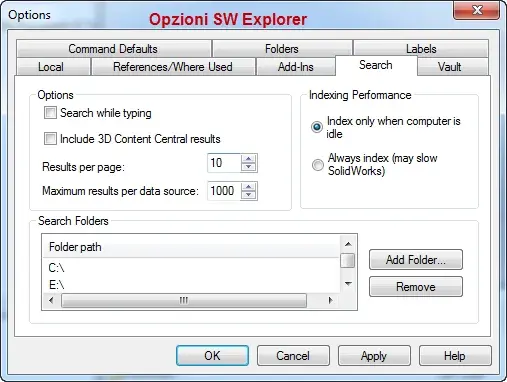
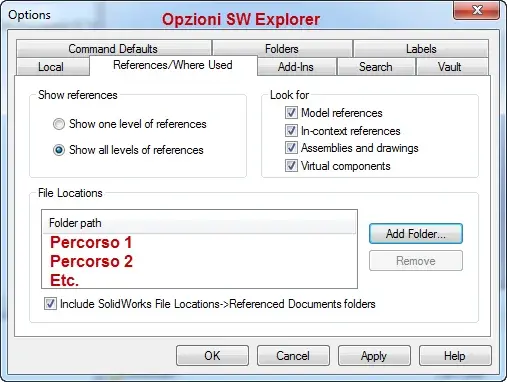
Did you put the folders in the solidworks explorer options?
 
for all:
windows 7 can do network searches.
Network folders must be available offline.
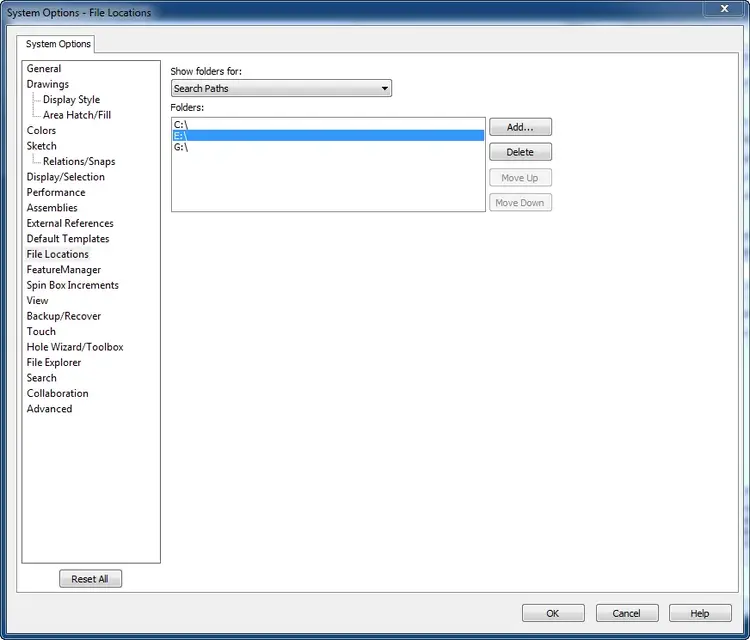
you have to add them in the 'research positions' of your pc in case the installation of solidworks explorer has not happened correctly, very difficult.
each route added in the search options of solidworks explorer, is added in search paths of windows desktop search that is absolutely integrated and should not be installed from view forward.

p.s:sto using sw in English because I have to report wrong translations in Italian and I have to see the correspondence between English and Italian.

p.s 2: Take a look also here..
 

Attachments

  • sw-search1.webp
    sw-search1.webp
    25.8 KB · Views: 17
  • sw-search2.webp
    sw-search2.webp
    23.5 KB · Views: 15
  • sw-search3.webp
    sw-search3.webp
    22.5 KB · Views: 19
  • sw-search4.webp
    sw-search4.webp
    24 KB · Views: 15
  • sw-search5.webp
    sw-search5.webp
    38.5 KB · Views: 15
This is the thing that upsets me a bit..cert is, that if changes to network files, they are immediately available on offline files, it would remain only the problem of the space used handles. .
 
offline means creating an index of files that may not be available.
Does anyone teach me how to index this folder offline?
I'm completely ignorant about it.

I also add that network folders, in solidworks explorer, do not keep them: I don't find the network folder that I just put on.

Thank you.
 
offline means creating an index of files that may not be available.
from what I understand, if you want to index a remote folder, the procedure of windows 7 is to copy it locally and index that, and then redirect the file requests on the remote folder (practically puts in "sincronia file" the remote folder and this local copy). really looks like a last-minute remedy....
 
soliduser, I understand you can doubt someone's abilities, but you have to trust what I wrote, on network path solidworks explorer
It doesn't work. you have mapped peripherals that are not on the network, under domain or else.

I set all paths, but not as you posted, but with paths of
network \\server\disegni ... even does not even work by connecting a network unit (right ts on computer resources... blah blah..) taking syntax z:\shared folder.
Currently with xp, with the old windows search, I have the possibility to carry out research beyond that from the appropriate win window, also through the search rectangle of solidworks finding easily the file that I want to open or print.
superfluous to say that even solidworks explorer works great, with xp....

w7:
map a folder making it available offline is a crazy porcade:
you lose the uniqueness of the files, you risk having double or triple files (because you have to consider that there is not only one workstation) and in the end the final version will be the one synchronized last (put the case of a job to which more users participate), not the one really right.
I've done some tests and I've been frozen. I've banned my colleagues.
procedure, it seems in fact, that when you go to open a file mapped on a network path and that file is made available (offline) the rescue takes place on the local one and if you do not implement a synchronization you are ciulated.
I did not have time to call the adage, but next week I will break the maroni to the assistance and if they do not solve this lack they will pay the economic consequences, as already happened last renewal for the multibody plates, making me make a discount on the three renewals.
 
from what I understand, if you want to index a remote folder, the procedure of windows 7 is to copy it locally and index that, and then redirect the file requests on the remote folder (practically puts in "sincronia file" the remote folder and this local copy). really looks like a last-minute remedy....
read my previous speech... Forget that procedure, I took a fright. fortunately recovered in my beloved backup nas).
Mah, I hope they do. . .
 
Does anyone teach me how to index this folder offline?I'm completely ignorant about it.

I also add that network folders, in solidworks explorer, do not keep them: I don't find the network folder that I just put on.

Thank you.
I'd be able to, but if I can give you some advice... I almost forgot,
from the search window of solidworks, it is true that it finds the files, but besides not to show you the preview, does not even open the files... .
offline mapping is only useful for searching in windows, in solidworks explorer and in solidworks does not bring any benefit if
not to have the background a solidworks session that you can close only with ctrl-alt-canc. ... no comment.
 

Forum statistics

Threads
44,997
Messages
339,767
Members
4
Latest member
ibt

Members online

No members online now.
Back
Top