• This forum is the machine-generated translation of www.cad3d.it/forum1 - the Italian design community. Several terms are not translated correctly.

initial sifting

  • Thread starter Thread starter Esselle
  • Start date Start date

Esselle

Guest
Good morning, I get the following:
I make a hole, with the creation wizard holes, ribbed with screw to head ribbed with Iso cap 10642 to follow I do another, on the same part or on other, of type threaded pre-hole short m6 or any. this last threaded hole is always created with the "initial sifting" option activated that I have to remove manually.
Is there any remedy? Where am I wrong?
 
is a memorization of the settings that however appears only if in the hole for screw 10642, already flared of its, you flagged the initial flagging item
creating a hole, removing the tick and then running it should memorize the new settings and not restart it again. eventually close solid and clean the cache
 
What do you mean to clean the cache?

because it always does, after I restarted solid, I always did not find a solution.
 
I didn't realize he was referring to the pdm, sorry.
test using a program like ccleaner to clean temporary data or by closing and rebooting the pc
but it is strange because I have done various tests and making a hole and disableing all the later do not present it
 
You're right when you say: I did a vased hole, then a thread, disabled the option and in the next does not turn back, this happens to me too.
I do not want to have to disable the option after making a vased hole.
 
:confused: I can't find the option.. .

other question, since we are in the area: where do the values set? e.g. the dripping diameter that for the life m6 is ø 6.6?
 
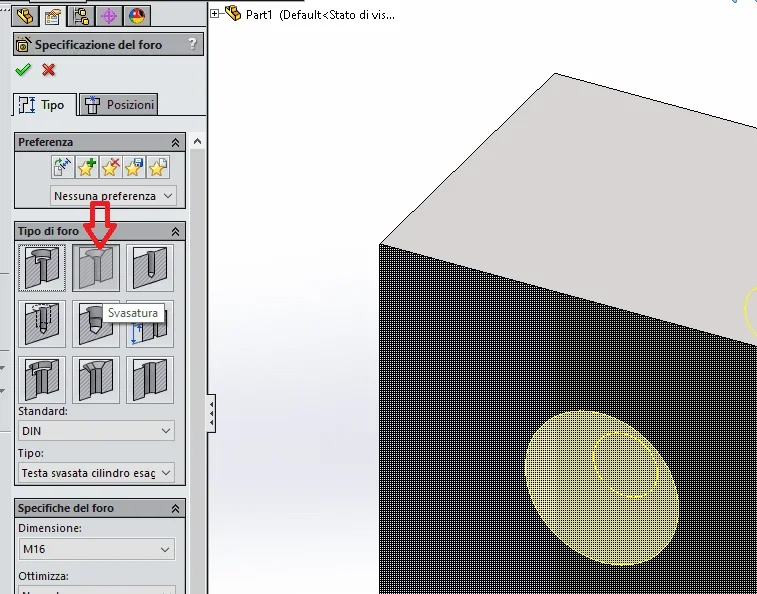
property manager, one of the icons of type hole (the second seems to me)
values set in the toolbox
 
you are what I use, but I don't see the word that you indicated me before "guided hole rigged", but only the various options with the screws to normal.
 
driven hole is the name I gave to that type of hole to understand us
The only one who put an image of the property manager to figure out what you're talking about is I...

that type of hole already has the rigging, why do you have to insert the optional one?
 
driven hole is the name I gave to that type of hole to understand us
The only one who put an image of the property manager to figure out what you're talking about is I... truethat type of hole already has the rigging, why do you have to insert the optional one?
I do not put it, I do the hole using that type of hole you indicated, I choose the screw 10642 and hole.
When I go to make a threaded hole, the vasation appears.
 
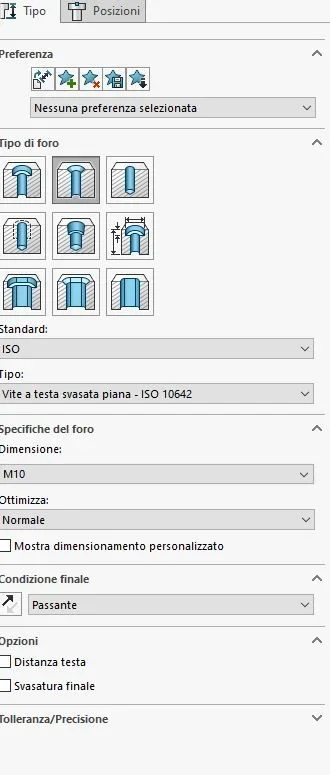
I put what I see when I go to make a hole for the screw in question:
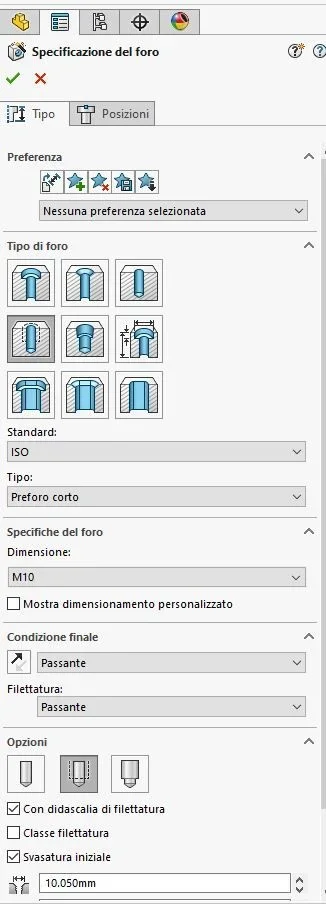
Svasatura 1.webpafter when I go to do the threaded hole, without me having selected anything it appears like this:
Svasatura 2.webpIf I remove that tick (on initial rigging) then I don't recompile until I make another rigged hole and the lap starts again.
 
I understand, let's hope it can work out, it's pretty annoying.

also happens with the din
 

Forum statistics

Threads
44,997
Messages
339,767
Members
4
Latest member
ibt

Members online

No members online now.
Back
Top