blubossa
Guest
I need to insert an image into one part, then insert the part into a assembled and perform render.
What procedure?
Thank you.
What procedure?
Thank you.

but I don't want to map the part, I just want to insert a logo.....in the attribution of color to the part, you find the option to attribute the textures (the option seems to me to be called map).
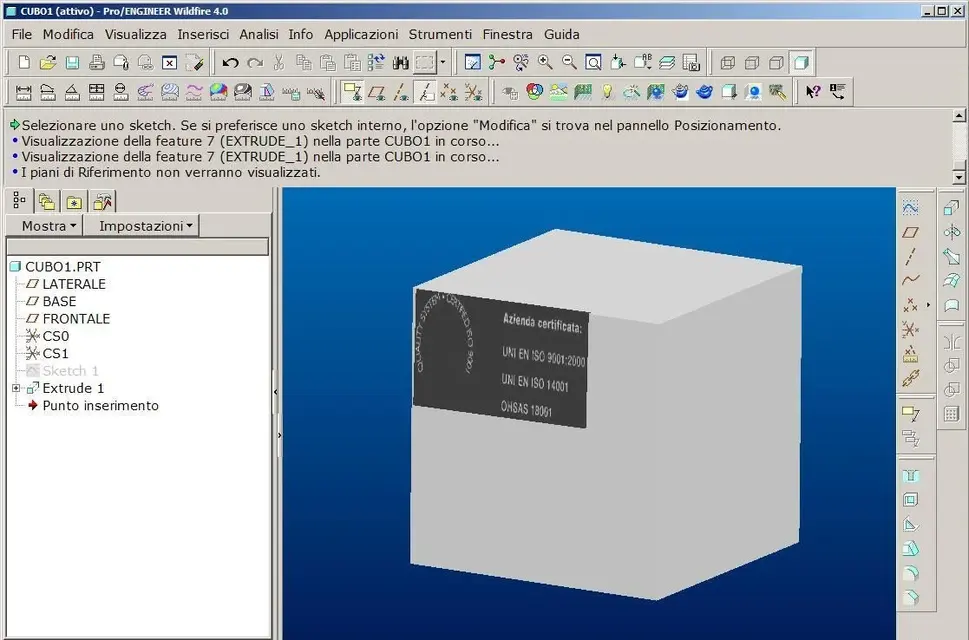
Now unfortunately I do not have pro-and under hand, I attach the image that for example I would like to insert in a corner din a cube....or other solidIt's the same thing. If you put an image of what you want to do, we can give you a more precise answer.
That's what I was looking for.One thing about the genere?
hi maxopus, I noticed something in the posted image. do you want to insert the sketch inside the feature or outside?One thing about the genere?
I also answerhi maxopus, I noticed something in the posted image. do you want to insert the sketch inside the feature or outside?
for example to do the parallelgram you did first sketch and then function. in this way proe, in the model tree, inserts the sketch out of the function.
 in my opinion it is a matter of habit, I believe (and underline I believe) that ptc advises to create "outside" sketches because they are more easily reusable and more robust (you can kill the "saving" feature the sketch).
hi maxopus, I noticed something in the posted image. do you want to insert the sketch inside the feature or outside?
for example to do the parallelgram you did first sketch and then function. in this way proe, in the model tree, inserts the sketch out of the function.
It's a matter of habit.I also answer
personally for extrusions and revolutions I always tend to use the internal sketch (to the face of the above), but I use the external sketch when this will serve me as reference for other features or other sketches (to avoid having reference to geometry)
Palo
in wf 5.0 the axis point was "integrated" in sketcher icons: when you do a sketch you can put the usual "point" or "point geometry". if the sketch is "only" the geometry point becomes a datum point once given the ok to the sketh, instead if the sketch is inside to an extrusion the geometry point becomes a board.There is a case in which one has to do it internally and is that of the creation of an axis point in polygons (e.g. hexagon).
If you do it outside you don't accept it (I don't know if something has changed in the wf5).
I want to take a look at it.One thing about the genere?
done, thanks the sameI want to take a look at it.
Thank you.