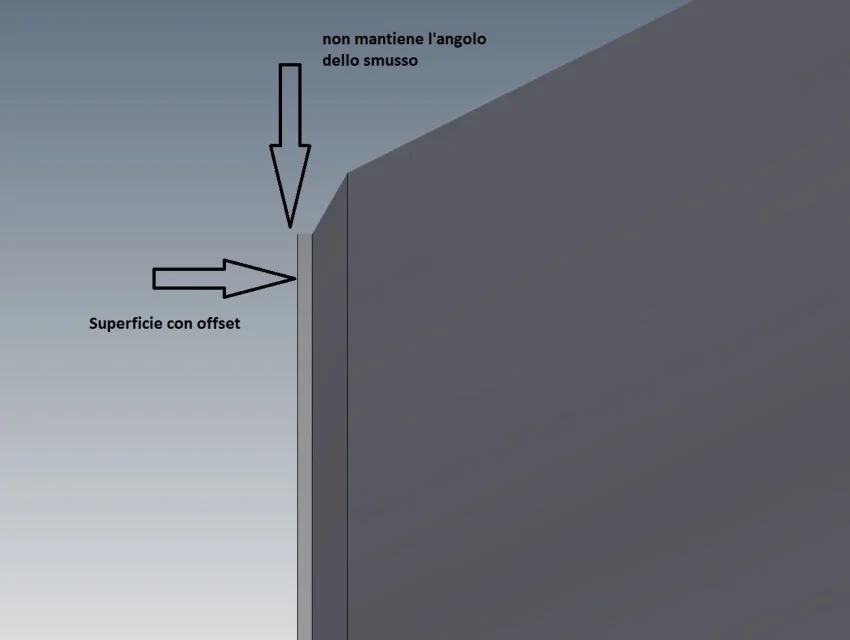
TECNOMODEL Guest May 16, 2017 #1 in the release 2016 when I applied an offset it behaved like thisnow with 2017 behaves like thisIs there an option to set? I do not find the way to keep the corner of the bevel
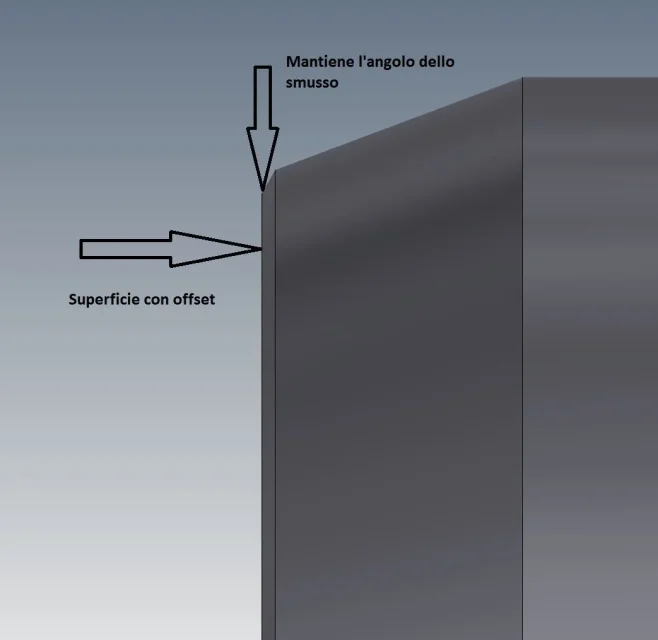
in the release 2016 when I applied an offset it behaved like thisnow with 2017 behaves like thisIs there an option to set? I do not find the way to keep the corner of the bevel
Matteo Cappelli dis.CAD Guest May 18, 2017 #2 you tried with the "direct" command Attachments DIRETTO.pdf DIRETTO.pdf 186.4 KB · Views: 13
TECNOMODEL Guest May 18, 2017 #3 I didn't try. I haven't been used to using the "direct" command, indeed, not knowing it I don't use it. p.s. nice pdf with the explanation of the command, if you have it for all commands I imagine that half of the forum would be happy to see them. :wink:
I didn't try. I haven't been used to using the "direct" command, indeed, not knowing it I don't use it. p.s. nice pdf with the explanation of the command, if you have it for all commands I imagine that half of the forum would be happy to see them. :wink:
stefanobruno Guest May 19, 2017 #4 TECNOMODEL said: p.s. nice pdf with the explanation of the command, if you have it for all commands I imagine that half of the forum would be happy to see them. :wink: Click to expand... I associate, but I cambia quel " conbination " with "co"mbination ", please
TECNOMODEL said: p.s. nice pdf with the explanation of the command, if you have it for all commands I imagine that half of the forum would be happy to see them. :wink: Click to expand... I associate, but I cambia quel " conbination " with "co"mbination ", please