• This forum is the machine-generated translation of www.cad3d.it/forum1 - the Italian design community. Several terms are not translated correctly.

interruption and annotation lines

  • Thread starter Thread starter IronMike87
  • Start date Start date

IronMike87

Guest
I'll be de coccio, but isn't there really any way I don't have such an obbrob? ? ?
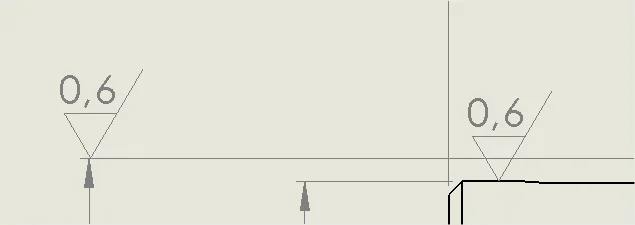
1544026751434.webpthe "beautiful" is that by activating the interrupt line:
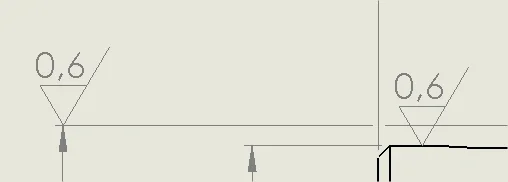
1544026817916.webpif then I try to move the roughness of the diameter "superior" start the bugs with extension lines that shoot to the infinite without any possible resolution

1544026789874.webp
if not that of:
1- deactivate interrupt line
2- win the annotation of roughness
3- hang the annotation of roughness
4- Reactivate interrupt lines

all because, of course, if I read the annotation of roughness directly to the diameter, I return to the starting point of the first image


in the 2018 version have they solved somehow?

or is it really systematic of sw?
 
I also noticed difficulties with the lines of interruption (I have 2016), so much to pass to redefine the cards (in my case we talk about catalogs or brochures) on illustrator
 
You're gonna do a section of that key, hopefully? Here is the diameter and roughness you put it on that view.
or the roughness of the greater diameter put it on the geometry.

We try to explain well that they don't say anything.
Is there really no way to have such an obbrob? ? ?
the "beautiful" is that by activating the interrupt line:
you have to go back to every paragraph you wrote to woven the data and understand that you refer to the roughness cut
 
You're gonna do a section of that key, hopefully? Here is the diameter and roughness you put it on that view.
or the roughness of the greater diameter put it on the geometry.

We try to explain well that they don't say anything.


you have to go back to every paragraph you wrote to woven the data and understand that you refer to the roughness cut
my working tables: the key was performed previously so no, no section. :p

the two roughnesses are those of the grinding phase, of two cylindrical parts, performed in the same processing. Of course, I could turn the first of 180° but it would be against the norm. I could "spy" the annotation with an arrow, but we're all over again given the interruptions wouldn't see it.

from what you're making me understand, I'd say it's a systematic sw behaviour.
to me honestly seems a serious lack.

I do not understand why not insert the manual break option of the quotation line. already now you can manually move the quotation line to the item. I don't think it's all this drama to program the possibility to insert breaks to manually command.


I could change the message.
 
without opening another topic.. .

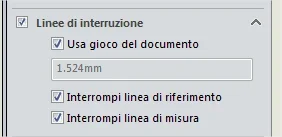
Is there a way to default line break?
or do I have to be selecting the casellin every time?
1558083670476.webp
 

Forum statistics

Threads
44,997
Messages
339,767
Members
4
Latest member
ibt

Members online

No members online now.
Back
Top