
• This forum is the machine-generated translation of www.cad3d.it/forum1 - the Italian design community. Several terms are not translated correctly.

interruption of the association between geometries

  • Thread starter Thread starter edo.ardo
  • Start date Start date

edo.ardo

Guest
Greetings to everyone, I'm new.
I have a problem with inventor 2014 (probably banal)
I realized any circumference on a tilted work plane and then projected on any parallelepiped.
Now I want to eliminate the initial geometry so that I can only work with the projected one, I can't do it, do you have any advice?
 
Why do you have to eliminate it? so you had to change something, like the diameter, you can't do it anymore!
If it is a sketch other than what you have to use then, I would simply hide it, while if the sketch is a single gorei to turn the circumference into line of construction.
I hope I've been helpful.
Hi.
 
Thank you... I can effectively hide it and call it back to make the various changes....however it would be interesting
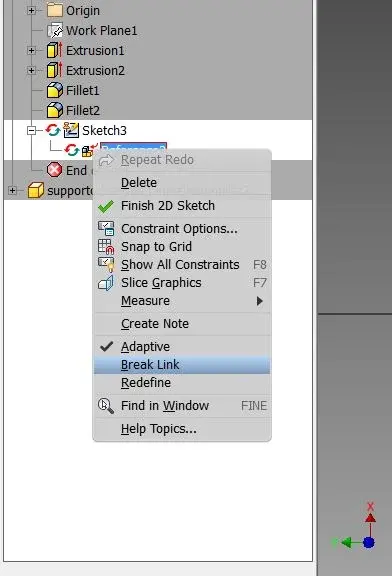
to be able to work on projected geometry, the tutorials say that it is feasible "break of the association between primary and projected geometry
click on the geometry to which you want to apply the normal style.
click the right mouse button and in the context menu select interrupt link.
I never found the "interrupt link" button.
 
Perhaps it means when working in a set and the primary and projected geometries belong to two distinct parts.
 
interrompi collegamento.webpbreak link = interrupt link

find it under the sketch where you projected geometries
 

Forum statistics

Threads
44,997
Messages
339,767
Members
4
Latest member
ibt

Members online

No members online now.
Back
Top