• This forum is the machine-generated translation of www.cad3d.it/forum1 - the Italian design community. Several terms are not translated correctly.

intersection of products

  • Thread starter Thread starter panormus
  • Start date Start date

panormus

Guest
Bye to all,

I'm trying to redesign a piper cub j3 by reconciling the passion for flight and aeromodellism with learning the sw catia v5.

I wanted to ask you how you can change a first product due to a passage of a second solid (appartenente to other product) through this.

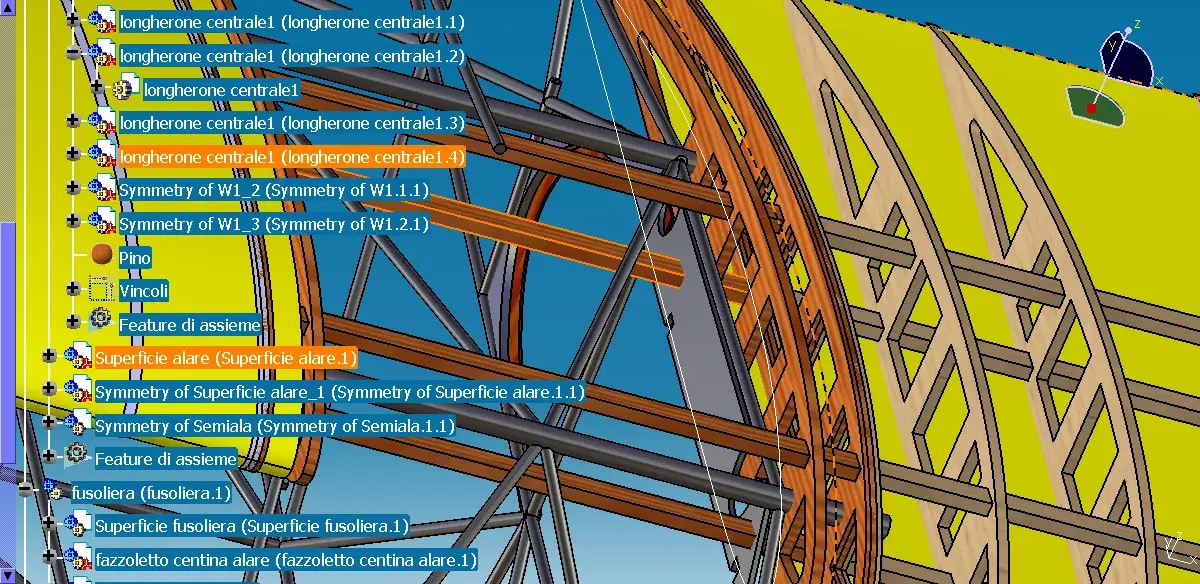
Attached you can see the middle of the wing (just above the cockpit) and a rectangular cross-section strip that crosses a steel sheet.

on this sheet I should make a hole in order to slide the above list. I hope you understand what I mean.

Can you help me?

greetings
 

Attachments

  • solido da intersezione di prodotti.webp
    solido da intersezione di prodotti.webp
    186.4 KB · Views: 36
  • prospettiva.webp
    prospettiva.webp
    140.1 KB · Views: 26
hoping you've understood your problem, I think you have to work in context mode. That is:
1st stay in assembly;
2. activate the part of the list;
3rd highlight the body of the list and the "copy";
4th activates the part of the sheet;
5° perform a "special glue with connection"; at this point you should find the "body" of the list highlighted with a green ball
6th remaining in the sheet part performs a boolean operation of subtraction between the body of the sheet you copied and the sheet body.
7th the result is the sheet with the seat of the list.

Who knows if that's what you wanted.
we waved
 
I add.
the startegia sometimes is to create in the same part 2 body: the first is the piece that interests you the second is the eventual "sede" you will use for Boolean operations. in your case, for example, if the strip is square section 10x10, you can prepare an additional leotard that you will call home and that will be parametric compared to the main body. this additional body can have for example a square section of 11x11.
as I responded earlier, using the "contextuality", you can take the "sede" body to perform Boolean operations.

Finally, I add that in assembly there is a direct command that makes you the Boolean operations between different solids placed in different assemblies but personally I find it excessively Moroccan and uncontrollable.
We laughed
 
Finally, I add that in assembly there is a direct command that makes you the Boolean operations between different solids placed in different assemblies but personally I find it excessively Moroccan and uncontrollable.
We laughed
Can you explain to me how it's between assemblies?
My respects.
 
Bye.
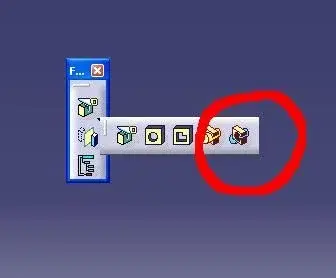
in "assembly" environment there is a command (see attachment). activating it in the main assembly, the system asks you what is the leotard that will have to act as a tool; Then a window will open with the list of all the parts present in the assembly. at this point it is sufficient to select one or more parts that will have to undergo the operation of "removal". the removals will be done automatically.
keep in mind that this rimoziona (Boolean subtraction operation) will be performed in or in selected parts only on the body that at that time is active in the same part then make sure it is. that's why, as I already told you, I prefer to manually do this by using the "copy-paste with links".
we waved
 

Attachments

  • IMA.webp
    IMA.webp
    6 KB · Views: 20
Bye.
in "assembly" environment there is a command (see attachment). activating it in the main assembly, the system asks you what is the leotard that will have to act as a tool; Then a window will open with the list of all the parts present in the assembly. at this point it is sufficient to select one or more parts that will have to undergo the operation of "removal". the removals will be done automatically.
keep in mind that this rimoziona (Boolean subtraction operation) will be performed in or in selected parts only on the body that at that time is active in the same part then make sure it is. that's why, as I already told you, I prefer to manually do this by using the "copy-paste with links".
we waved
Thank you, brother, as soon as I get you back.
;-)
 
feature definition error: partbody cannot be used to perform the remove operation, please select another body.

mmmmh...
 
Then:
doing Boolean operations means doing sum operations, subtraction and intersection between solids. in mathematics, for example, writing 3-2 means obtaining as a result 1; or writing 2-3 means obtaining as a result -1.
well; consider that 3 is solid "a" and 2 is solid "b"; in this case catia allows you to do mathematical operations between solid "a" and solid "b".
but... the solid "partbody", what you find by default when you start modeling, can never, I never say, be the one who will go subtracting another solid; can only undergo subtraction. so in this case if you have to do "a"-"b" and these are 2 partbody, you cannot use "b" and the system gives you error.
the message that appeared to you means that you are trying to use the partbody as an element of subtraction with another solid thing that catches you, as I have already repeated, does not make you do.
normally, but not always, it is advisable not to work in the partbody just to avoid this limitation. when active catia creates a new body and uses that to create your object leaving the partbody empty.

Have you already made your model in the partbody? transfer it to a new body with this command:
-I want to know the new body....then the 3rd mouse button....go on "object."...then go on "partbody modification."...and here's the whole story in the partbody moves into the body.
You'll see that now the operation you're trying to do is succeed.
we waved
p.s. some classes not and... ! !
 
Then:
doing Boolean operations means doing sum operations, subtraction and intersection between solids. in mathematics, for example, writing 3-2 means obtaining as a result 1; or writing 2-3 means obtaining as a result -1.
well; consider that 3 is solid "a" and 2 is solid "b"; in this case catia allows you to do mathematical operations between solid "a" and solid "b".
but... the solid "partbody", what you find by default when you start modeling, can never, I never say, be the one who will go subtracting another solid; can only undergo subtraction. so in this case if you have to do "a"-"b" and these are 2 partbody, you cannot use "b" and the system gives you error.
the message that appeared to you means that you are trying to use the partbody as an element of subtraction with another solid thing that catches you, as I have already repeated, does not make you do.
normally, but not always, it is advisable not to work in the partbody just to avoid this limitation. when active catia creates a new body and uses that to create your object leaving the partbody empty.

Have you already made your model in the partbody? transfer it to a new body with this command:
-I want to know the new body....then the 3rd mouse button....go on "object."...then go on "partbody modification."...and here's the whole story in the partbody moves into the body.
You'll see that now the operation you're trying to do is succeed.
we waved
p.s. some classes not and... ! !
great mocca, I liked you except in the ps. ;-) I studied from a text whose author did not want to provide an integration for in-depth studies: perhaps for fear that he became too good :-p.
;-)
 
  • I transferred the partbody to the new body (big mocca, rethanks)
  • I activated the Remove feature on the main product,
  • I selected the new body
  • I found a list of which I selected the centines interested in drilling/removing the longherone (on the new bdy)
  • I passed below and highlighted the interested parties
risultato non mi da born the ok born the annulla.

:rolleyes:
 

Attachments

  • rimozione.webp
    rimozione.webp
    235.1 KB · Views: 14
hoping you've understood your problem, I think you have to work in context mode. That is:
1st stay in assembly;
2. activate the part of the list;
3rd highlight the body of the list and the "copy";
4th activates the part of the sheet;
5° perform a "special glue with connection"; at this point you should find the "body" of the list highlighted with a green ball
6th remaining in the sheet part performs a boolean operation of subtraction between the body of the sheet you copied and the sheet body.
7th the result is the sheet with the seat of the list.

Who knows if that's what you wanted.
we waved
the product semiala contains the parts "centine" w1,w2,..wn and the part longherone.
- remain in assembly -> ok on semiala
- active the part of the list -> the selection but I can't copy it while I can copy the part but if I continue with special paste I don't edit the option "with link".
 
  • I transferred the partbody to the new body (big mocca, rethanks)
  • I activated the Remove feature on the main product,
  • I selected the new body
  • I found a list of which I selected the centines interested in drilling/removing the longherone (on the new bdy)
  • I passed below and highlighted the interested parties
risultato non mi da born the ok born the annulla.

:rolleyes:
Bye. I'm sorry, but today was a big day.
the ok is not enabled but another window should appear (see attachment) where there is the ok.
first but do this check:
options---->infrastructure--->part infrtastructure---> in the "general" curtain must be enabled (red tip) the first item i.e. "keep the connection with the selected object".
Let me know.
we waved
 

Attachments

  • IMA_01.webp
    IMA_01.webp
    146.7 KB · Views: 5
the product semiala contains the parts "centine" w1,w2,..wn and the part longherone.
- remain in assembly -> ok on semiala
- active the part of the list -> the selection but I can't copy it while I can copy the part but if I continue with special paste I don't edit the option "with link".
to activate the special copy-paste with connection obviously have to be active once at a time the parts in the context of assembly. to activate the parts you have to double-click on the name of the part (see attachment) so that the functions of the assembly disappear and appear that of the part design environment.
then: activate the part of the file where you need to draw the copy, highlight the body to copy and copy; then activate the part of the file where you are glued, highlight the name of the part and paste special with connection.
still check the option I told you before.
Let me know.
We laughed
 

Attachments

  • IMA_02.webp
    IMA_02.webp
    141 KB · Views: 5
  • I transferred the partbody to the new body (big mocca, rethanks)
  • I activated the Remove feature on the main product,
  • I selected the new body
  • I found a list of which I selected the centines interested in drilling/removing the longherone (on the new bdy)
  • I passed below and highlighted the interested parties
risultato non mi da born the ok born the annulla.

:rolleyes:
...for scruple set use these settings.. .
 

Attachments

  • IMA_03.webp
    IMA_03.webp
    53.7 KB · Views: 14
Well, I thought that was the problem. But instead. .
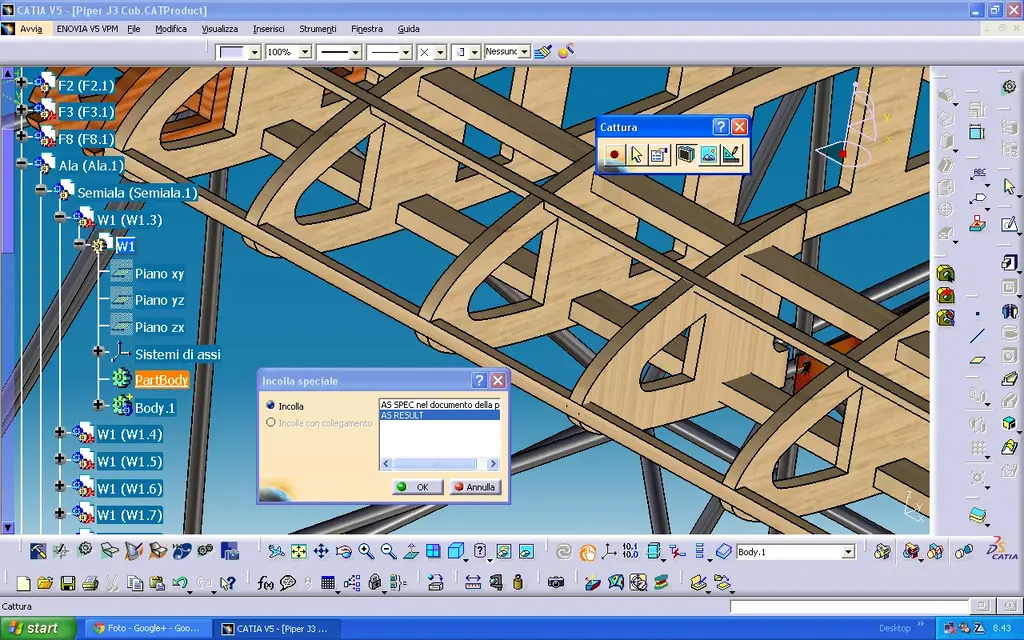
inserted the check I restarted catia, I reopened the product, I tried the copy and then the paste in the mode you explained, but it continues not to be editable.
I can copy the body into another part, but not with connection and the result is as if (or without as if) generated another solid (the list to be removed) add to the part rather than me a simple connection between them.

:mad:
 

Attachments

  • incolla-speciale.webp
    incolla-speciale.webp
    190.3 KB · Views: 5
  • incolla-speciale2.webp
    incolla-speciale2.webp
    195.2 KB · Views: 8
between products makes me a removal, but I do not understand what happens because everything seems unchanged,

regarding bool operations in the same part, if I cover a body of a later part on a previous one I can select as result with connection, on the contrary not, but also here the result is not clear to me.

If I create a new part, I create two leotards and perform the removal the result is perfect.
 
as I didn't say I was minkione.. If I cover the body on another part and follow the Boolean operation, but I leave visible the part from which I copied I will never notice that the operation was done.

:biggrin:
 

Forum statistics

Threads
44,997
Messages
339,767
Members
4
Latest member
ibt

Members online

No members online now.
Back
Top