• This forum is the machine-generated translation of www.cad3d.it/forum1 - the Italian design community. Several terms are not translated correctly.

inventor 2015 quarries for seeger in holes

  • Thread starter Thread starter Valter100
  • Start date Start date

Valter100

Guest
Good morning.
I designed a wheel with a bearing and its seeger. I can't fit the seeger quarry. Are there seeger cave libraries for holes?
Thank you.
 
the presentation, the reading of the rules is welcome. I moved in the appropriate section your request otherwise where you wrote you would not find answers.
study the forum first!
Thank you.
 
........ vademecum for designers? . .. search images on google "Table seeger for holes"? ................sites of industrial sales agents.......
 
thank you for the information received, but I do not want to draw the quarry by copying it from a table, but that you automatically draw it as a block. the two-dimensional tool that I use me10,(dated tool) does it automatically when I insert the seeger, draws the quarry automatically. inventor 2015 is a 3d instrument of last generation. I entered the seeger with the bookstores, but I can't insert the quarry.
 
that I know, of automatic there is only something under tree design, but even if I don't remember badly it works only for some libraries, for seeger uni it seems to me missing the thickness (it's a function that I haven't used for years, I hope not to remember badly)
 
I just went under the design-tree but I couldn't fit the quarry. so I went on projecting the geometries and thus building the quarry in particular. It seems to me an incorrect method; but I did not find an alternative.
 
I gave us a quick eye back on the 2014 version, strangely remembering well, for the seeger uni 7435 lacks the thickness to be able to realize the quarry (the din 471 or others work)
 
explain the procedure please. the insert you make it as a "assembly-position from the contained center" or from "design-tree".
 
I press that I never use tree design, hate it..... anyway......
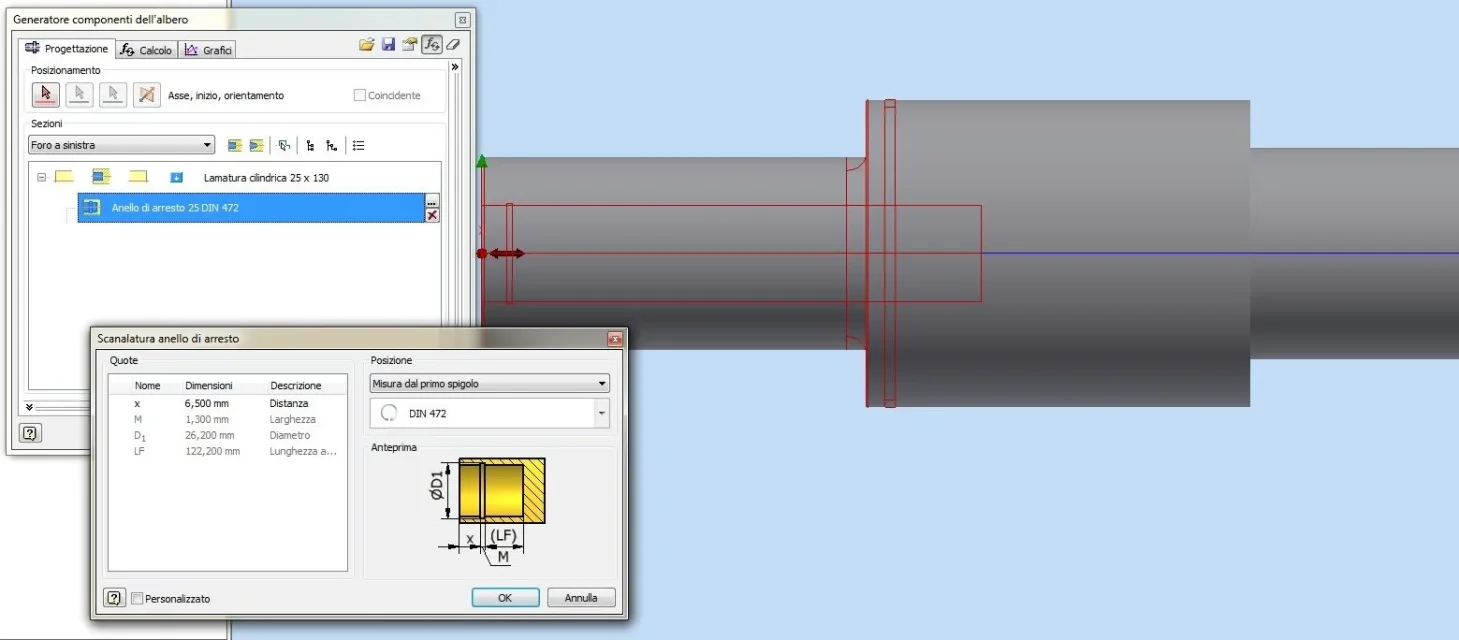
progettazione albero seeger.webpOnce the hole is placed, click on the blue square simboletto with the arrow and select the stop ring processing, then press on the "..." button to select the ring type, and use the drop-down menu to decide on which side of the quarry to take the quota

same procedure for external quarries
 
Okay tomorrow morning I try and let you know. Now I have a project to end with me10. otherwise they fire me....
Thank you.
 
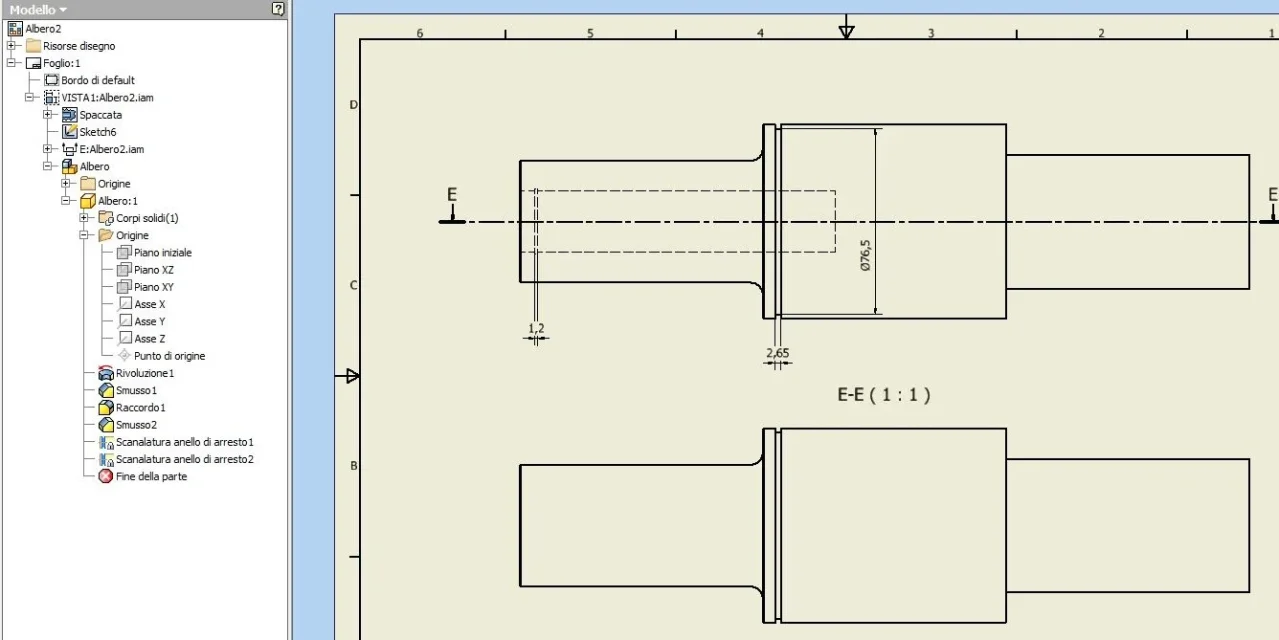
I tried to put in the quarry and managed. However, in the table, I do not see it in the detail of the pin, as a separate workmanship remains. the pin one workmanship and another. Can you explain?
 
I tried to put on the table a random piece made with tree designPIPPOLO.webpit seems not working in the section or the command splits, sincerely I have no idea why, from the design menu I am as far away as possible (apparte telai and the bearings to quickly find the right one and then insert it from the contained center)
 
I did the test, but when I put the pin detail on the table, the quarry does not appear. I noticed that the quarry was made after, it turns out a work separately.
 
I did the test, and the quarry entered into the axieme. but in the table of the particular of the pin is not displayed. because I noticed that the pin and the quarry are 2 separate jobs.
 
I press that I never use tree design, hate it.....
As I understand...:wink:
Instead I don't understand why with inventor,the standard work on the trees (scanalations, key locations etc.) should be done in the environment together.
I finally made some ifeatures for the various processes.
a job initially long, but eventually repays
 
...instead I don't understand why with inventor,the standard work on the trees (scanalations, key locations etc.) should be done in the environment together.
I don't understand either. these would be new useful functions.
 

Forum statistics

Threads
44,997
Messages
339,767
Members
4
Latest member
ibt

Members online

No members online now.
Back
Top