• This forum is the machine-generated translation of www.cad3d.it/forum1 - the Italian design community. Several terms are not translated correctly.

inventor 2019: migration template file

  • Thread starter Thread starter Lorenzo.bon
  • Start date Start date

Lorenzo.bon

Guest
Bye to all,
I just updated inventor to the 2019 version, but I think my doubt concerns all versions. I have always worked with a project file not created by me, without knowing how it worked and how to create a new one. had, with the new version I can no longer create an idw file according to that project, because it asks me to migrate and save the original project file. the fact is that I have the same problem even with the standard idw designs, but I can't find the model file that I have to open. would someone tell me where these default files are saved and how do I migrate them to make them usable with the new version?
Thank you.
 
Hi.
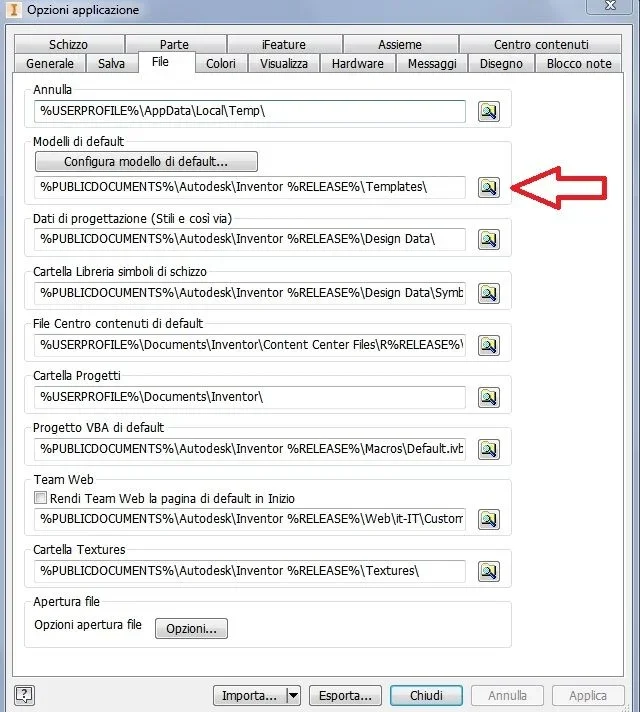
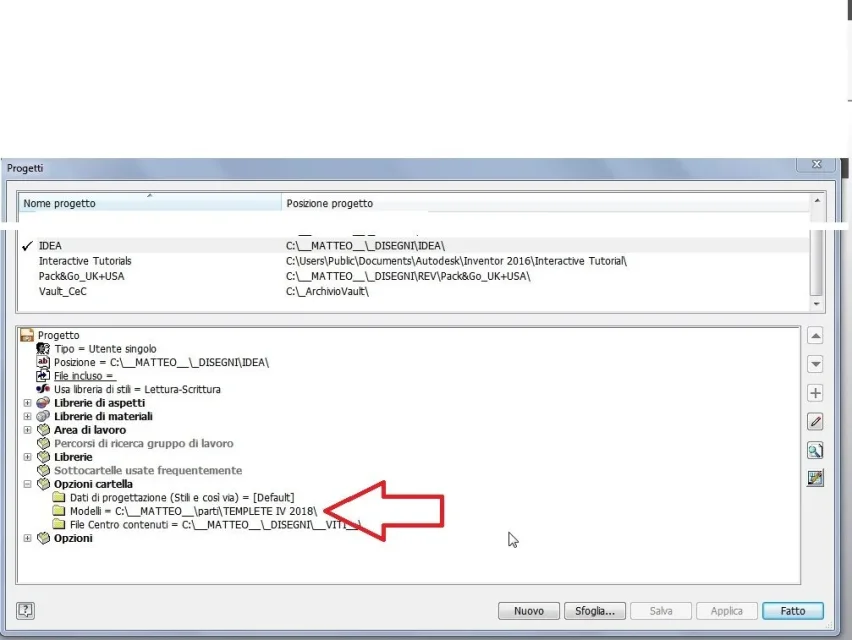
the folder where the template files you use with the "new file" command can be saved in the standard inventor folder or in a user folder

you can find this information in the project options:file di progetto (3).webpor in the standard general configuration folder in "instruments - application- tab file option:file di progetto (2).webp.... or if you give the command saves by name, save copy as a template, it will automatically position itself in the septed folder.

As for migration, you can make an opener and then a trivial save, will ask you to update to the current release and this, is valid both for models and for drawing boards

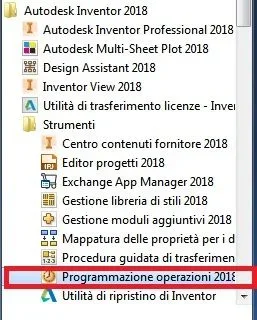
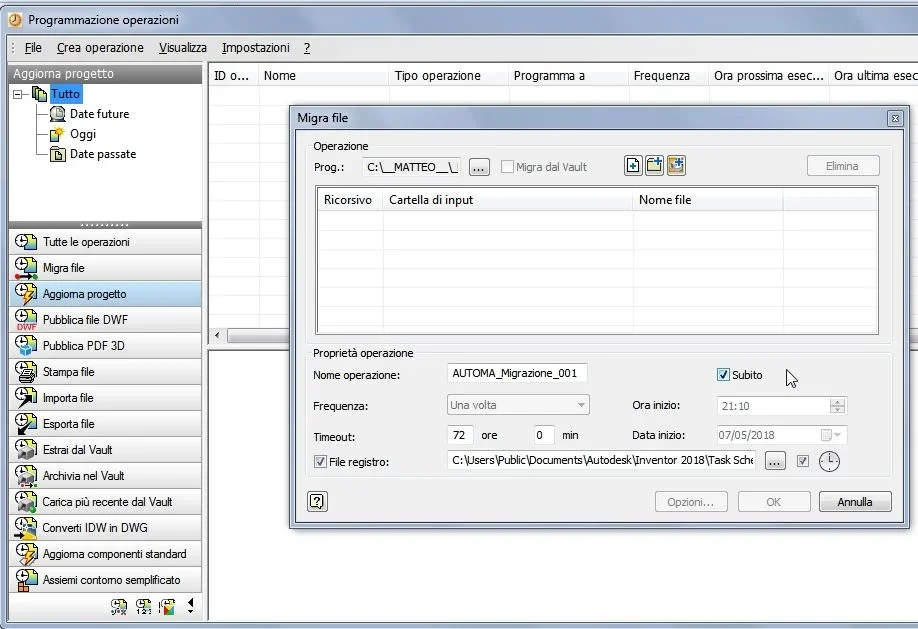
if instead you want to perform a mass migration, you have to go to the standard menu of windows, all programs, autodesk, inventor 20xx, tools, programming operation and segliere migra

you can migrate by file, by project, by folderMIGRAZIONE1.webp
MIGRAZIONE2.webp
 
Thanks, I found the template file and saving it asked me to do the migration, as you said. regarding the standard model, the only problem that remains is that if I try to open a dwg I don't find inventor 2019 as an option but only 2018
 
I follow the right-click path on the dwg-> file open with-> inventor 2019 but the executable in the inventor 2019 folder is that of 2018. while if I open ipts or iam the executable is 2019.
 
maybe not h associated with extension the correct program
associate the program via windows
I personally open first the version of inventor that I want to use (eg. iv2016 or iv2018) if the last time I used a different version is updated the file of the windows registry so that the "current version" is the one that launched; then from the inside of inventor, select the command file - open and choose what I need

I suggest you do this.

Good job
 
thanks, so I can actually open the dwg, but it continues not to memorize the default version. little bad, I usually do not need to open dwg but only to produce them. Thanks again
 
Yes, I read this, too, and I confirm that dwg in inventor format works. the only problem that remains is that if I try to open a dwg in autocad format (any version) opens it with 2018, while if the amount from 2019 asks me to open it with 2018 and migrate it, but then it does not work. but as I said it is not a big problem because once created the dwg are opened by other terminals
 

Forum statistics

Threads
44,997
Messages
339,767
Members
4
Latest member
ibt

Members online

No members online now.
Back
Top