
marcof
Guest
swx 2013 sp5
environment
I have an annoying problem during the editing of notes: as you see from the image this is the message that appears to me every time I double click on the note to change its content
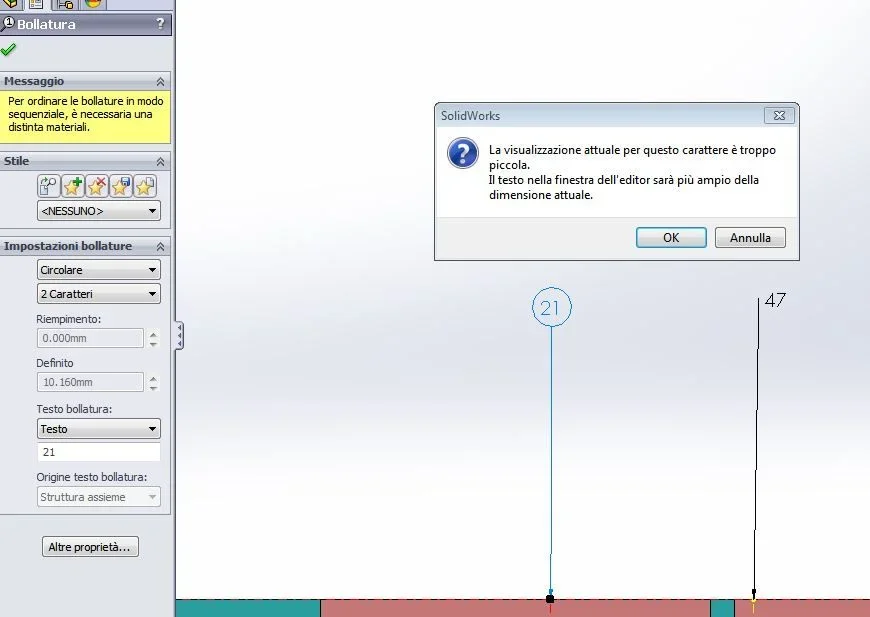 which forces me to click on ok to be able to type the novo value. characters are set to the default value (3,5 mm) and however also decreasing or increasing the size does not change anything. I also tried to put and remove the flag in the properties of the document/details to the item "I always text in the same size" without result. idem trying to change the number of characters and other options from the property manager of the note.
The same thing happens if I put bubbles.
to avoid dismaying too much the fastest system that aduced is the single click on the note/folding and then type the new value of its head from the property manager.
perhaps the smoothing of bales also drags in rotation the brain which prevents me from finding the solution that should be trivial.
Since I have to edit a hundred notes and before I have defined the numerical sequence of reference I will have to change the content at least two or three times some soul pia has an idea what loop wants from my life swx?
Thank you.
environment
I have an annoying problem during the editing of notes: as you see from the image this is the message that appears to me every time I double click on the note to change its content
which forces me to click on ok to be able to type the novo value. characters are set to the default value (3,5 mm) and however also decreasing or increasing the size does not change anything. I also tried to put and remove the flag in the properties of the document/details to the item "I always text in the same size" without result. idem trying to change the number of characters and other options from the property manager of the note.The same thing happens if I put bubbles.
to avoid dismaying too much the fastest system that aduced is the single click on the note/folding and then type the new value of its head from the property manager.
perhaps the smoothing of bales also drags in rotation the brain which prevents me from finding the solution that should be trivial.
Since I have to edit a hundred notes and before I have defined the numerical sequence of reference I will have to change the content at least two or three times some soul pia has an idea what loop wants from my life swx?
Thank you.