EDU
Guest
Good morning. in a joint, having several different parts, how can I join 2 or 3, why become a part? Thank you very much

you can seal the parts that interest you and save as a part instead of as a wholeGood morning. in a joint, having several different parts, how can I join 2 or 3, why become a part? Thank you very much
What are we talking about?Good morning. in a joint, having several different parts, how can I join 2 or 3, why become a part? Thank you very much
How do you do that? There's not this option in I create that I know.you can seal the parts that interest you and save as a part instead of as a whole
I do exactly so with shrinkvrap and get a prt. then I save it in step to give the clits in such a way do not cover the inside of the axieme. the big problem is that some have difficulty in opening it or they just fail. mostly with autocad and solidworks.then with the copy geometry, copying all the surfaces of the two pieces and then solidifying them.
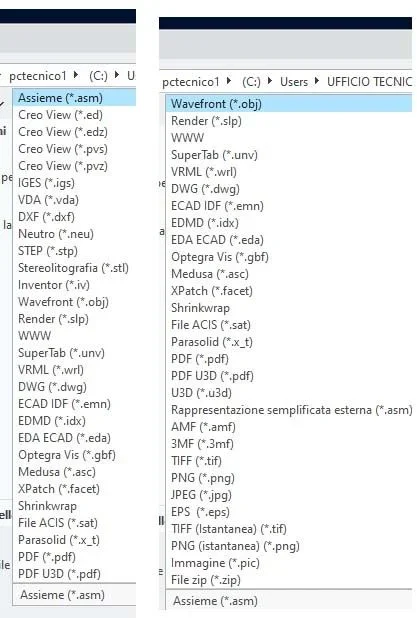
if you do not have the command, using the shrinkvrap, with maximum detail, but the maximum precision, you would have it with the copy geometry
Just do your set, save a copy and save it as partHow do you do that? There's not this option in I create that I know.
I when I make 'Save copy' I don't have the prt as option look... and use creo7Just do your set, save a copy and save it as part
There is no eros unfortunately... I'm freaking out with the booleans!I now use solidworks, but I remember that with pro and I don't remember that version I could... You make me wonder
that I know, it has never existed since 2000 to the various wildfires and I create, such an automatic function.I now use solidworks, but I remember that with pro and I don't remember that version I could... You make me wonder
first export it as a step together and then reimport it with step-by-steps, the parts that remain as a set of unclosed surfaces, often have or of the messed-up surfaces of them, or coupled with zero-compnetration surfaces, that conversion sends in error, but with some attempt, often combine in a few minutes.There is no eros unfortunately... I'm freaking out with the booleans!
I tried... it mattered me mixed so damn! I don't understand why you play me in shanghai with the components!first export it as a step together and then reimport it with step-by-steps, the parts that remain as a set of unclosed surfaces, often have or of the messed-up surfaces of them, or coupled with zero-compnetration surfaces, that conversion sends in error, but with some attempt, often combine in a few minutes.
It's a problem with export and/or import options, there is a combination of options that causes the problem.I tried... it mattered me mixed so damn! I don't understand why you play me in shanghai with the components!
I tried to save it in iges and import it and I'm mixing does not happen. That's right. Then I got it back in step.It's a problem with export and/or import options, there is a combination of options that causes the problem.
iges to avoid in 90% of cases, the algorithm often incans surfaces.I tried to save it in iges and import it and I'm mixing does not happen. That's right. Then I got it back in step.
is it not that tomorrow I can send you the result and look if you can get the internal measures to do?