• This forum is the machine-generated translation of www.cad3d.it/forum1 - the Italian design community. Several terms are not translated correctly.

lack of sketch constraints on series and mirror

  • Thread starter Thread starter Tarkus
  • Start date Start date

Tarkus

Guest
as from title,:
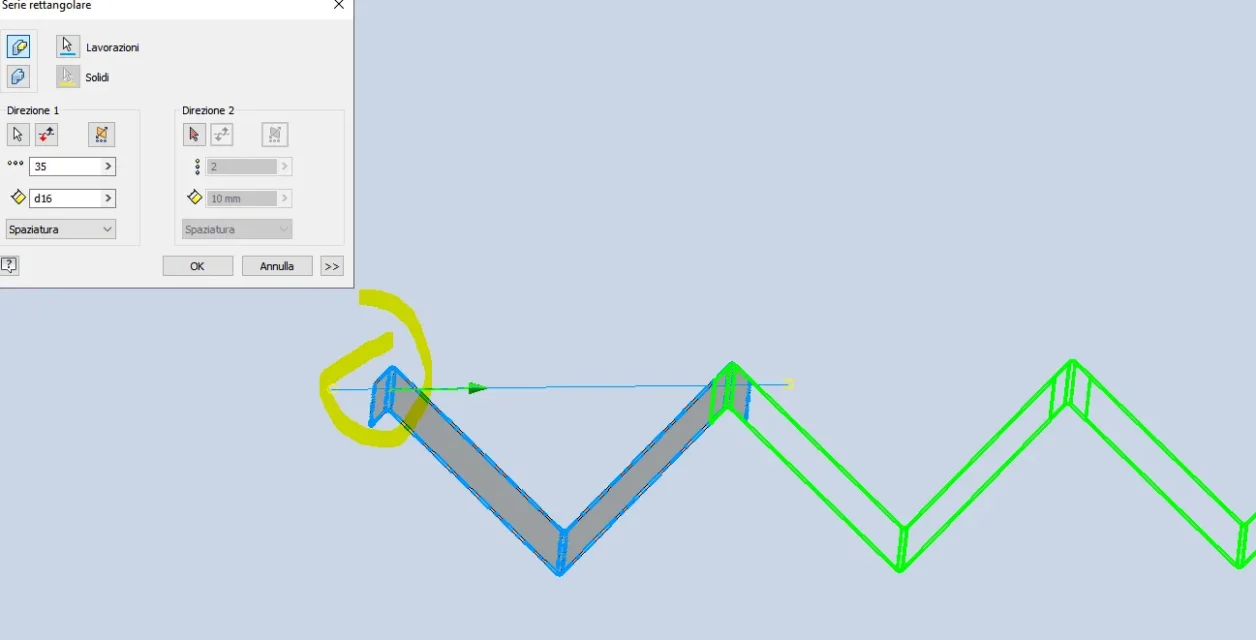
I have to make a sheet folded to "top": I make a banal sketch of a "v" (2 lines equal to 90° each other), and the serialization to have the profile to be created.
I use the "flangia contour" command on the sketch, but it makes me select only the first two lines. I go back to the sketch and I see that there is no linkage between one and the other.
Try to put them by hand, even if I have to do it for 35 occasions, but it tells me that the sketch is hyperwinked.
I then tried to make a circular series, or a mirror with this and other sketches, but the result is the same not connected by constraint of coincidence. .
How to ovviate?
Am I wrong? :mad::confused:
 
no, nothing wrong, the series does not bind one with the later and it gives you error if you try to bind because they are "ins" fixed by the series.
test with the "copy" command by selecting the base point, should bind it correctly. If you properly bind the first, if I'm not mistaken, you should automatically put equal restrictions on other copies.
 
It's not true, I thought I'd take a leak thinking I'm sure, and then I tried, but I don't do one or the other. Sorry.
 
I have to make a sheet folded to "top": I make a banal sketch of a "v" (2 lines equal to 90° each other), and the serialization to have the profile to be created.[...]I then tried to make a circular series, or a mirror with this and other sketches, but the result is the same not connected by constraint of coincidence. .
How to ovviate?
Am I wrong? :mad::confused:
I remember that I went crazy a few months ago, just for a bellow; at the end I had to quote with holy patience one by one all the points of the vertices, binding them vertically one to the other.
 
I made a quick test of a v and a series, once made the series select the lines of the sketch - right button - diagnostic sketch. warnings that are open lines, and if you only talk about a series of v just start pressing with ira enter until all windows disappear and you find yourself with a unique line to be able to use the flange contour.....

this on the 2014 version for newer versions I have no idea, never used
 
make him do the "automatic wine"!!
Go to the "automatic quotation" command, take off the "quote" flag, leave that "win" one, then give it to me!
you can do diagnostics after .
 
I made a quick test of a v and a series, once made the series select the lines of the sketch - right button - diagnostic sketch. warnings that are open lines, and if you only talk about a series of v just start pressing with ira enter until all windows disappear and you find yourself with a unique line to be able to use the flange contour.....

this on the 2014 version for newer versions I have no idea, never used
make him do the "automatic wine"!!
Go to the "automatic quotation" command, take off the "quote" flag, leave that "win" one, then give it to me!
you can do diagnostics after .
bho, I don't meet both methods.
in sketch diagnostics both tell me that to add constraints goes removed the association of the series, so even if the command "flangia contour, makes me select the whole sketch, I should still put ties to handcuff on all lines of the ex series if I want to change the design of the two base lines.. .
 
If I make the "contour flange on the initial profile and then serialize the solid, the thing obviously works, but it seems that the various occasions remain detached, in fact no solid model.
alternative method:
from sheet metal go to model mode
-I make a sketch of a z with the two legs long half of the central section and with a fitting at the corners of 1.5*th thicker.
-supply
-supply series
command "unite surface" on all created surfaces.
thickening = thickening and thickening at the center of the line.
It works!!!
-Communicate surface across the whole series
 
I ask vein, I didn't realize that he jumped the chance to change the series by closing the lines open, I hope I didn't waste too much time.
 
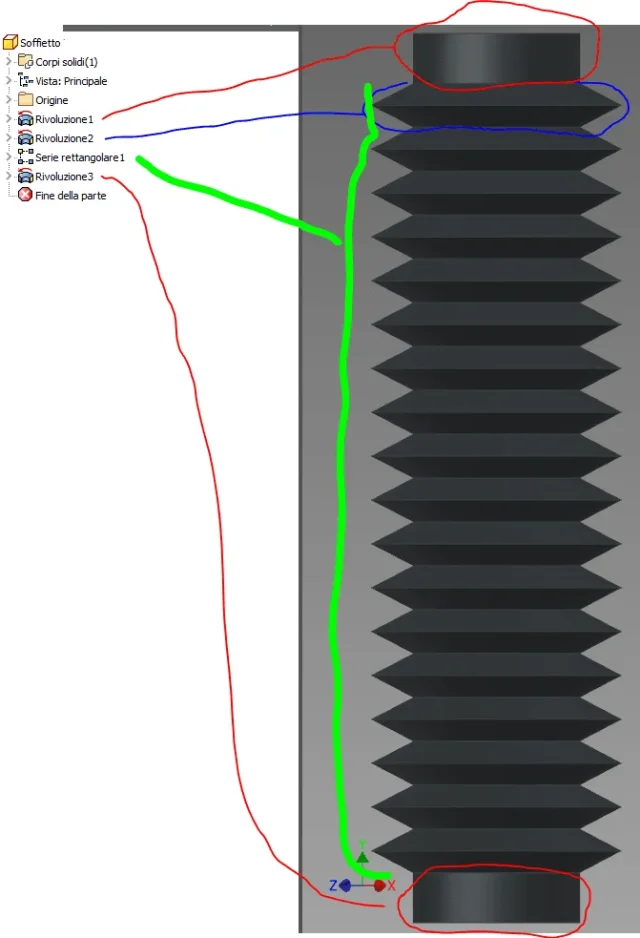
I take this thread back because I needed another bellow and I searched in the old messages to refresh my ideas on how to proceed.

I created it as part (not sheet), taking cue from the previous post of tarkus.

instead of using only one sketch (and only one revolution) I built it in four steps; I attach an exemplary image, if it were not clear to tell and explain better.
 

Attachments

  • Soffietto.webp
    Soffietto.webp
    33 KB · Views: 15
draws the first "v" with also raying and make series of processing, then final and initial curve cuts ...
 
1626438854610.pngI put a radius 6 but you have to know the thickness
1626439028622.pngyou cut the part then in excess simple and fast
 
Last edited:

Forum statistics

Threads
44,997
Messages
339,767
Members
4
Latest member
ibt

Members online

No members online now.
Back
Top