• This forum is the machine-generated translation of www.cad3d.it/forum1 - the Italian design community. Several terms are not translated correctly.

lemon

  • Thread starter Thread starter edward
  • Start date Start date

edward

Guest
I am forced to open a new discussion as I have found nothing to help me.. .
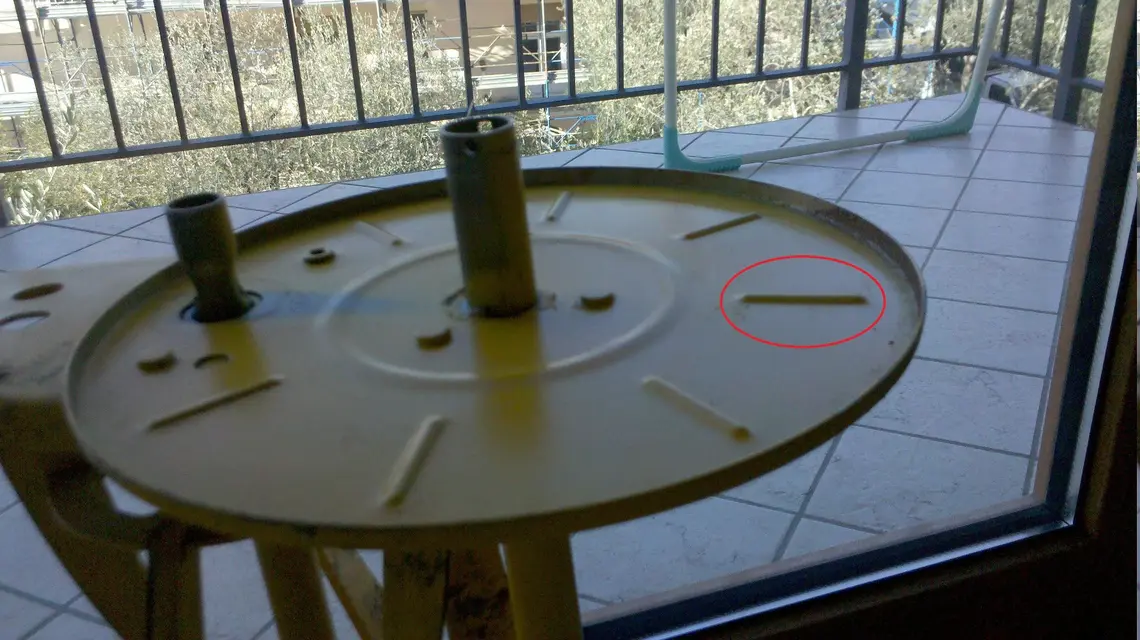
My problem is that I have to make a funnel on a sheet disc, a few mm on the whole edge.
I think the command is "form", but I don't understand how to perform the processing.
I will also have to make punches, the command shows me the window to open a file, what kind of file should I open?
(I love wildfire 4.0)
 
exactly one thing like that, I saw that you used the flange command, but to me it allows to select only half edge, if they relocate the command and choose the other half it allows me to perform the operation only by changing the thickness to the other side of the profile.:confused:
Since we're here, what's the difference between the flange command and the flat command?
I don't want to abuse the forum but I don't have any tutorials for sheet metals, how do small funnels take place? for clarity I attach photos of the component that I have to fall.


Thank you in advance
 

Attachments

  • 20101229121335718.webp
    20101229121335718.webp
    631.2 KB · Views: 12
Last edited by a moderator:
to select the top destination, click on the edge, hold shift and select the other half.
the difference between the two commands is the fact that the flange command works on the curved edges and then there are other differences.
the "small funnels you're talking about are "punzonatures".
You need to make the punch and then apply it.
You should find something here on the forum.
Now I have to go out, in case you can't get an example tomorrow morning.
 

Forum statistics

Threads
44,997
Messages
339,767
Members
4
Latest member
ibt

Members online

No members online now.
Back
Top