• This forum is the machine-generated translation of www.cad3d.it/forum1 - the Italian design community. Several terms are not translated correctly.

library notes for table

  • Thread starter Thread starter Ptch
  • Start date Start date

Ptch

Guest
Good morning to all, by former solidworks user, I used a "note" bookcase created by me, here I can not understand natives where they are and where to create them.

practically I would like a list known where to select and drag into the drawing, more than anything to avoid forgetfulness and inconsistencies among the drawings.

Thank you.
 
solved, if it should serve I explain anyway.

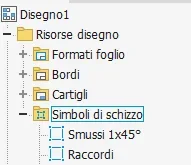
in the annotation menu " insert sketch symbol", creates a sketch->salva-> block name.
1646749369137.webpthen just click on insert to see the created note in the list.
 
you can also access from here:1646808912082.pngIf you're more comfortable. you will find directly listed the "local" ones of the file or with dx>i Enter key you can access the window displayed with your method, from where you can also draw from the centralized library: I don't think (but I can go wrong, maybe someone will correct me) there are practical differences between the two methods apart from personal preference.
 
you can also access from here:View attachment 64815If you're more comfortable. you will find directly listed the "local" ones of the file or with dx>i Enter key you can access the window displayed with your method, from where you can also draw from the centralized library: I don't think (but I can go wrong, maybe someone will correct me) there are practical differences between the two methods apart from personal preference.
perfect.
that I know the only difference is that with the insert icon, you can also choose to scale it or rotate it directly while you insert it.
 

Forum statistics

Threads
44,997
Messages
339,767
Members
4
Latest member
ibt

Members online

No members online now.
ciao
Back
Top