
• This forum is the machine-generated translation of www.cad3d.it/forum1 - the Italian design community. Several terms are not translated correctly.

libreria solidworks - rotaie

  • Thread starter Thread starter Dario Carozzi
  • Start date Start date

Dario Carozzi

Guest
Good afternoon to all.

I designed the burback rail profiles. I would like to use it as profiles for welding (drawing between other chariot things and parts for steel mills and mining industries where these rails are used) but, on the seven rows I designed, the "l" present in the attached file and in the sketch is present only in a file. now I am facing two problems i.e., the first, that on one of the two pcs the library is not read by solidworks (c:\program files\solidworks corp\solidworks\lang\italian\weldment profiles\iso\burback) and I would like to understand how to operate the other files with extension sldlfpLibreria rotaie.webp
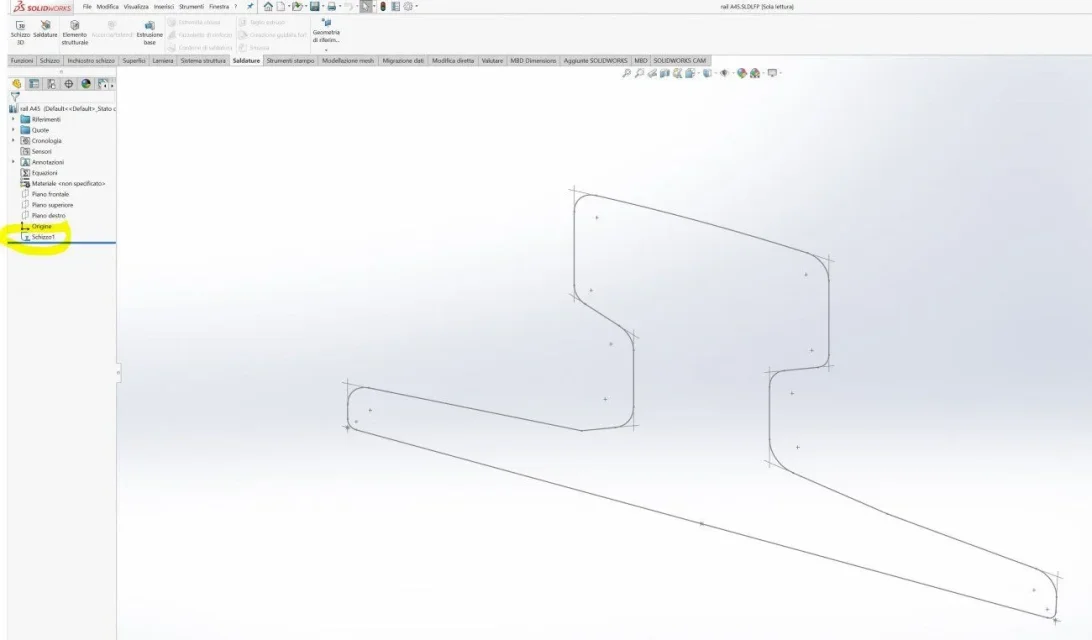
 
Thank you very much, but I had already followed everything and the path is present in the system options!! I'm sorry but the "l" doesn't create!!! urgo please remedy. Thank you.
 
attach screenshot of system options library path, screenshot of libraries while commanding structural elements and working sldlfp files
 
Good evening. I have reconstructed the files and on one of the two pcs, they are perfectly fine even if I have not yet well understood when a file becomes "full" ie, the sketch profile, as a symbol, owns the "l".
on the workstation, I have the problem that although there is the correct path of elevation of the profiles, when I look for the burback rails inside the iso/burback folder and then choose the type of rail, I do not even select the new mind folder the other pre-existing ones, there are all. I ask you to help me by giving me advice. Thank you.
 
insert the solid version into the profile so that you give advice with the version and exchange compatible files.
attach profile files with forum tools; if there is not the extension of the file you want to attach zipper.

what type of profile is: normal or configured?
show the screenshot of the property manager of the structural elements
there is too much information to understand where the problem is
 
I found the remedy. Thank you. I removed the profiles folder outside the working environment and remitted the same (always out of the files type, part, together, etc.), and all worked, recognizing the new folder of the rails.

if you need 3d burback rails (version for sw 2019, let me know that I'll make them available).

Thank you again!
 
You didn't understand anything about how you solved it. It explains better.
What is the working environment?
how does a folder be out of the file type, part, together; What does file type mean, part, together?
 
Good afternoon.
in reference to the solution that allowed me to show the rails inside the profiles, I left sw open without having loaded or parts or assemblies or drawings (even new) and from there through the menus, I set the paths removing the path of the rows of the profiles of the welding and remittance them. After this step, I opened a new file part and building a sketch and taking the welding profiles, I saw that the folder of the rails and all the rail files, they loaded seamlessly.
As for the files of the rails, the portal does not charge them to me (file with extension ".sldlfp ". Someone has a solution. Thank you so much!
 

Forum statistics

Threads
44,997
Messages
339,767
Members
4
Latest member
ibt

Members online

No members online now.
Back
Top