• This forum is the machine-generated translation of www.cad3d.it/forum1 - the Italian design community. Several terms are not translated correctly.

link attributes to a dynamic block

  • Thread starter Thread starter marcmemba
  • Start date Start date

marcmemba

Guest
Good afternoon to all! !
as from the title, I wanted to connect 2 attributes (in the dynamic block), in the sense that if I have an attribute "a" with "val-a" value, I would like to duplicate it and in the design if I change one or the other value change happens for both.
I tried to copy them, but they create me two attriubtes, with the same name, but they always remain unrelated, and autocad me makes them red...
Does anyone know if and how it is possible to do this?
Thank you so much in advance and good afternoon! !
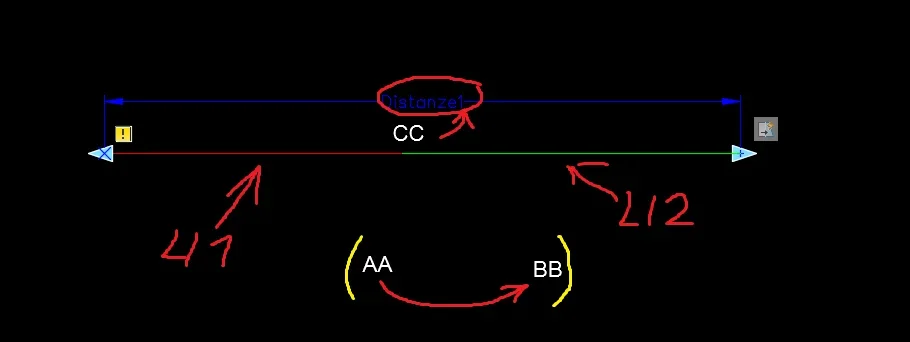
 
first creates another attrib perhaps called "bb" then uses data fields.
insert a data field into the attribute that must contain the value of the other.

to enter a data field:
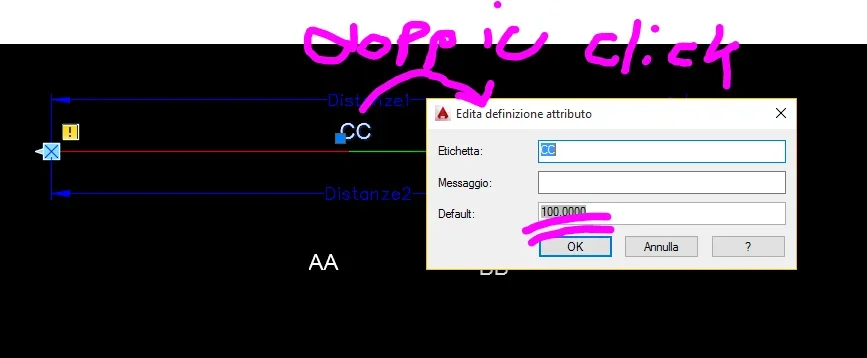
1 - double click on the block;
2 - in the attribute mask at the attribute value that must contain the right click result in the box and select "put data field";
3 - in the window that appears select the category "object"
4 - Select the button to select objects and select the block
5 - in the property list you will now also see the aa and bb attributes labels, select aa
6 - go out with ok

this operation was performed in the block and not in its definition. Therefore, if you have to make multiple inserts of this block, you should copy several times what you have performed the above operations.

when changing the value of the first attribute will increase a rigen to see the result in the second.
 
Thank you so much! That's what I was looking for! It is phenomenal this stuff:smile:! !
Now after connecting aa and bb I came an idea for my block...and then I wanted to connect the parameter distance to the data field...so type object> linear parameter>properties>distanze...and to theory it seems to work...and I was very happy, but then testing the block with the attribute, instead of the value of the length comes out to me "###############################################################################################################################################################################Blocco_1_.webpIt should be noted that "distanze1" is composed of 2 lines, unfortunately I cannot extract the sum of the two lines (li1 and li2). . .
Blocco_2.webpThis is the mistake that gives me...
Blocco_3_.webpdouble-clicking on the attribute connected to distance1, the correct measure appears "distanze1" = to 100... ("100" is the measure that should appear instead of "##########")

Thank you in advance and wish you a good evening to all! !
 
all the operations you have done executing not in the block editor but in the normal model space having visible the block, and you will see that it will work.
eye to synchronize attributes with sincatt.
 
first of all thanks for the answer celery...but I have not understood how to make visible the block in the model, succeeding to see the parameters to be applied. . .

Now I tried to create the block of an attribute in the model, then insert it into the editor blocks where I connect the attribute to the parameter distance1....now it appears correcting the value of the distance, but then if I text the block I reappear the value #####################################################################################################################################################################################################
if instead I create an attribute to the outside of the block and connect it to the block, choosing the parameter diztanze 1 from the management of the samples....poi works.... but I would like to maintain the reference of the attribute inside the block, so that if I copy the block I already have everything inside it.
thank you from now and good afternoon!! !
 
first of all thanks for the answer celery...but I have not understood how to make visible the block in the model, succeeding to see the parameters to be applied. . .

Now I tried to create the block of an attribute in the model, then insert it into the editor blocks where I connect the attribute to the parameter distance1....now it appears correcting the value of the distance, but then if I text the block I reappear the value #####################################################################################################################################################################################################
if instead I create an attribute to the outside of the block and connect it to the block, choosing the parameter diztanze 1 from the management of the samples....poi works.... but I would like to maintain the reference of the attribute inside the block, so that if I copy the block I already have everything inside it.
thank you from now and good afternoon!! !
Calm down. .
The cc attribute you created in your block is fine. now execute these steps (memory vade)
1 - close the block editor
2 - double click on the block, in the window that appears there should be your 3 attributes (to bb cc) if it were not using the sincatt command and repeat this step.
3 - in the cc attribute value box right click / enter data field
4 - object
5 - Select the object selection button and select the block
6 - in the reopening window select "distance1" in the property list
7- close
 

Forum statistics

Threads
44,997
Messages
339,767
Members
4
Latest member
ibt

Members online

No members online now.
Back
Top