• This forum is the machine-generated translation of www.cad3d.it/forum1 - the Italian design community. Several terms are not translated correctly.

local and abaco label on multi-storey edifico

  • Thread starter Thread starter cadrev
  • Start date Start date

cadrev

Guest
Hello guys, I would need a hand to create local and abaco labels related to areas and volume. the preloaded labels and those in the library for what I managed to verify I'm not useful. in fact, they are in the presence of a multi-level building with 4 apartments per floor; the label I would like to use must have the same characteristics as what we find by default on revit, i.e. area, volume, name but not number. I would like to replace the "number" with the word "apartment 1", 2, etc. etc. but I would wish it was not visible in the plant. all this in such a way as to find me in the abacus, the superphilia, the volume and the name/destination of use of the local associated with the relative housing cell. show in every label the number of the apartment I don't need, but I would like the label to be associated with something that is visible in the abacus and that automatically collect the various surfaces in the apartment of belonging.
is that possible?

Thank you very much in advance
 
the premises have by default the department instance parameter, nothing forbids you to mean it as "a,b,c" apartment and fill it as most useful.
 
the premises have by default the department instance parameter, nothing forbids you to mean it as "a,b,c" apartment and fill it as most useful.
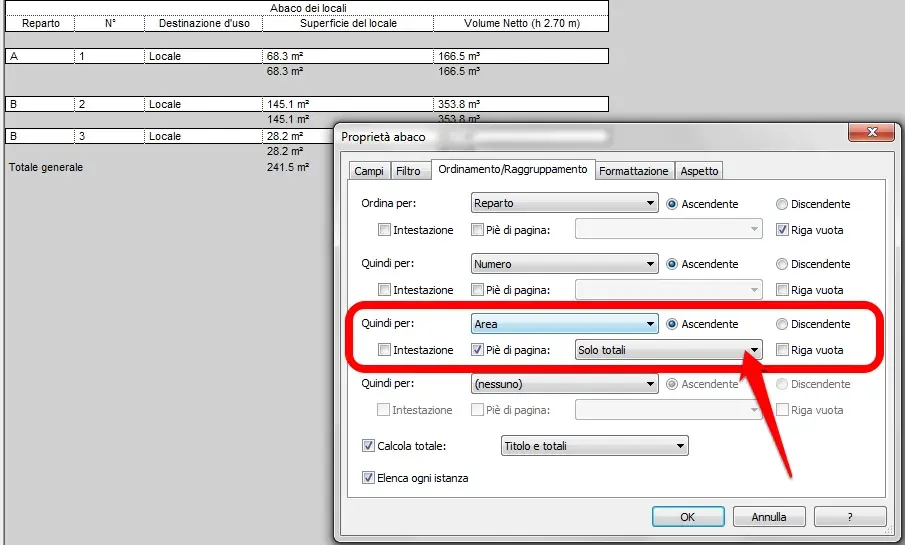
Hello mb thanks for the answer! You didn't tell me anything about visibility... :redface: :biggrin: I solved it this way (although it is not what I wanted). after indicating in the various labels the number of apartments I created the abaco. I later made the text department invisible in the label family. on the abachi I remain the subdivision as before...(is a correct approach? or do you know another one that allows me to bypass the change to the family at the second time??????) I ask you one last thing at this point. in the attached image you will find the abacus (a quick test I made after your post) with the total surface. I ask you can also insert the total of each single apartment? I couldn't find the way
abaco.webp

Thank you so much!
 
I think you're confusing your ideas. a label simply serves to read the value of a parameter and bring it back in text form within a view. Now the department parameter exists regardless of whether or not there is a label in your project that if you go to "read" (re proof of this you can try to make the abacus without labels being loaded in the project, you will see that the fields will still be compiled). for all partials see the attached image. I hope I have cleared you the concept
 

Attachments

  • abaco.webp
    abaco.webp
    37.7 KB · Views: 25
I think you're confusing your ideas. a label simply serves to read the value of a parameter and bring it back in text form within a view. Now the department parameter exists regardless of whether or not there is a label in your project that if you go to "read" (re proof of this you can try to make the abacus without labels being loaded in the project, you will see that the fields will still be compiled). for all partials see the attached image. I hope I have cleared you the concept
Forgive me, but by rereading my post, I found nothing that meant the confusion you referred to... I was asking for something else... Anyway thanks to the image you attached to me I found the way to add the total for each housing cell. :biggrin:
but there is a way to leave an empty line even on the general total?
 

Forum statistics

Threads
44,997
Messages
339,767
Members
4
Latest member
ibt

Members online

No members online now.
Back
Top