• This forum is the machine-generated translation of www.cad3d.it/forum1 - the Italian design community. Several terms are not translated correctly.

local section

  • Thread starter Thread starter tecnico_plast
  • Start date Start date

tecnico_plast

Guest
Bye to all,
to conclude the year in beauty :biggrin:, I have a problem with the sections in a schematic total of a reducer (wf5):

1 - toothed wheel section: How do I dissect a toothed wheel and exclude the tooth?
the simplest thing that comes to mind is to create a cut of the same size as the tooth, so that the latter is not sampled in the table.
Is there a command to get the same result?

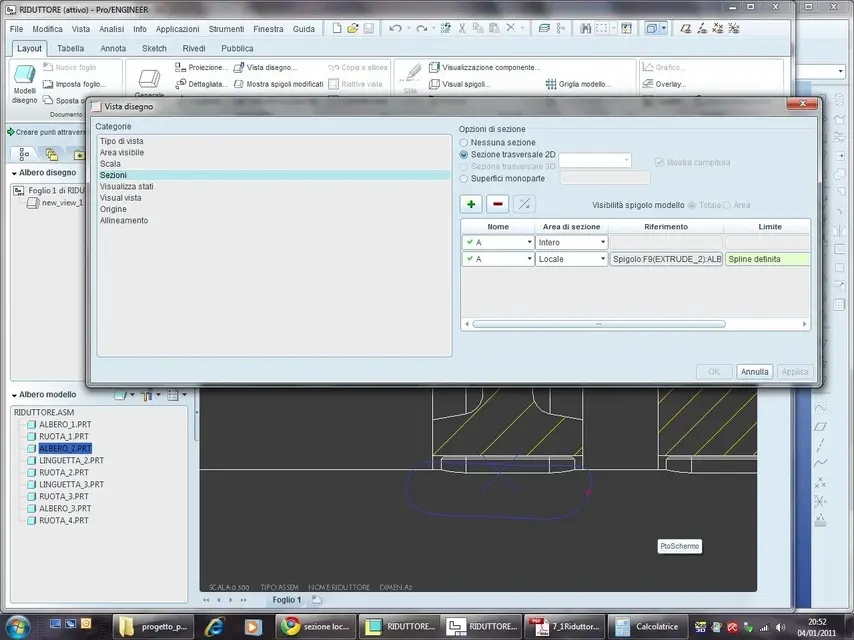
2 - local section: in the table of the aid of the reducer, I can not do the local section on the tree at the place of the tab, after making the spline I can not conclude the operation because it is the button applies that ok are not active.

allego two pdf to clarify the problem.

thank you and good year to all!
 

Attachments

Hi, Tec.

pass the file in step with the plan you intend to use for the section I want to try if in v5 does the same thing to me


Hi.

 
Bye to all,
to conclude the year in beauty :biggrin:, I have a problem with the sections in a schematic total of a reducer (wf5):

1 - toothed wheel section: How do I dissect a toothed wheel and exclude the tooth?
the simplest thing that comes to mind is to create a cut of the same size as the tooth, so that the latter is not sampled in the table.
Is there a command to get the same result?

2 - local section: in the table of the aid of the reducer, I can not do the local section on the tree at the place of the tab, after making the spline I can not conclude the operation because it is the button applies that ok are not active.

allego two pdf to clarify the problem.

thank you and good year to all!
  1. If the toothed wheel you designed it as a full cylinder you cannot exclude the tooth, you may use a correctly shaped tooth wheel or one with two compartments corresponding to the section plane.
  2. you tried to click with the central key after finishing the spline.
 
It seems strange to me that you can't do it, you'd solve it with two local sections or with a working region.
ps: When do you spline for the sez.local for example on the tab you give it confirmation with the central button?
greetings and good year
:finger:
 
Yes, I confirm with the central, I attach a screenshot to make the idea better.

I use the same section, once whole, and once local (after excluding the tree from the whole one).

I don't understand where the mistake might be... :rolleyes:

I also attach the sp.
 

Attachments

you could solve by drawing a hand spline and applying a sampling, since now with the wf5 you can perhaps (in previous versions I never tried), but I would like to find the correct solution if possible. . .
 
the problem is that you can't create a local section on an already full name.

do so:
Step 1:
create the whole section that dissects all the components and call it to, then in the property of the section exclude from the sampling all the elemeni that you do not need, including the tree with the tab.
Step 2:
create another section identical to the a but you will call b, this may have multiple local sections, so you can dissect the tab locally and also the teeth wanting.
ps: here you do not have to exclude any sampling.

greetings ozzy
 
Hello Tecn...

I tried to do a section with sketch avoiding the gear zone and then manually erasing the sampling in the 2 trees, I think pro\ can do the same thing quietly

I hope I've helped you.

allego file
foto 1 in the gear zone shows you a field interference in red
2 attachment pdf

greetings


Attachments

  • ZONA ROSSA INTERFERENZA.webp
    ZONA ROSSA INTERFERENZA.webp
    41 KB · Views: 19
  • riduttore_RS4.pdf
    riduttore_RS4.pdf
    43.7 KB · Views: 11
the problem is that you can't create a local section on an already full name.

do so:
Step 1:
create the whole section that dissects all the components and call it to, then in the property of the section exclude from the sampling all the elemeni that you do not need, including the tree with the tab.
Step 2:
create another section identical to the a but you will call b, this may have multiple local sections, so you can dissect the tab locally and also the teeth wanting.
ps: here you do not have to exclude any sampling.

greetings ozzy
thanks ozzy,
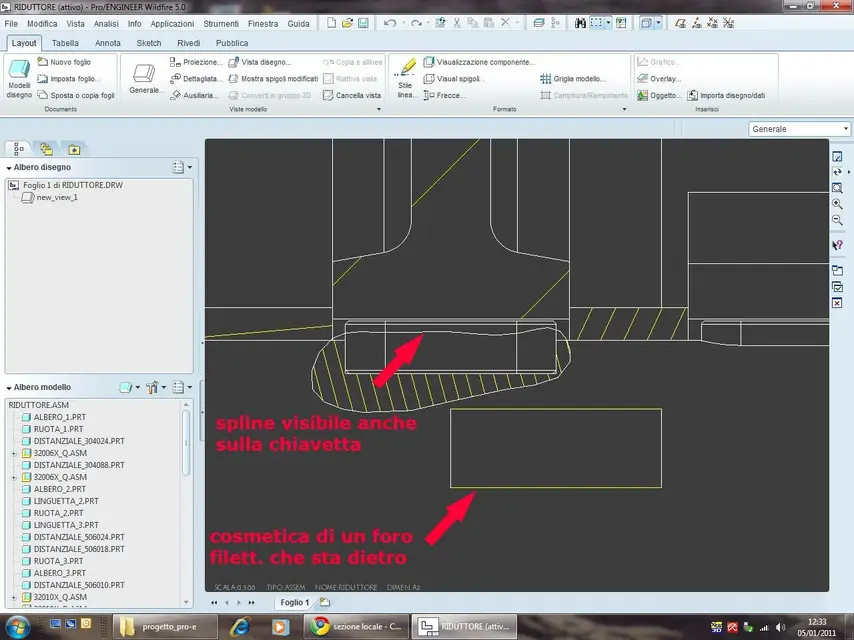
Now it works but there is another problem, which dates back to the previous versions, and is what the spline is displayed in full, even on the tab. . .

a last problem, even this dating back to the previous versions, is that of the visualization of the cosmetics of the threaded holes that are behind, only that before I could eliminate them with the command "show/drop", now I can't.
you could solve by putting cosmetics in a hidden level, what do you think?

I attach a screenshot of the problem.

thanks to all for the answers :finger:
 

Attachments

  • 003.webp
    003.webp
    96.4 KB · Views: 19

Forum statistics

Threads
44,997
Messages
339,767
Members
4
Latest member
ibt

Members online

No members online now.
Back
Top