• This forum is the machine-generated translation of www.cad3d.it/forum1 - the Italian design community. Several terms are not translated correctly.

machine tool compensation (g41 or g42):

  • Thread starter Thread starter alexfunk
  • Start date Start date

alexfunk

Guest
good morning, as from title I would need to create a tool path (profile or pocket) with the need to make tool corrections on the machine. Inside the file however there is no g42 or g41.suggerimenti? thanks alessandro

 
yesterday I also posted this discussion, but I see that maybe I will never have the answer since you asked her a month ago...
 
for the roughing, as far as I can see, it is not possible. you can have a point-point output (only g00/g01) or on request also with circular interpolation (g02/g03).
to improve the result of grinding you can interact on processing tolerance, obviously at the expense of system response times.
 
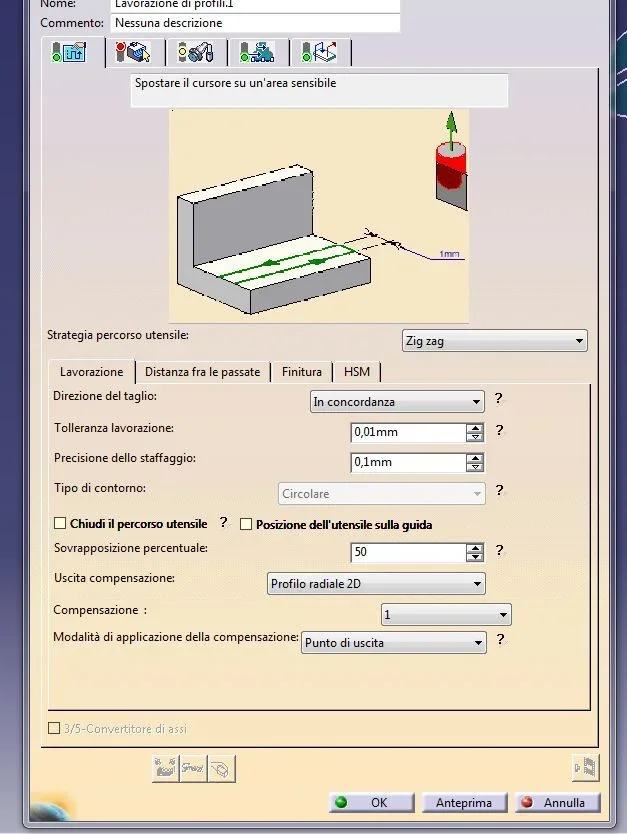
Good morning daxo and good Sunday, I'm sorry again, but I'd like to ask you something again. to have the "d" radius corrector in the nc iso file, do I have to do some procedure or just do what you posted in the image? Thanks again.
 
First of all, what you have done for sure, you have to go under "group of processing"--"machine cn"--- "select type machine" ---- "number control" and here you have to define:
"postprocessor" for example fanuc 18
"Table words pp" for example imsppcc_mill.pptable
"data type cn" : iso

enable linear interpolation 3d, circular interpolation 2d and in some cases circular interpolation 3d.

Another important thing to ensure that the path is correct is to have macros of approaching/reduction that contain a straight tract. for example "axial horizontal circular" as the post processor inserts the g41/g42 in the straight tract before the input radius.
other advice for not having error messages of the type "ray interference error" or similar, obviously in the process execution phase in the machine, is to use a wider range of approaching or retraction of the tool radius.

I hope I've been clear and the information is useful to you.

Bye-bye
 
Hey, daxo, I'm sorry if I'm still bothering you... So, I did what you posted and I managed to do almost perfectly everything. I now have a problem with g43: I do not understand why it inserts the .4 after g43 (e.g. n4 g43.4 z30. h1).
I hope you can help me again. Thank you in advance.
 
the working center you use with what control is equipped?
It's a 3-4 or 5 axes center.
attention to post processors attached "free" in catia are just demonstrations. If you do not want to put hand, with various edits, to the post-processed iso files, you must buy a personalized post processor.
regarding g43.4 should be clearing axes on 5assi working centers with tool center point control option active (for fanuc and mazatrol).
if your center is not a 5 axes you must specify it in the "working group" the type of machine used "3 axles"/"4 boards with table".
if it is a working center 5 axes test an insert the word of post processor:
multax/off for positioning work
multax/on for continuous work.
attention: post processor words depend on the activated pptable.
 
Hello, daxo, thank you again for answering me.
the working center is a 3 axes and the cnc is a fanuc 18i (this working center I use it for small jobs and unfortunately I have not yet purchased a custom pp).
those purchased, they are for the 5 axes, but they were customized for mastercam.
however I have followed what you have suggested to me; I went to the "working group" and I configured the type of machine, that is to three axes, setting also the pp. we say that the iso file is fine, but the g43 I always get out like this: g43.4think you can get rid of that .4 , or do I have to delete them manually?
Thank you in advance.
 
I would not trust to brutally eliminate .4.

I ran some tests, and I didn't have any problems with the suggested settings.
most likely you did not set the setting for the output of the iso files correctly.
verify the following settings under "instruments"--"options"---"emission" must be dubbed "ims" if you use pptable provided by ims or "icam" if you use pptable provided by "icam".
if select pptable does not congrue the post processor fails to interpret correctmemte the instructions.

Let me know if you got a proper otput.

Bye-bye
 
hello daxo, then Monday I will carry out this verification and I will let you know as soon as possible. Thank you again for the help you're giving me.
Good night:
 
Hello, daxo, I'm sorry if I'm only answering you right now. . .
So, I set everything as you posted me and finally thanks to you I solved. :finger:
I want to ask you something else... as the programs that generates me the pp are very long, by chance there is some settling to work directly from the pc to the cnc? as communication software use ddfm32 dostek dnc file manager.
Thank you in advance.
 
good morning to all:after several tests personally I would not activate the compensation with the radial profile command 2d or 3d because if we forget to compensate on board machine the mill works in the profile center (already experimented) and you can throw the piece. I will compensate the active in the attack position and remove it after the cut off the profile. alessandro

p.s. would have to work also with pockets (I did not try)
 
hi rodendor, regarding the size of cn files, personally, I do not use any data transmission software in dnc as all the working centers used, in the company where I work, are connected via network cable.
a council that I feel I give you and generate more cn programs that will reside in specific areas on the various machine tools and then generate a small cn program to perform the call of the various subprograms.
If you use fanuc you can transfer the longest files to the "dataserver" and then in the small call/connect file you can run them by code m198. Perhaps the suggested things are trivial and use them already.
to transfer files to the data server you will need to use "cardridge data" or on recent centers the usb ports available.

with the occasion I greet you.

Bye-bye
 
Good evening. alexfunkpersonally I have been using the activation of the compensation through the "radial 2d" option and I have never had any problems.
attention:
- with the option "radial profile 2d" I will have to manage the tool wear by changing the diameter/route tool directly in the data table uncontrollable.
- with the "radial point 2d" option I will have to manage wear by entering the value of how much I will want to remove + or in - always in tool data table. the diameter/route of the tool in this case is not taken into account, because the output of the tool path, generated by the post processor, is the milled center and therefore to compsare you will have to indicate in table tools the possible "wear".

also as mentioned above:
"another important thing to ensure that the route is correct is important to have macros of approaching/reduction that contain a straight tract. for example "axial horizontal circular" as the post processor inserts the g41/g42 in the straight tract before the input radius. "


with the occasion I greet you

Bye-bye
 
hi daxo, unlike the other controls, unfortunately this fanuc is located in a local of the company where there is no business network and therefore I do not know how to fit programs of size even more than 180 kb (more than 4000 blocks).
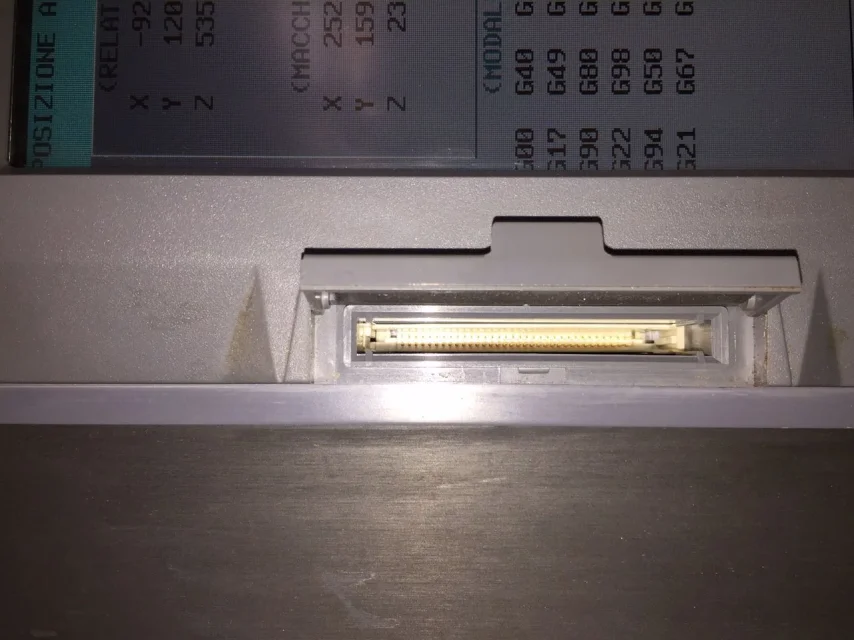
In your opinion, would I be able to enter programs and also run them directly by purchasing a pcmci adapter with a sd card? 18i has a pcmci input (as attached).
Thank you again: IMG_8120.webp
 
ciao surrounding.
I'm not an expert. what I would suggest and ask for assistance to those who provided you with the tool machine or as an alternative to fanuc italia. I, fanuc, contacted them and always answered.

I personally think that in the slot, indicated in the photo, you can insert a sd card but only to transfer the files to the nc-ram.
to be sure you should check if there are parameters in the system setting menu to define the sd card as a data transfer device. the thing, however, as you know, is complicated because every manufacturer customizes the user interface and sincerely I couldn't guide you in verifying what I suggested.

a question, maybe stupid, did you check if an area is not planned for dnc operations?
I on:
- makino with fanuc 16i / profesional3 I had a nc-ram of 180 kb but was equipped with date server fanuc

- mori-seiki confanuc 18i / mapps3 I have a nc-ram of 4mb + area of about 100 mb per dnc with mapps options or 1 gb with date server fanuc.

Fortunately, the work centers I have at my disposal are well configured: because we often work on sculpted surfaces and therefore the files are considerably "corporated".

hoping to have been of help with the occasion I greet you

Bye-bye
 

Forum statistics

Threads
44,997
Messages
339,767
Members
4
Latest member
ibt

Members online

No members online now.
Back
Top