• This forum is the machine-generated translation of www.cad3d.it/forum1 - the Italian design community. Several terms are not translated correctly.

[machining] preferential holes

  • Thread starter Thread starter cacciatorino
  • Start date Start date

cacciatorino

Guest
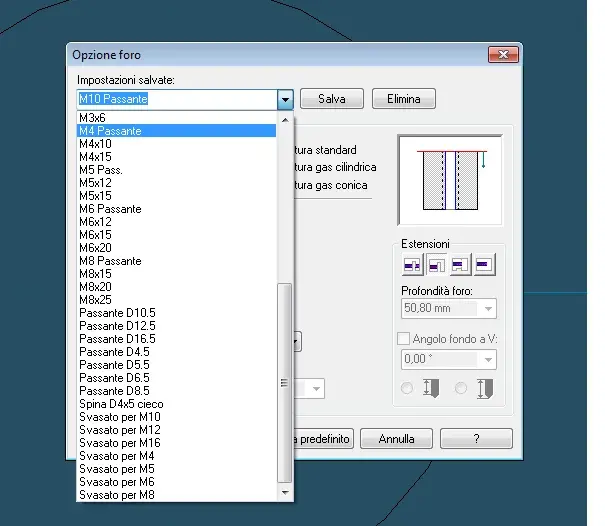
I would like to ask if it is possible to save preferential holes in the machining interface, to be recalled to the need without each time filling out the whole tab.

for example: "lamed by m8", "wrong by m10", etc. the thing would speed me the daily work.

I attach an image of what I mean, done with another software cad.
 

Attachments

  • fori.webp
    fori.webp
    24.9 KB · Views: 42
I would like to ask if it is possible to save preferential holes in the machining interface, to be recalled to the need without each time filling out the whole tab.

for example: "lamed by m8", "wrong by m10", etc. the thing would speed me the daily work.

I attach an image of what I mean, done with another software cad.
I did not understand well however I have a macro that makes the holes to you according to the threads (m8 -> hole 8.5) editable that you put the values you want, one that makes the blades already set.
You mean that?
 
I did not understand well however I have a macro that makes the holes to you according to the threads (m8 -> hole 8.5) editable that you put the values you want, one that makes the blades already set.
You mean that?
Yeah, something like that, what macro is it? Can you show me a screen?

p.s. better explain the problem:

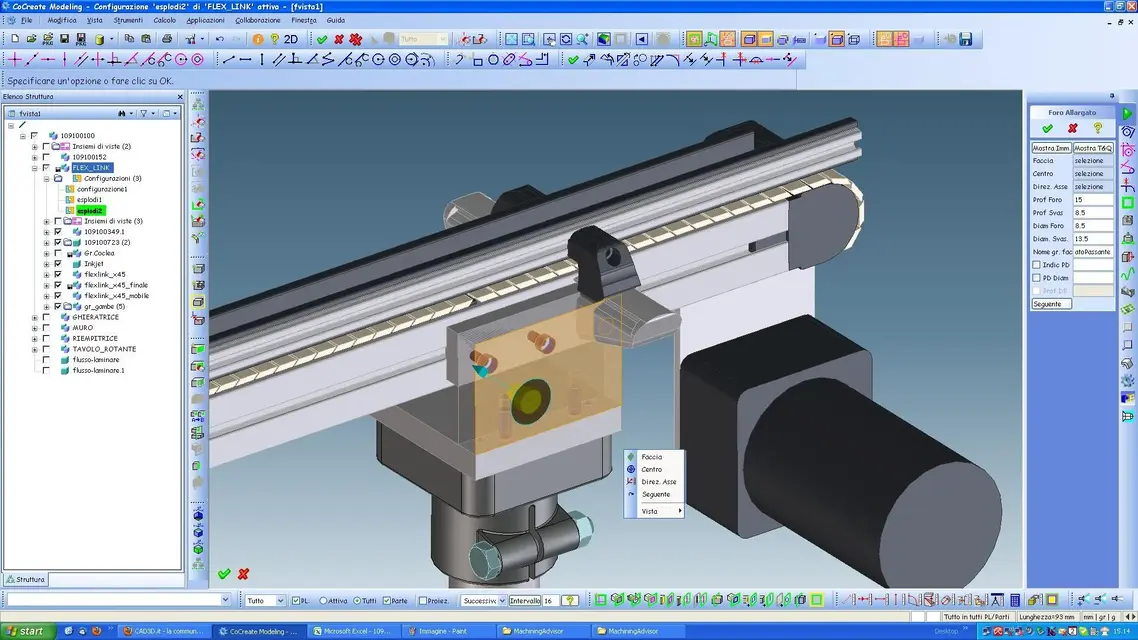
If I go to make a laminated hole for tcei m8, every time I have to insert hole diameter, lamature diameter, lamatura depth. But if, after making the hole the first time, I can save it between the "preferred", and next time I can call it back from a drop-down menu.
 

Attachments

  • campi.webp
    campi.webp
    66.4 KB · Views: 31
Yeah, something like that, what macro is it? Can you show me a screen?

p.s. better explain the problem:

If I go to make a laminated hole for tcei m8, every time I have to insert hole diameter, lamature diameter, lamatura depth. But if, after making the hole the first time, I can save it between the "preferred", and next time I can call it back from a drop-down menu.
This is the right button that is comfortable.
to upload them you must insert them into the ma_customize file in the machiningadvisor folder (c:\documents and settings\marco\dati application\cocreate\cocreate modeling 2008\16.00\machiningadvisor)
so I always put this file as a reference, then you fix yours. I hope I've explained if you have problems writing here or if you want to call me the phone you find it in the consortium table
 

Attachments

  • forature.zip
    forature.zip
    15.9 KB · Views: 39
  • fori_lamati.webp
    fori_lamati.webp
    217.4 KB · Views: 32
This is the right button that is comfortable.
I look at it tonight, I need to see if you can live with the macro that I downloaded from cad.de and that contains many thread definitions.

for now thank you, you are always attentive and helpful! :smile:

Did you write these macros? How did you do that?
 
I look at it tonight, I need to see if you can live with the macro that I downloaded from cad.de and that contains many thread definitions.

for now thank you, you are always attentive and helpful! :smile:

Did you write these macros? How did you do that?
but that I wrote...... where I took the license they gave me but they are the same ones that are on cad.de only translated and slightly improved
 
I tried to insert your files but at first did not find the file director lisp, then once put in place, it does not create the toolbar "ep" that seems to me to eda on the jpg.

I'm trying to study it a little longer, maybe I'll take the lisp files and then put them in to what I already have.

Thank you for now.
 
I tried to insert your files but at first did not find the file director lisp, then once put in place, it does not create the toolbar "ep" that seems to me to eda on the jpg.

I'm trying to study it a little longer, maybe I'll take the lisp files and then put them in to what I already have.

Thank you for now.
what you mean by ep toolbar, however try to drag the lisp into the graphics area so you charge then try to make a laminated hole and should work. probably there is only some misunderstanding with the reading path.
 
Hello, girl.
Does anyone know how to remove the hateful red face with relative tolerance from the lamati machining holes?
p.s.
the macro of the holes works, but at the loading it gives me in output:
warning: the cell value nil is not of type number. will assume the new value 0.
 
Hello, girl.
Does anyone know how to remove the hateful red face with relative tolerance from the lamati machining holes?
I found how you change color, but not how to do why faces machining take the default color of the model.. .
 
Hi.
If you can tell me where the color changes, I'll take a look.
the problem perhaps comes from version 18.00
 
but you don't get the error by doing even drag & drop files
fori_fil_fori_bul.lsp
and
holes_filettati.lsp
? ? ?
 
solved with the recorder in the button, but the default still remains a mystery......... .
 

Forum statistics

Threads
44,997
Messages
339,767
Members
4
Latest member
ibt

Members online

No members online now.
Back
Top