• This forum is the machine-generated translation of www.cad3d.it/forum1 - the Italian design community. Several terms are not translated correctly.

macro for motion analysis parameters

  • Thread starter Thread starter Luca1269
  • Start date Start date

Luca1269

Guest
Good morning to all,
I'm new to the forum and I don't know what rules are there..However I am a designer who for some years has been using solidworks as a cad and for some time I'm approaching even from the point of view of simulation, in the detail of movement analysis.
in playing with macros I would like to try to automate the modification of some parameters such as "photograms per second" and the "cycle time" of movement analysis.
looking around I did not find I did not find examples and/or rows of code in vba that allowed me to insert these parameters through a macro; I ask at this point to you if someone has ever approached this kind of problem and/or if he is aware of how to write these lines of code.

Thank you all.
 
Hello luca1269,
It's a macro topic I've never dealt with, and I should go deeper. I believe that on the internet on what you have to do there is very little, you tried to see in the manual bees of solidworks? Even if there are no examples, the important thing is that there are bees to do what you need.
 
Hi, jenuary.
First of all, thank you for the answer.
I have consulted so much material about it, both as books as "automating solidworks 2011 using macros", and as official web sw documentation including the bee manual, but specifically I have not found how much I was looking for.
the most I managed to find was a series of commands that allow me to change the "frames per second" of the study "animation". Obviously I tried to change the code to equal controls to act on the study "movement analysis" but without success.
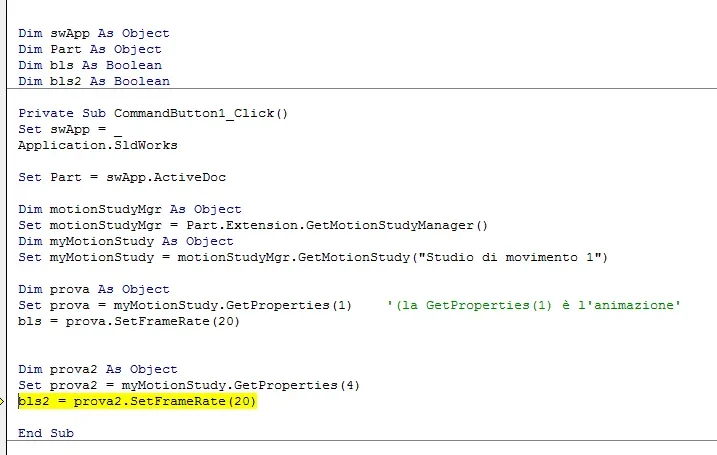
I'll get you the code I wrote, maybe something comes up to you:

dim swapp as object
dim part object
dim bls as boolean
dim bls2 as boolean

private sub commandbutton1_click()
set swapp = _
application.sldworks

set part = swapp.activedoc

dim motionstudymgr as object
set motionstudymgr = part.extension.getmotionstudymanager()
dim mymotionstudy as object
set mymotionstudy = motionstudymgr.getmotionstudy("movement study 1")

dim test as object ' here I can act on animation fps successfully'
test set = mymotionstudy.getproperties(1)
bls = test.setframerate(20)


dim test2 as object ' here I cannot act on the fps of the "movement study"
test set2 = mymotionstudy.getproperties(4)
bls2 = test2.setframerate(20)

end

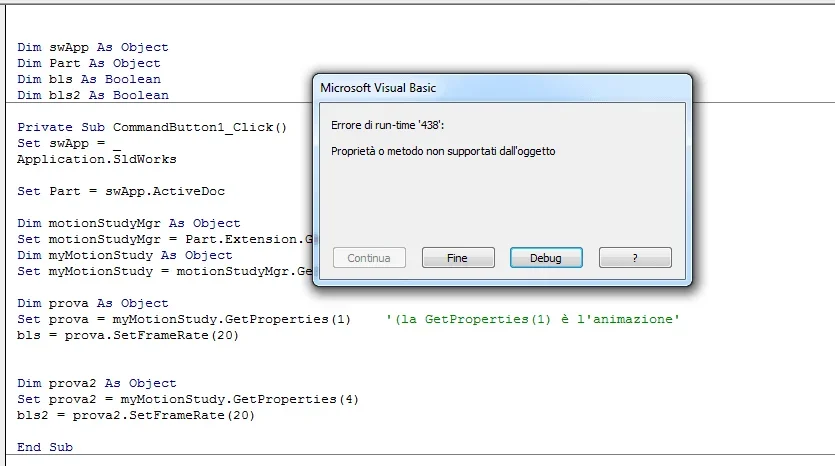
I'll bring you back the mistake that gives me.

Thank you in advance.

See you soon.
1579358951452.webp
1579358898977.webp
 
Hi.
I took a look at the code, there's a few things to fix.
not having attached the macro file I don't know if you in the references you popped up
solidworks 20xx motionstudy type library
indispensable to access the movement libraries.
in speed I changed the macro, I didn't try it because I don't have your solidwoks file on which you will try the movements, I'm sure it won't work completely, but it's the starting point.

in the manual bees you can find examples, where they get or set the data you actually want to do, take a look at these links in the online manual:https://help.solidworks.com/2019/en...rop.swmotionstudy.imotionstudyproperties.htmlhttp://help.solidworks.com/2019/eng...n_study_properties_and_results_example_vb.htm

come ho scritto in passato più volte nel forum, è molto meglio dimensionare la variabile solidworks e model doc2 in questo modo:
dim swapp as sldworks.sldworks
dim part as sldworks.modeldoc2
questo ti permette di vedere nel menù a tendina le proprietà e i metodi per queste librerie

questa è la macro che ho modificato su cui devi lavorare:

dim swapp as sldworks.sldworks
dim part as sldworks.modeldoc2
dim bls as boolean
dim bls2 as boolean
sub main()
set swapp = application.sldworks
set part = swapp.activedoc
dim motionstudymgr as swmotionstudy.motionstudymanager
set motionstudymgr = part.extension.getmotionstudymanager()
dim mymotionstudy as swmotionstudy.motionstudymanager
set mymotionstudy = motionstudymgr.getmotionstudy("studio di movimento 1")
dim swmotionstudyprops as swmotionstudy.motionstudyproperties

'dim prova as object ' qui riesco ad agire sui fps dell'animazione con successo'
set swmotionstudyprops = mymotionstudy.getproperties(1)
bls = swmotionstudyprops.setframerate(20)

'dim prova2 as object ' qui non riesco ad agire sui fps dello "studio di movimento"'
set swmotionstudyprops = mymotionstudy.getproperties(4)
bls2 = swmotionstudyprops.setframerate(20)

end sub
 
Hi, jenuary.
you are really a big!!!.. you gave me a great indication.
I had read the example of the manual bees you brought back, trying also part of that code.. but without success. The fact is I was completely "fumato" the activation part of the motion library. Therefore the macro stopped immediately and then folded on the other road that at least partially worked.
Thank you very much.
now I will try to complete the code trying to go to change the "cycle time".
See you soon.
 
Hi, jenuary.
you are really a big!!!.. you gave me a great indication.
I had read the example of the manual bees you brought back, trying also part of that code.. but without success. The fact is I was completely "fumato" the activation part of the motion library. Therefore the macro stopped immediately and then folded on the other road that at least partially worked.
Thank you very much.
now I will try to complete the code trying to go to change the "cycle time".
See you soon.
Well, I'm glad you've been hostile.
Good job
 

Forum statistics

Threads
44,997
Messages
339,767
Members
4
Latest member
ibt

Members online

No members online now.
Back
Top