
• This forum is the machine-generated translation of www.cad3d.it/forum1 - the Italian design community. Several terms are not translated correctly.

macro per collegare excel e autocad

  • Thread starter Thread starter atorchia
  • Start date Start date

atorchia

Guest
Good morning to all,
I wanted to know if it was possible to make a macro that allows me, from within a sheet of excel (through a bottoe or other) to open a file of autocad and that this is opened in a certain area.
practically I have a very extended file of autocad and in excel a list of zones (area 1, aerial 2, area 3, etc.). by clicking on the "area 1" of the excel sheet I wanted to make sure that the autocad file is opened but that it zooms on the chosen area (individualizing it through the autocad coordinates). and so on for all areas.... is someone able to tell me if you can do it, and if so how?
Thank you very much.
 
Good morning to all,
I wanted to know if it was possible to make a macro that allows me, from within a sheet of excel (through a bottoe or other) to open a file of autocad and that this is opened in a certain area.
practically I have a very extended file of autocad and in excel a list of zones (area 1, aerial 2, area 3, etc.). by clicking on the "area 1" of the excel sheet I wanted to make sure that the autocad file is opened but that it zooms on the chosen area (individualizing it through the autocad coordinates). and so on for all areas.... is someone able to tell me if you can do it, and if so how?
Thank you very much.
Okay, now it's much clearer, what you want to do is simple enough to accomplish.

Are the coordinates of the windows (views) inserted into some excel cells or should the values be set by the macro?
 
...can manually insert them into hidden excel cells or put them in the macro. It's indifferent... ..that + simple... .
 
but use the old view command and save the various views by calling them area1, area2 etc.
 
...the problem is I'm about a centiary. . .
it would be convenient to have a list in excel (where I will also put short descriptions of the areas...) and then be able to view them by clicking on the relative writing. . .
 
...the problem is I'm about a centiary. . .
it would be convenient to have a list in excel (where I will also put short descriptions of the areas...) and then be able to view them by clicking on the relative writing. . .
and manage everything from autocad with a form that gives you views and where you put the descriptions you like?

type:
- Name
-description
-coordinates

with button go to ....
 
...but...in the sense that the person who should then display these areas already uses little excel... autocad we don't talk about it.... .
 
...but...in the sense that the person who should then display these areas already uses little excel... autocad we don't talk about it.... .
I understand.
...


If you give me some data, I try to throw something down. .

You should also post me the excel file you want to use to write over the macro.
 
...to tell the truth before starting to set up everything I wanted to have clear ideas on the way to follow, before throwing away time for nothing.... .
However the idea was to make a format excel type that attached a column with the name of the area/area that clicking on it should open the autocad file by zooming in the specific area, and a descriptive column of the area.
I hope I was able to attach the excel file.
 
...to tell the truth before starting to set up everything I wanted to have clear ideas on the way to follow, before throwing away time for nothing.... .
However the idea was to make a format excel type that attached a column with the name of the area/area that clicking on it should open the autocad file by zooming in the specific area, and a descriptive column of the area.
I hope I was able to attach the excel file.
mmm no.. nessun file excel
 
ok this is a draft but should work, save the contents of the archive in c:

I open the excel file and you positions on the line you want

click on the button and should start autocad and stop on the coordinates indicated in the line.

if you see up there is the path of the file and the name

if you need to open your file you have to put the correct path there.

Obviously the macros in excel must be active, if not you go on macro protection tools and put on media, so asks you whether to activate the content or not.
 

Attachments

as required by the user deleted button and the line is activated by double_clicik on the line corresponding to the desidarated view.

entered confirmation message operation to avoid undesirable macro launches. Selecting yes follows, to cancel no

modified location columns
 

Attachments

Last edited by a moderator:
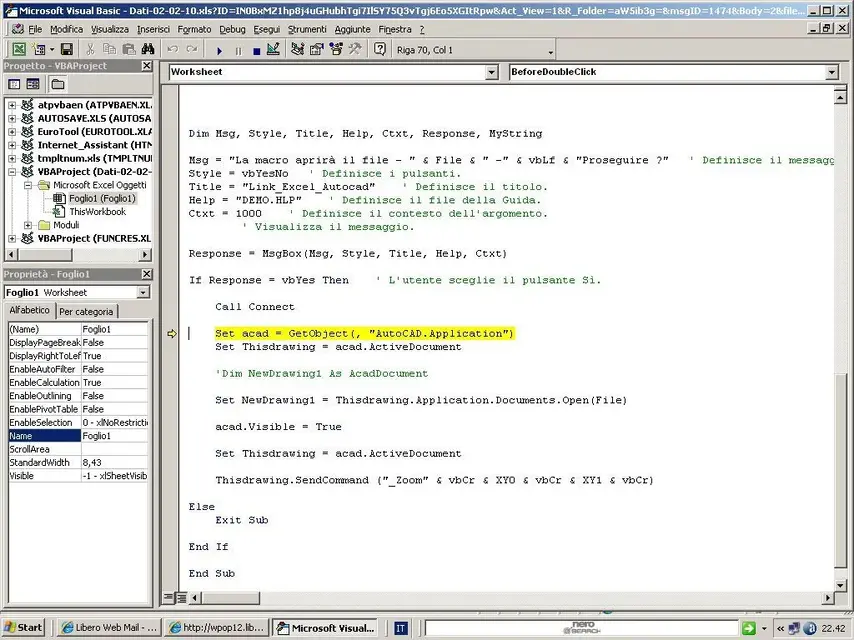
with excel 2000 the macro from this error:

"the activex component cannot create the object"

" run-time error '429':the activex component is unable to create the object"

is there no compatibility between excel 2002 and 2000 regarding macros?
 
with excel 2000 the macro from this error:

"the activex component cannot create the object"

" run-time error '429':the activex component is unable to create the object"

is there no compatibility between excel 2002 and 2000 regarding macros?
I'm sorry, but I've had a bit of a hard time, the problem you reported is abnormal, because I developed the thing by testing it on excel 2000.

I think your partner misses a few bookstores, and I'll let you know.
 
...I don't know, I got him checked in tools, add-ons, and it's all flagged. I found this on the internet http://support.microsoft.com/kb/281848/it But honestly... I don't know how to intervene...
And I'm sorry for the continuous cracking of boxes...
the problem, or rather, the message is a fairly generic error that can be tied to a thousand things, in protic if in a pc funiona and in another no means that some component or some dll is not correctly recorded on the target pc.

This basically means that I have used standard dlls that in theory on all machines should be installed.

But it's not always like that.

Now the problem is to understand which and where you plant at your partner.

you place the excel fiel without macro protection, so the error shows you the point where it crashes and possibly even missing references.
 

Attachments

the problem, or rather, the message is a fairly generic error that can be tied to a thousand things, in protic if in a pc funiona and in another no means that some component or some dll is not correctly recorded on the target pc.

This basically means that I have used standard dlls that in theory on all machines should be installed.

But it's not always like that.

Now the problem is to understand which and where you plant at your partner.

you place the excel fiel without macro protection, so the error shows you the point where it crashes and possibly even missing references.
hi shape,
when you open the excel file, click twice on the line that interests you from ok to ask to start the macro.... stop it all at this point....
 

Attachments

  • errore macro.webp
    errore macro.webp
    111.5 KB · Views: 78

Forum statistics

Threads
44,997
Messages
339,767
Members
4
Latest member
ibt

Members online

No members online now.
Back
Top