• This forum is the machine-generated translation of www.cad3d.it/forum1 - the Italian design community. Several terms are not translated correctly.

macro to convert .stp to dwg

  • Thread starter Thread starter Solid User
  • Start date Start date

Solid User

Guest
Good evening, everyone.
I press that I'm not expert on autocad, I only use it as a viewer. use usually solid edge.
I need to create many .dwg files starting from .stp files created in solid edge.

Can someone tell me if there is automatism to do this in batch?

Thank you in advance for suggestions
 
I doubt you can create a dwg starting from a step
usually dwg is a two-dimensional
I don't know solid edge, but I think you have to make step table with solid edge and then export it to dwg
once performed the table with solid edge.. surely there will be a .bat file that exports you to dwg
 
Thanks for the answer.
I confirm that the step (3d) can be converted to dwg. just make “import other formats”.
I’m “handed” a file at a time.
I'm looking for an automatism that automates it for a series of files.
 
compliments for solid edge
I have a question.. But the dwg you get is a wireframe?
or do you get a solid in dwg?
 
compliments for solid edge
I have a question.. But the dwg you get is a wireframe?
what you get is a three-dimensional solid as if it was made with autocad. as autocad does not have a function historian, correct me if I said a minchiata, import is not functional to the source software.
I'm looking for an automatism that automates it for a series of files.
without bothering lisp, of which I don't know a snitch, maybe you can do it with a script.
 
I knew that.
I used it a long time ago, for the precision I used mechanical desktops then I abandoned it.
at the time.. If I read the step, I got a wireframe back in dwg
I thought you wanted to get a 2d from a step.
Now I understand.
 
Uh... Maybe I said shit.. Maybe I read the format iges and returned the dwg wireframe
 
in the forum of scripts it was spoken, especially from me that not knowing how to make lisp I surrender. do a search and we update
 
ciao @massivonweizen I read some old post on autocad scripts! Very interesting!
As soon as I have some free time to calmly put myself to do some tests I let you know the developments.
as always appetite vien eating and reading the possibilities of this function came to mind also other...
I hope I can do something, programming is not my strong...
Hi.
 
Hello, everyone.
I tried to try to try a little bit with the excel sheet for scripts.
I have doubts.
to launch the script I execute the following operations:
  1. apro autocad
  2. I open a new design
  3. launch the command esegui script
in the excel tab createfilescript (useful) files that I can manage are only .dwg.
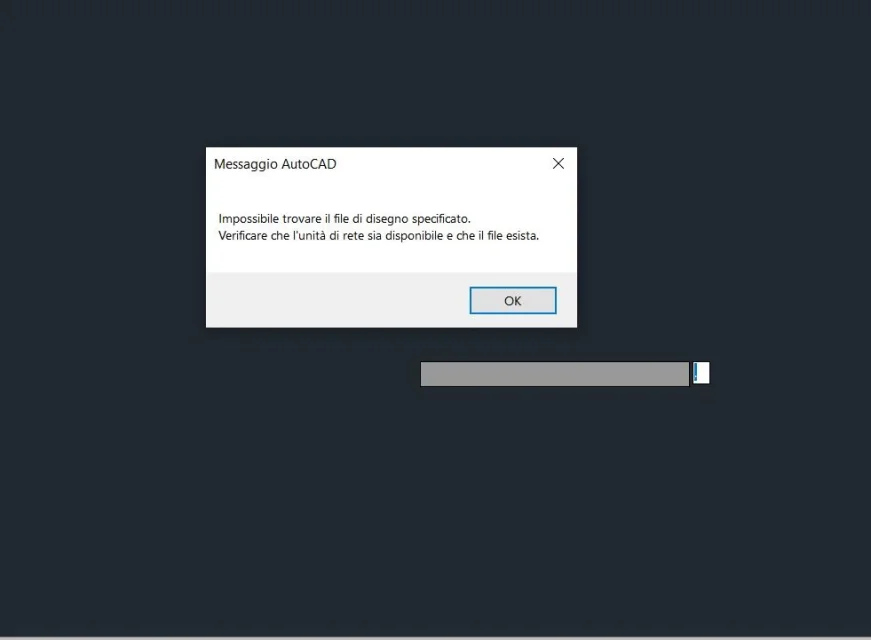
I tried to change the macro to read also .stp files.img 2.webp I can show them, but then when I launch the script, the message comes outimg.webpI have .stp files that I just have to convert to .dwg. at the moment I don't have to do anything more if I don't care about them in autocad and save them. can you change the script so that it manages the opening of .stp files and the subsequent saving in .dwg without having to open autocad every time?

I do not know anything about programming. . .
 
can you change the script so that it manages the opening of .stp files and the subsequent saving in .dwg without having to open autocad every time?
without using the script what is the command sequence you use to import a step and save it?

I didn't understand what the macro was about...
 
ciao @massivonweizen , thank you for the answer.

without script:
  • apro autocad
  • click on "Start design"
  • import --> other formats --> I choose the extension .stp
  • select the .stp file to open --> click on open
  • click on the bottom right when the cartoon with the path of the selected file
  • once uploaded the file click on save with name with .dwg extension
I went to shake the macro because the excel file createsfilescript only select files with .dwg extension, I have to open .stp files. so I went to change in the macro the only two places where the .dwg and .dxf extension appeared.

I know nothing about programming. . 😥
 
the script is nothing but the command sequence that fits into the command bar, so once the step presses f2 and you will appear the command historian executed. These are the ones you need to insert into the excel file.
big way, with all the limits of my imagination, will be:
Open the door
new
acad.dwg
care
type
Step
address file
sending
save

then I will tell you that if you write in a search engine it strings:autocade script import stepa world comes out.
 

Attachments

  • Immagine.webp
    Immagine.webp
    68.8 KB · Views: 3
update
with this edit I can open the file in .stp format MOD 1.webpNow I want to be able to save him with the right name.

at the moment saves me as _close.dwg with this sequence of commands MOD 2.webpI keep studying. . .
 
at the moment saves me as _close.dwg with this sequence of commands
obvious because after _qsave the file name is required then the next row corresponds to the name; If you want it to be equal to the step you can use excel functions to recover it entirely or partially from the corresponding cell. after use _close, even if I recommend you also insert the purge and zoom extension commands to optimize the file
always try to repeat the commands by placing them one by one in autocad to see how they behave
 
Good afternoon to all.
I solved the problem I had for the assignment of the file name with a string.estrai in excel.
I can't understand and use the purge command recommended by @massivonweizen I don't know what it's for, but the zoom command works well. I also added a display change.
the sequence of commands I use is:
_import
file
_Zoom
_
_vscurrent
_shaded
_qsave
= stringa.estrai (...;...;...)
_close
But now I have another question. converted the first file of the list of files I had in the excel sheet, the operation stops. How do I automatically reiterate it for all the files I entered in the first column of the excel sheet?

Hi.
 
to know what the purge command serves is sufficient a network search; eliminates from the design everything that is not used: layers, blocks, line types... .
not having files to upload directly you can not automatically create a list of drawings to process, you must copy n to vote the sequence of commands and then export it to the scr file
 

Forum statistics

Threads
44,997
Messages
339,767
Members
4
Latest member
ibt

Members online

No members online now.
Back
Top