• This forum is the machine-generated translation of www.cad3d.it/forum1 - the Italian design community. Several terms are not translated correctly.

main axes of view 2d

  • Thread starter Thread starter Adahm
  • Start date Start date

Adahm

Guest
1 - red notesis it possible to set inventor so that when I project a view from the .ipt file, you always draw me the axes of the view on which to rest to make quotations, instead of always having to draw them in all views with the axes commands?2 - notes of green colouris it possible to set inventor so that the axes of the holes are always projected?
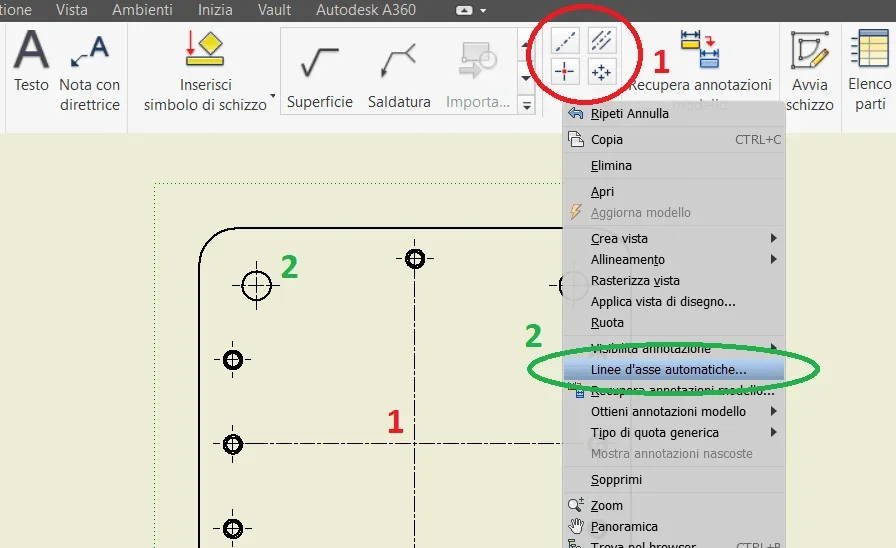
Assi.webp
 
Thanks zac69!

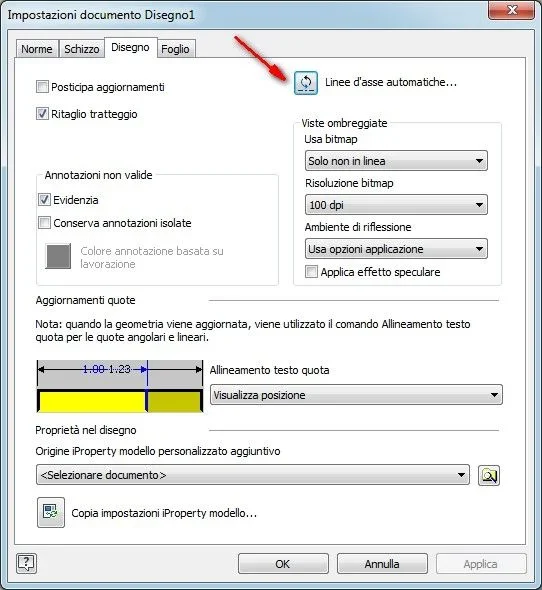
I had already set this option, but it stores only the elements to be proposed when selecting for each view or for the selected views, the axes to be projected.
does not already project the axes when I project the views.
Am I wrong?

Besides, can you tell me if you can project the axes of the view (as asked in point 1)?
 
Bye. that I know, that's the only option available. I don't think it's possible. I'm sorry.
 
with this ilogic rule activates all the boards of the whole table in a single barrel.
Code:
dim osheets as sheets
dim osheet as sheet
dim oviews as drawingviews
dim oview as drawingview

'capture the current active sheet
dim ocurrentnumber  as sheet
ocurrentnumber  = thisdoc.document.activesheet

osheets = thisdoc.document.sheets
for each osheet in osheets
    osheet.activate
    oviews = osheet.drawingviews
    for each oview in oviews
        'get centerlines
        oview.setautomatedcenterlinesettings()
    next
next

'activate the original current sheet
ocurrentnumber.activate
for the first voice I can not help you
 
thanks reb, it works!
Do you know if you can project the axes of the view as well as the axes of the elements?

the axes of the sight would serve me because doing many drawings very similar to each other and the quotations start right from the axes of the sight. each drawing is never created from scratch, but obtained from other similar and much of the quotas could remain unchanged if I could lean on the axes of the view that do not change between pattern and pattern.
If they change, the drawings become pink, of course, and with them they become vulnerable the quotas supported above.
 
Alternatively, could lines be projected from geometries designed in 3d?
in 3d it would be easier to create relationships for the correct positioning of the same.
 
Yes, you can create geometries and show them in the views, but in my opinion you would be less able to copy the solid and derive it, you would take much less time, especially with vault
 
How can I create geometries that allow me to project on a view of the axes?
I don't understand.
Could you explain me better?
thanks reb
 
If I have well understood you start from a drawing to create similar ones, through vault there is the possibility to copy everything keeping the table connected to the new solid, modify the solid and here is that you update the table.

If you create "basic" surfaces, you can see them at the table or better yet, you tire everything to the origin 0 of the boards!
 
thanks reb,

In fact vault is one of the things I want to deepen because I never used it.
I installed client and server licenses, but I have to start. If I need, can I ask you lumen?
for the moment I copy the files, I rename them and reconnect them through the command "replace model reference" in the "management" tab.
while the derivative parts reconnect through code.
It works, of course, I think with vault it's all easier.

for the surfaces, if I create two vertical faces so that I project the lines of the axes, then I find them in the secondary views, which I might possibly hide.
You mean that?
 
for the surfaces, if I create two vertical faces so that I project the lines of the axes, then I find them in the secondary views, which I might possibly hide.
You mean that?
Yes, I meant that.

ask, here are people much more prepared than me, so go to the wedding!
 
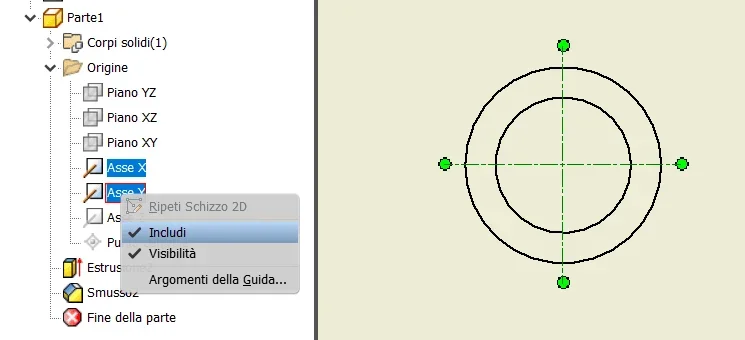
If anyone can care, I found this solution.
in the browser you can see the view with information of the projected 3d.
if you browse the part and look for the origins there are plans and reference axes of model 3d.
by right-clicking on "include" the axes appear on the design view on which the odds can be supported.
 

Attachments

  • Assi vista.webp
    Assi vista.webp
    18.5 KB · Views: 5

Forum statistics

Threads
44,997
Messages
339,767
Members
4
Latest member
ibt

Members online

No members online now.
Back
Top