• This forum is the machine-generated translation of www.cad3d.it/forum1 - the Italian design community. Several terms are not translated correctly.

management base

  • Thread starter Thread starter brn
  • Start date Start date

brn

Guest
good evening I wanted to know if it was possible to export the separate base in excel so that the excel sheet remains connected to the table for example by adding or removing components to the axieme or by changing the properties to the parts.
I would need to be able to draw up an orderly list to separate components, for example, available to trade pieces to be made to numerical control or carpentry inside or the pieces to be sent to subcontract.
I imagine that at each piece I have to add a specific property to be inserted in the columns of the distinct materials and this is possible using a table of the standard ones or you have to create an ex-novo?

already that we are someone has advice to give me on managing the distinct with solidworks? (Let us say that the advice or opinions of those who are more experienced are always welcome)
 
I wanted to know if it was possible to export the separate base in excel so that the excel sheet remains connected to the table for example by adding or removing components to the axieme or by changing the properties to the parts.
the exported excel sheet does not maintain any connection with the source file.
I would need to be able to draw up an orderly list to separate components, for example, available to trade pieces to be made to numerical control or carpentry inside or the pieces to be sent to subcontract.
just, as you have guessed, enter a property that indicates the type. then you can order the table by order, even more than one property, and wanting, detach the column from the distinct and bring it out cartilage so that it is not printed
mmagino that at each piece I have to add a specific property to be inserted in the columns of the distinct materials and this is possible using a table of the standard ones or you have to create an ex-novo?
that you make it new or leave from one already done anyway in the end you will have to save it otherwise it must repeat the procedures every time
Does anyone have any advice to give me on managing the distinct ones with solidworks?
It is a pointless question if not formulated with requests for precise clarifications. However, it begins to read the threads in which we talk about distinct and blur your doubts
 
this question has been asked a myriad of times and the answer is always the same: excel does not communicate with solidworks for the distinct.
if you do everything in the pdm you can do something that works, i.e. set all the appropriate modules for a quick extraction of the distinct in excel.
 
I understand the pdm will be installed shortly so I will expose the doubt directly to the super expert who comes to help, but at least the thing is feasible.
but would it be possible, for example, to have the sum of the lengths of a given structural element?
For example, I would need to know the total length of all 40x40x2 and 60x40x2 cans so as to adjust for orders without being in a handle to sum all lengths in the various cutting distinte
 
but would it be possible, for example, to have the sum of the lengths of a given structural element?
For example, I would need to know the total length of all 40x40x2 and 60x40x2 cans so as to adjust for orders without being in a handle to sum all lengths in the various cutting distinte
freshly inserted mode in 2016. see voice welding in whatsnew (menu ? > · > > > > > > > > > > > > > > > > > > > > > > > > > > > > > > > > > > > > > > > > > > > > > > > > > > > > > > > > > > > > > > > > > > > > > > > > > > > > > > > > > > > > > > > > > > > > > > > > > > > > > > > > > > > > > > > > > > > > > > > > > > > > > > )
 
depends a lot on how you implement things and who implements it how good it is. Surely your dealer will give you a hand.
 
hello to all; I join this debate because I have a question;
use solidworks 2017 in company without pdm (sw nude :-) )
I am not experienced and I wanted to know if it is possible to export the distinct base of a set (of a machinery, in this case) having multiple levels.
through the material tables you can have the complete list of parts, but do not display subaxes in the various levels.
I would have the need to export to excel... How can I do that?
Thank you! !
 
Thank you Massivon!
I apologize, but I did not cry; I have already read and read the guide; I also searched here on the forum and did not find how to do it.
I need to see the distinct explosion of a set of 4 levels (with many below axioms).
I have to see for each group, of which details is composed and in what quantity.
I have tried in every way, but I do not export what I need:-(
this I have to do because in the management the separate basics must be inserted manually;
wishing to avoid printing all the drawings (for details in triple or quadruple copy, being in common on multiple assemblies), I wanted to provide a table excel summary.
I don't know if I explained:-(
Now I tried with the tabellina of together, with re-entry, shows all configurations (here I was wrong), not to change numbers of the element.
should be like this, correct me?
Thank you. .
 
hello to all; I managed to create the distinction that interests me;
But it happens that in the sw table, the "sheet" lines appear: what is it due to?
 
ok but why does the line display with the sheet, making the separate table base?

Where is she?
 
a bhé you only know how you did that distinct and with what options. therefore answering is almost impossible (almost because the answer would be fruit of deductions)
 
a bhé you only know how you did that distinct and with what options. therefore answering is almost impossible (almost because the answer would be fruit of deductions)
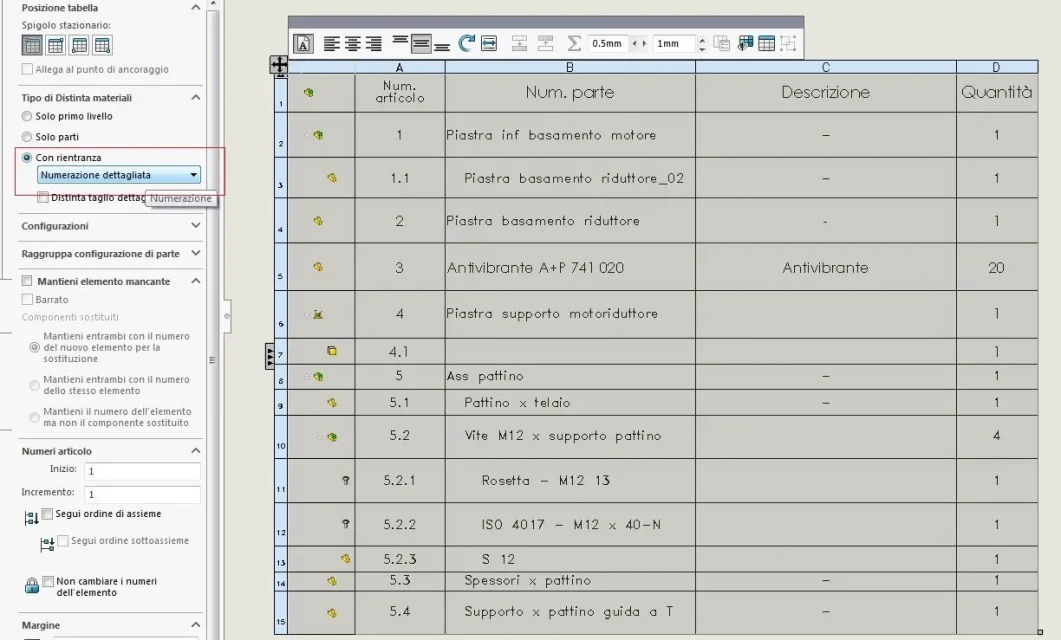
with default sw2017 settings
table distinct materials
with return
detailed numbering
configurations: default

Thank you! !
 
the distinct materials with re-entry makes see also the distinct cut. So if you have a sheet, it fits them. to overcome the problem solutions are
eliminate the lines of the hand distinct
eliminate the cut distinction from the side
exclude the components from the cut of the part
 
OK I try;
I take advantage of it to ask you also:
How do you delete the "new sketch... in part..." from the feature manager? Is there any check in the options?
then for today... Just... Thanks again for patience:-)
 
bhé a request thrown there without specifying:
if it refers to part, together or drawing
where you find this voice
if the wording is correct (memory I don't remember any description, notice, command that you carry dots of suspension) maybe making a search on the guide or on the internet impossible
that maneuver is made to have this

It makes me fall the bales for the pressapochism of demands as if you were just here for the pleasure of getting fucked up. Let's get settled! ! !
 
if it refers to part, together or drawing
we talked about together
where you find this voice
as written in the feature manager, at the bottom, after the list parts and the list "couplings"
hanging dots carry
the suspension dots were the names of the various parts that have sketches defined in the axieme;
different lines appear (and in old versions did not happen):
update sketch2 in namepart1
updates sketch1 in namepart2
etc.
search on the internet, I am able to do it to myself; I would not have asked the question.
It makes me fall the bales for the pressapochism of demands as if you were just here for the pleasure of getting fucked up. Let's get settled! ! !
no one teases and no less wants to be pressapochistic; it was a simple question; if you are exhausted, take a good dose of valium, keyboard lion.
education first of all. the regulated tries to give it to you;
If you don't want to answer, simply ignore the posts. senior users should give the example: Congratulations.
 

Forum statistics

Threads
44,997
Messages
339,767
Members
4
Latest member
ibt

Members online

No members online now.
Back
Top