
• This forum is the machine-generated translation of www.cad3d.it/forum1 - the Italian design community. Several terms are not translated correctly.

memory mancante

  • Thread starter Thread starter uluwatu_74
  • Start date Start date

uluwatu_74

Guest
I'll ask you a pig question! :rolleyes:
Can you tell me why this writing shows up?
I've been seeing myself lately. ..passing from a wireframe view to shading...and not even for the whole design...but also for details as in the attached image.
thanks to those who answer.
aloha
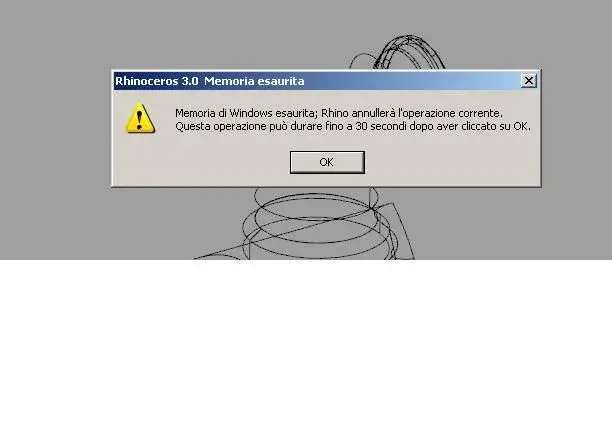
 
here is the image...and the software...as you can read in the error message... is rhino 3.
 

Attachments

  • errore rhino.webp
    errore rhino.webp
    13.9 KB · Views: 16
It happened to me too, I had a "corrupt" surface, it was an offset of a cm of a very wide double curvature sup, it gave problems when I made the table, once I removed the offset I solved, I don't know if it is so for you, try to make checks.
 
Thank you for the answer!
I... noticed that it's happening to me on a hull with all imported surfaces... and so with "series" issues!
but could there still be something abnormal in the setup of my computer?
Hi.
 
Thank you for the answer!
I... noticed that it's happening to me on a hull with all imported surfaces... and so with "series" issues!
but could there still be something abnormal in the setup of my computer?
Hi.
I don't think so.
It happened to me too because of an evil trimmed surface, when rhino calculated the mesh to view the shade view .. he put a life and then gave me memory error.
found the surface that gave problems and put the trim all fixed
 
Okay....I've arranged all the "porcaio" of the surfaces! and I would say that this indication is fundamental to the future! :finger:
Now... another problem: the file is about 85 mega and I have to make some renders!!!! ! !
All right! I get nailed regularly! ! ! ! ! ! ! ! !
I have a precision with 4 mega memory and a 256 picture...and I get to cry if you tell me it's not up to it!!!! :redface:
the error message that from is "flamingo is out of memory".
What do I do? :smile: I go to buy a new washing machine?
I looked into the parameters to be changed and increased a voice that indicated the memory used under "general options". from 512 kb I brought it to 3000 (value so at home) and it closed completely the program!
I don't want to have to abdicate and spend all the work at the studio sink working with v-ray! :biggrin:
thanks again for the further answers.
aloo
 
Now... another problem: the file is about 85 mega and I have to make some renders!!!! ! !
All right! I get nailed regularly! ! ! ! ! ! ! ! !
I have a precision with 4 mega memory and a 256 picture...and I get to cry if you tell me it's not up to it!!!! :redface:
the error message that from is "flamingo is out of memory".
What do I do? :smile: I go to buy a new washing machine?
I looked into the parameters to be changed and increased a voice that indicated the memory used under "general options". from 512 kb I brought it to 3000 (value so at home) and it closed completely the program!
I don't want to have to abdicate and spend all the work at the studio sink working with v-ray! :biggrin:
thanks again for the further answers.
aloo
I rarely make spindle renderings and I don't use flamingos anymore from a piece, so I go to memory.

when all the objects came to their final version, I create the mesh of all the objects in the file and save them in a separate file.
So I have an exact copy of the project, where I have no more surfaces but mesh.
these mesh inherit texture mapping from the surfaces, so no problem to attach materials or decals.

The advantage is that flamingo no longer has to calculate them from the surfaces, because it already finds them ready, and also I do not have the memory occupation of the surfaces, which gives me more ram for the rendering operation.

test and then sappici say:smile:
 
pppppppppppppppporca lazozza!!! ! !
As I'm not a "renderist" :tongue: I always wondered when the hell they could serve mesh!
but you opened the world now!!!!!!!!!!!!! :biggrin:
I go to check:finger:
Thank you.
... but I say thank you... thank you very much! :smile:
Hi.
 
Your suggestion was correct! Good memory! :wink:
But I have another problem: once I meshato all the work...I launch the render... buy the progress window render... and then I let you go during the night; being the file of 100mega... it takes a lot!
the problem is that every morning I get up... and I find nothing!!!!! :frown:
I find it closed and I don't know why... since there are no strange error messages!
which can depend on this time?
 
flamino goes out of memory because it went to use over 1.3/1.4 gb. probably still happens and for this it closes without giving any message. change program to render. . For example with hypershot I have rendered 3dm files from over 250 mb and the result is well higher than what you could do with flamingo. and to make the meshatura he thinks us smoothly.
 
I took a look at the site...and no hypershot for rhino3!
hypershot is not a rhinoceros plug-in (as far as there is one that allows you to apply the materials directly in rhino but it does not work well) but it is a separate program that natively opens the 3dm files.
 

Forum statistics

Threads
44,997
Messages
339,767
Members
4
Latest member
ibt

Members online

No members online now.
Back
Top