
• This forum is the machine-generated translation of www.cad3d.it/forum1 - the Italian design community. Several terms are not translated correctly.

menu rapidi

  • Thread starter Thread starter melotto_silvio
  • Start date Start date

melotto_silvio

Guest
Hello everyone,
I've been very well with the quick menus coming out by pressing the dx button, so I'm customizing them well. in the editing (which appears with a selected object) I appear to be functions that I would like to remove useless xes but I cannot identify them in the customization screen; are: "open in content editor" - "save as new content..." - "edit in content editor"
Can you tell me how to remove them?
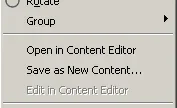
op.webpthanks for the courteous attention
Hello everyone
 
menu tools>personality> interface (or command _cui) go under the tab Quick choice menu and in the subchambers there is one called menù di default. I don't know.
otherwise select tab for tab by deleting them from where they are placed
 
Hi.
thank you for the glow, but I do not find cmq what I look for, it is already for a while that I leave and change such menus but those commands in particular I do not find them right; I'm sorry if I ask you, but... did you check and find the commands so much discussed? Or did you go to memory? Please give us an eye because I don't come out
 
Hi.
I saw your pdf, but as I had predicted, in the default menu there are no functions I would like to delete:
- "open in content editor" - "save as new content..." - "edit in content editor" as from image above; and I can't figure out where it takes them. in any case the default menu comes out when pressing the dx button without any selection, while my case is where, with at least one selected object, press the dx button. I discarded all the menus but I didn't find those commands anywhere, they don't even appear in the autocad command list.
 

Forum statistics

Threads
44,997
Messages
339,767
Members
4
Latest member
ibt

Members online

No members online now.
Back
Top