
• This forum is the machine-generated translation of www.cad3d.it/forum1 - the Italian design community. Several terms are not translated correctly.

minuteries from content center of not display ipro

  • Thread starter Thread starter Giancesa
  • Start date Start date

Giancesa

Guest
I have to store a series of screws, washers etc. in the company archive to make 3d available when they serve for our products. to do this I opened the minuteries I needed from the contained center and I saved by name so as to re-name the files and give the company codes wanted in the ipro number part and number warehouse. However, it happens that in the list phase parts in the axieme are not seen. all minuteries in a set appear under the same component posiz. even if they are different, and on the table, in which I inserted the columns of "number part" and "number warehouse" include *value*. I'm doing something wrong?
 
you probably have the number part and the identical warehouse number on all created parts.
 
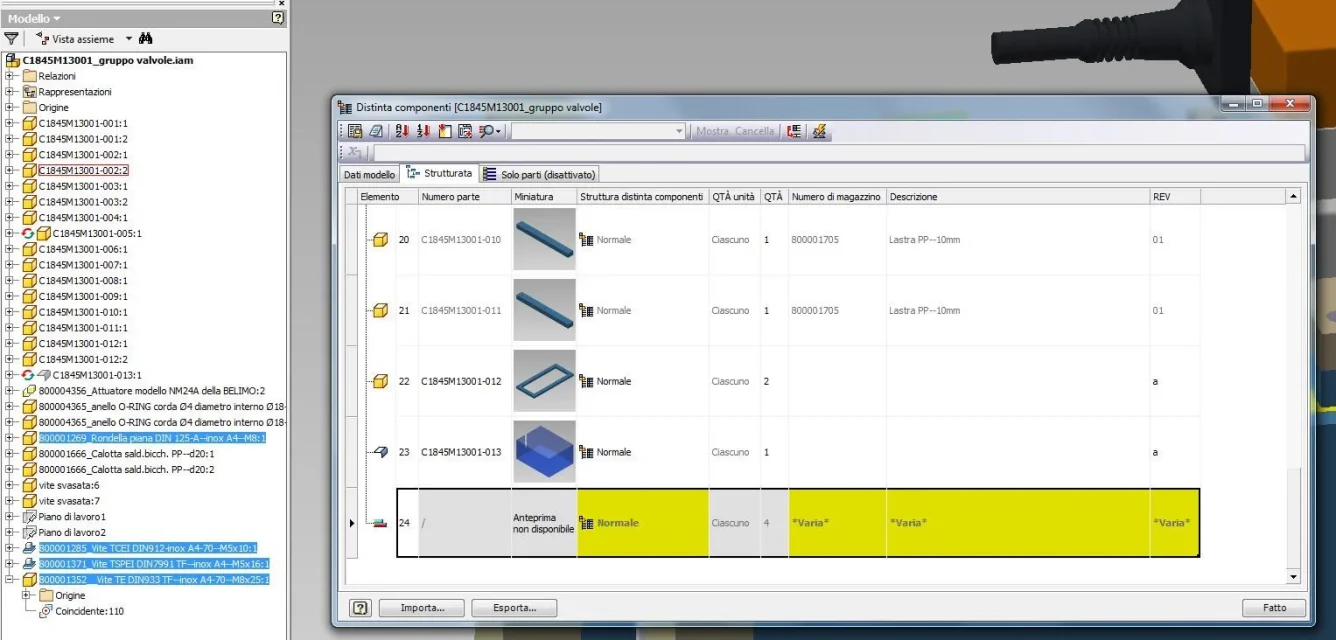
I checked, they're all different. I enclose image of what you see in the separate axieme. It's highlighted in yellow by inventor himself, I don't know why. I also tried to create a vine as a derived part, to see if anything changes, but nothing.minuterie.webp
 
the symbol of the column "element" on the left, of the line of your component (the one with the two superimposed rectangles blue and red), means that different parts, with identical number part were joined in the calculation of quantity.
the parts in yellow means that for several pieces with the same "number part", in your case, have the "different structure", number of warehouse", description" and "revision" different.
I can also say that all parts in question have the value of the "number part" set as a "/" symbol.

Check well.
 
try to attach two or three screws.
What do you use?

Okay, I see that the journal has already hit the problem.
 
the symbol of the column "element" on the left, of the line of your component (the one with the two superimposed rectangles blue and red), means that different parts, with identical number part were joined in the calculation of quantity.
the parts in yellow means that for several pieces with the same "number part", in your case, have the "different structure", number of warehouse", description" and "revision" different.
I can also say that all parts in question have the value of the "number part" set as a "/" symbol.

Check well.
You're right. I had put a bar "/" at each number part of each minute, because it appeared in the table that there were no drawings. What a chicken I am! Thank you very much.
 

Forum statistics

Threads
44,997
Messages
339,767
Members
4
Latest member
ibt

Members online

No members online now.
Back
Top