
• This forum is the machine-generated translation of www.cad3d.it/forum1 - the Italian design community. Several terms are not translated correctly.

missing half autocad design

  • Thread starter Thread starter camilla72
  • Start date Start date

camilla72

Guest
Help! !
I closed a line, and at the reopening there were less than half of the things I had done! !

when I open the file appears: this file is a trusteddwg last saved by an autodesk application or autodesk licensed application

and the beauty that in the preview you see all the objects.

Has anyone ever happened?? or just the only vent? ?
 
try to verify that all layers are turned on, not frozen and zoom extension, maybe something just moved into the model space in other coordinates.
if this is not successful, try to rename the file "-nomefile-.bak" with "-newname-.dwg" and then restore the previous save.
if you have not yet found what you need search in the auto save file ".ac$" in c:\users\user\appdata\local\temp. rename it with dwg you should be able to recover something.
If you haven't recovered what you needed, if you don't have a backup somewhere, I think you have to remake how lost.. .
 
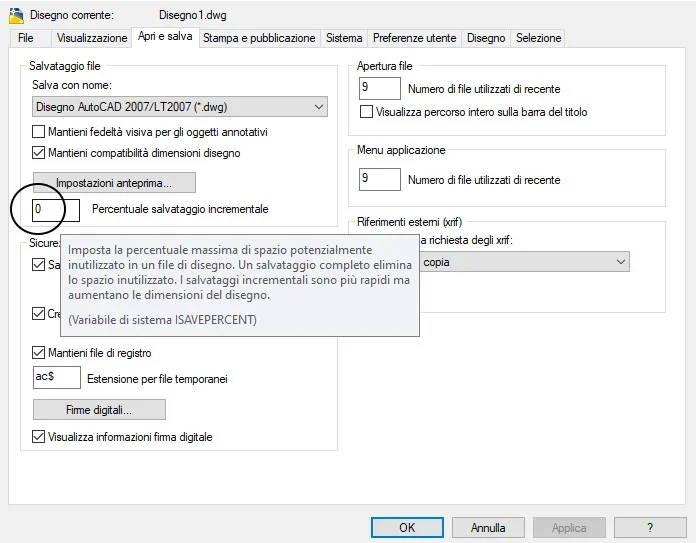
I use incremental rescue (it is in options) with value 0.
the default value 50 means that the design is saved only partially (only in the different parts compared to the previous save), so in case of "disastro" it becomes more difficult than the ac files[dollaro] o sv[dollaro], contain the complete design.
the (poco) time lost for full rescue, is widely repaid to the first "crash" of the pc!
 

Attachments

  • Salvataggio_Incrementale.webp
    Salvataggio_Incrementale.webp
    37.5 KB · Views: 5
I personally prefer to always do the good old "save" from time to time. I don't trust these automatic saves too much.
See if this page is about the message can be useful
trusterdwg

I translated the page in Italian and it seemed to me to understand that autocad from however the possibility to open the file, but ' must first appear a window whose opening seems to be regulated by a variable called dwgcheck.
I don't know, but it's an attempt you can do.
I literally carry:
trusteddwg is a key function of autocad and autocad lt that analyzes dwg files while they are opened. the function checks whether the dwg file was last saved with an autodesk product or an authorized software developer to use the realdwg toolkit. If the file does not exceed trusteddwg analysis, it will inform you in various ways that the dwg file may not be compatible, nor will it ensure its integrity if used with autocad or autocad lt. then, let's take a look at how to get the most from this main advantage.

how autocad or autocad lt alerts you

the visibility of these alerts is controlled by the dwgcheck system variable. dwgcheck is a full variable and is saved in the register, not in each drawing. by default, dwgcheck is set to 1. 8 different states are available which can be set up and which determine the type of alert displayed or not. We will examine the alerts you will see in the default setting of 1.

first, when opening a dwg file saved the last time by a non-autodesk product, the following dialog box will be displayed:
AutoCAD TrustedDWG
you'll have the option to open the file or delete it. if you choose to select the option "Always open dwg files", it will not change the dwgcheck setting, but it will simply hide this dialog box. you can change this setting (or any hidden message) through the Settings tab in the Options dialog box.
 
check that there are no bad sectors in your disk.

go to "prompt of commands" and open it with administrator privileges.
(menu start on the bottom left and type "command prompt" choose "execute as administrator"
in the prompt window (all black) type chkdsk and wait for it to end. a report will eventually show if there are data recorded in bad sectors.
It's difficult, but it's not impossible that parts of the drawing file have been stored in sectors that then have been damaged.
 
However it is always nice to see how different users (often new members) who ask for a hand, then participate in the open discussion giving us feedback to the options that we have committed to writing for them!!
Please, you're welcome. cordiality first of all! ! !
 
..... generally it is users who open a discussion and intitle it by paying particular attention to the fact that the title can be useful to others: "help help" or "urgent!"
 

Forum statistics

Threads
44,997
Messages
339,767
Members
4
Latest member
ibt

Members online

No members online now.
Back
Top