• This forum is the machine-generated translation of www.cad3d.it/forum1 - the Italian design community. Several terms are not translated correctly.

model gone!

  • Thread starter Thread starter mauriba
  • Start date Start date

mauriba

Guest
Good morning to all,
I have a problem, in my design I was doing an extrusion and finished extrusion the model seems to be gone, i.e. there are all the functions and if I step on it with the mouse arrow you see the edges but the model no, and even there are no views in transparency or anything, not even with the sky I can see the model...what I could do to solve the problem.
Thank you.
 
I apologize, problem solved, I had planned the program I believe because in rebooting it is reappeared all at opening the file.. .
Thanks again
 
I apologize, problem solved, I had planned the program I believe because in rebooting it is reappeared all at opening the file.. .
Thanks again
Are you sure you're not working with a non-certified graphics card or video driver?
 
or that you didn't hide the solid body?
but when you hide the solid body you shouldn't see the edges highlighted when you pat on it with your mouse.
and then that it has settled with the reboot of swx or pc makes me think about the video card. if the body was hidden is not that you reactivate its display every time you open swx.
 
but when you hide the solid body you shouldn't see the edges highlighted when you pat on it with your mouse.
and then that it has settled with the reboot of swx or pc makes me think about the video card. if the body was hidden is not that you reactivate its display every time you open swx.
Frankly, I don't remember. Maybe you see them when you select it in the body folder. Sometimes I happen to hide bodies unintentionally with the popup menu, that's why I was doubtful.
It doesn't seem like a vga defect to me, at least if it happens once.
If it were the vga should always do it and it would be impossible to work there 2 minutes.
But I'm daring, I have the crystal ball with the low battery and I can't consult it right now.:smile:
 
but what kind of programs do you use? harry potter's?
to the next release date provided the magic wand!
ha ha ha ha ha ha ha ha ha ha ha ha ha ha ha ha ha ha ha ha ha ha ha ha ha ha ha ha ha ha ha
 
for me is the classic card problem not certified.
you can solve by enabling the use of opengl libraries via software.
 
for me is the classic card problem not certified.
you can solve by enabling the use of opengl libraries via software.
all this thread has become a purely academic discussion. "mauriba" eclipsed in comet style, having solved the problem (or believing that it solved:smile:).
of course it is well looked at by giving indications on the hardware it uses: echecazzo! is never that someone with the same problem on similar hardware can benefit from his case and from what is written true? :cool:
 
all this thread has become a purely academic discussion. "mauriba" eclipsed in comet style, having solved the problem (or believing that it solved:smile:).
of course it is well looked at by giving indications on the hardware it uses: echecazzo! is never that someone with the same problem on similar hardware can benefit from his case and from what is written true? :cool:
I'm sure the problem is what you're supposed to do and I'm reproposed.
I also knew that the model disappeared, then between opengl's ability and then with realview activation through tool, I solved the problem.
 
I resume this discussion even if old.. .
to me is happening about the same thing, but in different mode. to me happens in rendering (use pv360): at first test I saw the model, then I changed settings and relaunched and disappeared the object...my video card is a nvidia geforce gtx 550 you
 
I resume this discussion even if old.. .
to me is happening about the same thing, but in different mode. to me happens in rendering (use pv360): at first test I saw the model, then I changed settings and relaunched and disappeared the object...my video card is a nvidia geforce gtx 550 you
Sorry I'm late.. .

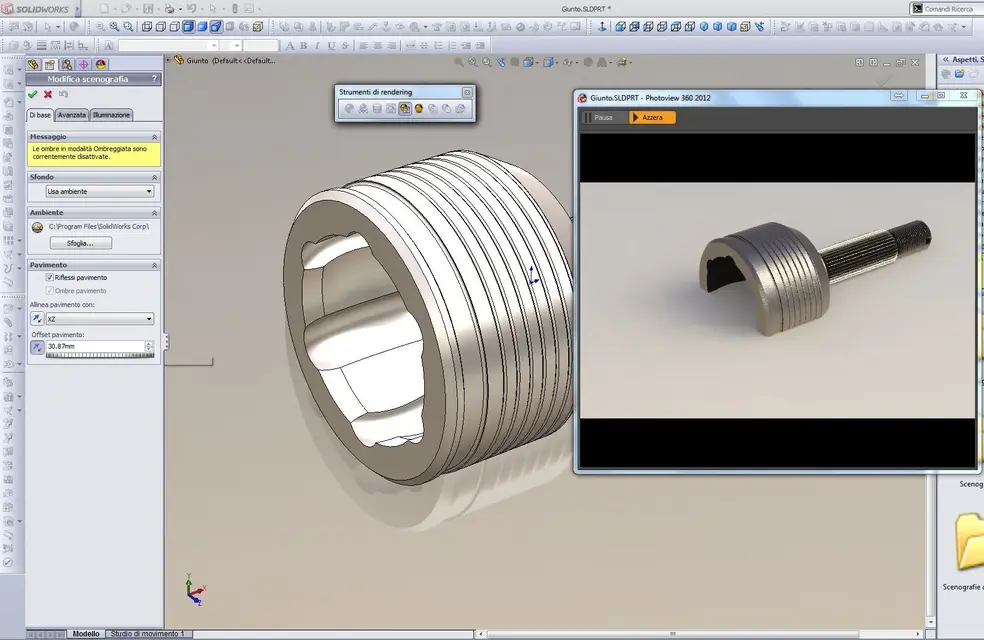
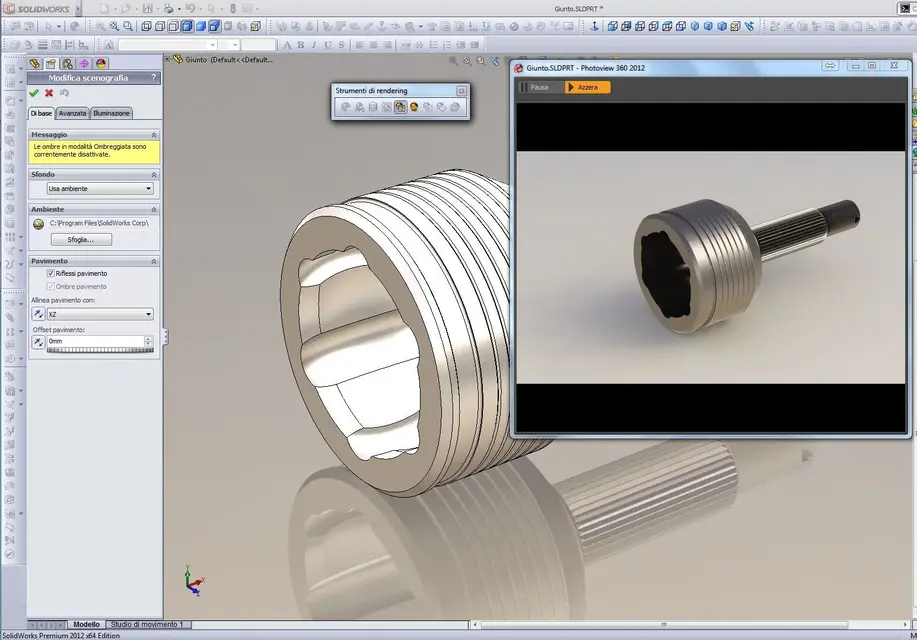
check that the floor is under the object and not above.. .
I'm suggesting this because you mentioned the stage change.
 
I was doing simple tests with default settings, like "soft box" or "goccia studio". Isn't the floor automatic?

Thank you. .
 
Unfortunately for copyright reasons I cannot post the file.
But I did some tests. I tried to do some evidence with another observant and also part of the incriminated axieme and everything works perfectly. ..magari being a set (about 25 parts) sw makes a bit confused about where to place the "floor"...if imposed as a scene "reflective chess floor" I see faded the silhouette of my object. . .
 
Unfortunately for copyright reasons I cannot post the file.
But I did some tests. I tried to do some evidence with another observant and also part of the incriminated axieme and everything works perfectly. ..magari being a set (about 25 parts) sw makes a bit confused about where to place the "floor"...if imposed as a scene "reflective chess floor" I see faded the silhouette of my object. . .
to control the floor, look at the attached pictures.
 

Attachments

  • pavbas.webp
    pavbas.webp
    135.2 KB · Views: 19
  • pavok.webp
    pavok.webp
    129.2 KB · Views: 15
I finally had a moment to try and... you were right: I had the floor above the model. you can change your location and angle to the "scenographic display" menu.

I take advantage to ask you some info-parre on pv360:
to be able to make images for advertising purposes (almost close to photorealism) how suitable this render engine is? how much control there is for those fundamental factors to get photorealism (or almost), such as texture mapping, advanced lighting management, material behavior etc.
When I worked with rhinoceros (I speak to the past...) I exported to blender and rendered with yafaray with satisfactory results, do you know this render engine?

Thank you, simone
 

Forum statistics

Threads
44,997
Messages
339,767
Members
4
Latest member
ibt

Members online

No members online now.
Back
Top