
• This forum is the machine-generated translation of www.cad3d.it/forum1 - the Italian design community. Several terms are not translated correctly.

mold creation (boolean diff. failed)

  • Thread starter Thread starter R76
  • Start date Start date

R76

Guest
Hi.
use rhinoceros for less than 2 months, I read a lot, but I can't solve the following problem.
I am trying to create a mold, I attach the file and describe in short the various steps.

1) I created the object I need without too much trouble
2) I made the division line between the two parts of the mold
3) I used extruded strip curve to extend the division line and filled the belt center with a patch
4) I created a cylinder (the mold)
5) I cut in two the cylinder with the surface-ship

Now it's all about subtracting the solid from the two parts of the cylinder, but I can't, it always gives me a failed boolean difference.
the problem I think comes from the way I cut the cylinder.

Am I wrong? What is the correct procedure?
Hello and thank you
roberto


edit
by exploding the surfaces and going to eliminate the ones that do not serve, I can get the mold in negative, but if there is a better procedure well come.. .
 

Attachments

Hi.

edit
by exploding the surfaces and going to eliminate the ones that do not serve, I can get the mold in negative, but if there is a better procedure well come.. .
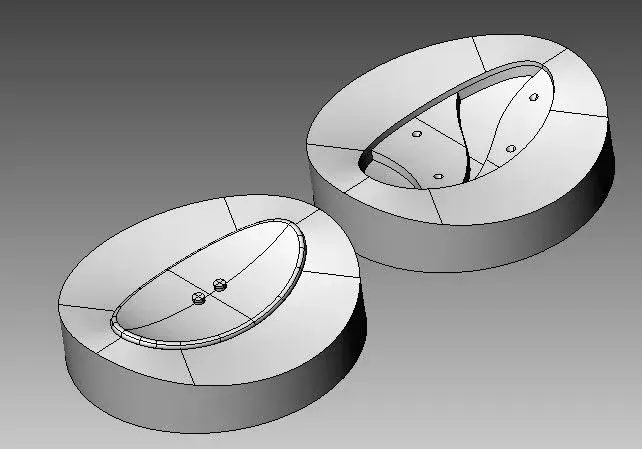
Rhino is not a solid modeler, his kernel, so in boolean can in some cases fail.
Your object is a closed polysurface and therefore a solid.

you only made 2 mistakes:

1) You have given the command group to your object, which probably gives problems to the Boolean.

2) you built the patch surface with too bright parameters, I remade it with tighter parameters see attached image.

3) when boolean between 2 objects fail I always use the difference command (as in this case ) because it uses a different algorithm to achieve.

in the attached file you will find both the objects on which you can do your tests, and the result obtained with the difference command.

I always follow another road, which is more natural for a surface modeler, and maybe it's the same one that you eventually followed.
 

Attachments

  • stampo.webp
    stampo.webp
    25.9 KB · Views: 15
  • OVALE_1_1.zip
    OVALE_1_1.zip
    345.6 KB · Views: 6
  • stampo-1.webp
    stampo-1.webp
    21.6 KB · Views: 15
thank you so much for the tips, I adjusted everything according to your directions and I solved other problems on other files too. :
Hi.
 
Mr Mariuss.r, you can better explain paragraph 3, because I am not very clear about the procedure.
I often use the Boolean difference and most often manages. In some cases however, I must proceed "hand", step by step cutting the parts, joining them and then using the command creates solid. I don't understand if it's the same procedure you follow, or if by "difference" you mean something else.

Thank you.
Hi.
 
I don't understand if it's the same procedure you follow, or if by "difference" you mean something else.

Thank you.
Hi.
Hello, young man.

I mean the command. <differenza> in solid menu (cmd English _difference)
then even if that fails I make the separation of the surfaces 'to manina':biggrin:</differenza>
 
Hello, young man.

I mean the command. <differenza> in solid menu (cmd English _difference)
then even if that fails I make the separation of the surfaces 'to manina':biggrin:</differenza>
hello mariuss, in the meantime thank you for the clarification.
I had never considered that the down controls could be different from those of the bars, to icon. I, as far as possible, use icons, except some that I find more easily from drop down curtains (I have a predominantly visual memory).
The problems with the Booleans happen to me almost always in collecting edges. I hope the next news and improvements are in this direction.

Bye.
Thursday
 

Forum statistics

Threads
44,997
Messages
339,767
Members
4
Latest member
ibt

Members online

No members online now.
Back
Top