
• This forum is the machine-generated translation of www.cad3d.it/forum1 - the Italian design community. Several terms are not translated correctly.

mold with feature pocket

  • Thread starter Thread starter Davide La Rosa
  • Start date Start date

Davide La Rosa

Guest
Good morning, everyone, they're at first with catiav5.
Does anyone know how to stamp a part with a code or description with the feature pocket on a cylindrical surface with constant depth?
I only once managed, see image.STAMPIGLIATURA.webpI did it by doing the following:
- created tangent plane to the diameter.
- created the text to be moulded into the drafting environment and saved as dwg
- uploaded the file in dwg format
- copied the text to die
- created sketch on the tangent plane to the diameter, pasting the text to be crumbled
- click on feature pocket setting it as the image below
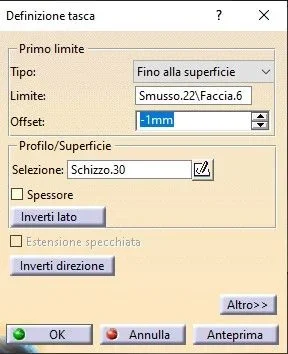
TASCA.webpthen I did it again for another part only that I get the following error:ERRORE.webpCan anyone help me?
 
could depend on a problem of the sketch, a point left or curve not closed: try to control it

or the target surface is too enveloping: try it on a surface with less curvature and see if it works.. .

if that's the problem, (and here I go to memory, you have to try) extract the surface (winding), then menu' insert shape developed development... from them you project the sketch on the extracted surface, then trimming you revenues the surfaces of the letters and numbers
create another solid where it gives the thickness to the surfaces, then remove it to the first with a boolean

Let me know.
 
You can point me through the passage:
if that's the problem, (and here I go to memory, you have to try) extract the surface (winding), then menu' insert shape developed development... from them you project the sketch on the extracted surface, then trimming you revenues the surfaces of the letters and numbers
create another solid where it gives the thickness to the surfaces, then remove it to the first with a boolean.

I never used the shape environment.
Thank you.
 
really is already step by step, only the hyphens are missing

extract the surface (winding),
then menu - insert - shape developed - development.

figure to develop: I'll do it.
reference surface: that extracted

the sketch on the extracted surface, then cut the surfaces of the letters and numbers

create another solid where it gives the thickness to the surfaces, then remove it to the first with a boolean.

I have attached an example of the r21 guide

Let me know.
 

Attachments

try with this example.. ti allego catpart, ma è con versione 2017
 

Attachments

  • Immagine 2020-09-30 195052.webp
    Immagine 2020-09-30 195052.webp
    34.9 KB · Views: 7
  • Part2.zip
    Part2.zip
    395.3 KB · Views: 3
you should create a circular surface inside the round and extrude the writing to the surface
 
Hello victorious,

I can't open it (I have r21), if you want to send it to igs

Meanwhile try as mcbramby says
 
but gianni55... Where do you have the "development" command that I can't find?? ?
is there not that you have x which you have other packages (type sheet metal or freestyle) that activate the development command in gsd?? ? ?
 

Forum statistics

Threads
44,997
Messages
339,767
Members
4
Latest member
ibt

Members online

No members online now.
Back
Top