• This forum is the machine-generated translation of www.cad3d.it/forum1 - the Italian design community. Several terms are not translated correctly.

monometric asonometry

  • Thread starter Thread starter MrGioba
  • Start date Start date

MrGioba

Guest
I don't know if it's the right section for this, because what I have is not a usual, but a model "iron fil", but anyway. . .
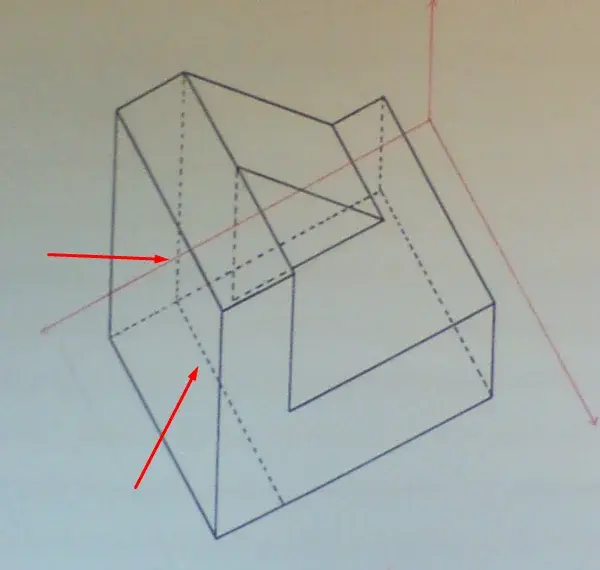
I wanted to make the isometric axemetry of this solid. . .
monometric I managed to do it simply by setting a so assonometric view but for the monometric I should set the axes 30 and 60 and I have no idea how to do it. . .
Is there any command?
I attach the cad file already in monometric and an image of the result I would like to have.
file cad in mono: View attachment PMEC_Normal_MONO.dwgresult in iso:xtm0.webpOf course, thank you all.
 
Last edited by a moderator:
If you use the search function, this topic has already been dealt with, it is resolved using a lisp
if you find the discussion you will also find the lisp;)
 
I have already used the search button but the discussions are of 3d models in assonometry... I have an iron fil pattern I just have to rotate the axes
 
I would also just understand that angles set for the monometric here:
 

Attachments

  • cAQDDN9.webp
    cAQDDN9.webp
    14.7 KB · Views: 15
Last edited by a moderator:
hello mrgioba, check the hidden lines well, are not right.

enigma
Strange, the design teacher checked it out. I had some doubts about these but the prof made me add them. . .


Well but then monometric assonometers with autocad can't be done?
 

Attachments

  • vm3y.webp
    vm3y.webp
    16.8 KB · Views: 16
Last edited by a moderator:
change prof., the indicated lines are not there and in compensation one is missing.
It seems easy, but we settle... to the scientific with 2 hours a week you can not expect much... .

for the acenometry with autocad instead?
 
an autocad carrier identifies with a length and direction.
you can easily draw by indicating the lengths and the desired angle (concerning relative to a point) writing (for example) 100<30 (a 100-line long line tilted by 30° (anti-clock rotation).
I don't think you need anything else.
Bye.
 
you can draw it in 2d, but you can't rotate a solid to have that acenometry, in reality there is no, it is a purely graphic solution, if you roar the object until you have the basic straights at 90 degrees you have a plant! Just try. Then I don't know if there's a lisp to do it automatically.
 
download does not work, I gave up, it seems impossible.... thank you very much anyway to all
 
Öanna96, ... good evening, hello, hola, konbanwa.... from your side is not used to say hello when writing the first post?
It is also good to present yourself as you are entering a community and not at the rhonal market behind home.
Finally, but not less important, when you made the request you climb thank, not for the answers you will receive, but for the attention of those who will read you.

education this unknown.
 
Maybe you shouldn't override me.
I'm sorry I didn't say goodbye, show up or thank you in advance. I was working and I saw this post of 2014 and posted that question in hope that someone could help me.
However, I am a student of construction architecture at the last year of masters and I was looking for information about asscav but for mac. at the moment I uploaded it to the windows partition but I would rather work on ios.
 
but if you're a student, wouldn't it be better if you learned how to do acenometry with classical instruments? and when you learn them correctly use the lisp to speed up work?
otherwise when you really have to do an acenometry and you will be without lisp as you will?
which then is a method to quickly represent an idea on a sheet in the yard, in the workshop, to the colleague who asks for explanations, to take notes. If you do not see how the three-dimensional object is done you cannot represent it. the lisp in this does not help you
 

Forum statistics

Threads
44,997
Messages
339,767
Members
4
Latest member
ibt

Members online

No members online now.
Back
Top