• This forum is the machine-generated translation of www.cad3d.it/forum1 - the Italian design community. Several terms are not translated correctly.

motion study + video recording

  • Thread starter Thread starter reggio
  • Start date Start date

reggio

Guest
Hi, come back!

I would like to show you the difficulties I encounter with a simple study of movement and first on those I have encountered in the use of:
view/screen/video capture

In practice I see that on 4 video compressors, the 1st we auto do not recommend (generates corrupt files) the 2nd and 3rd are equal, the 4th creates huge files, and all show nothing but the assembling, leaving the commands, the pointer, the alerts, ....
question: do you use that? If so, would you explain how to set it up?

Okay, by going to the real problem, I'm going to train you a video of the handmade movement. [youtube]b58[/youtube]and another video (made with camstudio)[youtube]jmofjffarya[/youtube]that shows my attempts to run a simple 2 block movement study bound to 2 closed tracks and how swx interpreters in his way to do.. .

To begin with, I would just understand how to make a simple "track"
then, understood that I would like to add more groups to step and turn them together,
Finally launch a rendered film.... and then... and then... The Moon:

I also attach files hoping for "free trials" and solutions :tongue:
 

Attachments

I'm sorry I can't help you here, but I'll stay tuned to learn a field
for me hostical and almost unknown.
 
I'm sorry I can't help you here, but I'll stay tuned to learn a field
for me hostical and almost unknown.
ah, are you pulling this round? :biggrin: thanks equallythen we hope that other friends will help me! ! !ps: per cronca: he spun his come fare l'ho prisoner Here and there it seemed very simple... :frown:
 
Hello, Reggio,

Since you do not use swx 2011, which with active motion module gives you the possibility to set a motor with motion along a curve, I recommend you follow the following procedure (with simplified model):

1) creates a central point line at the center of the bearing door face that goes into contact with the guide. extract a sketch along the guide, which will represent your path.

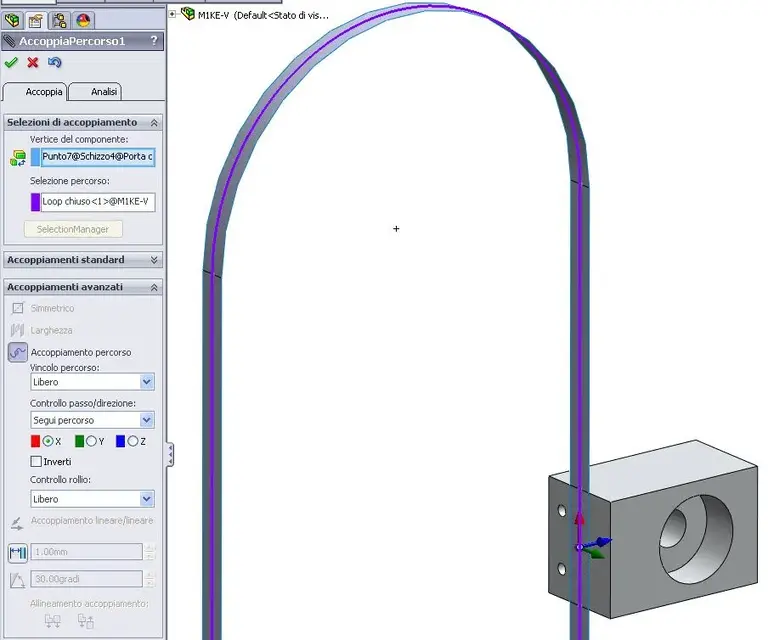
2) use advanced coupling "path coupling" to join the two parts.

3) define a parallel coupling between the front face of the bearing door (the one with housing) and the front plane.

4) enable the motion study window, set "basic motion" as a type of study and apply a linear motor to the upper or lower face of the bearing port and as direction the line we built previously on the contact face.

5) calculates... and experiences variants.


if it can help you, I also found this video:
http://www.youtube.com/watch?v=ucc50rlzbtq&feature=relatedavailable for more info.

Hi, swarzy.
 

Attachments

  • 1.webp
    1.webp
    14 KB · Views: 11
  • 2.webp
    2.webp
    42.3 KB · Views: 11
  • 3.webp
    3.webp
    41.5 KB · Views: 10
  • 4.webp
    4.webp
    60.4 KB · Views: 14
  • 5.webp
    5.webp
    59.4 KB · Views: 15
Hi, come back!

I would like to show you the difficulties I encounter with a simple study of movement and first on those I have encountered in the use of:
view/screen/video capture
missing a component in the zip.
 
missing a component in the zip.
Ooopss... missing "mile" ... again:redface:
... now I understand xkè swarzy has directly coupled the "sealing door". .
... seen that you do not use swx 2011, which with active motion module. . .
...I had not updated my profile yet, I actually now have swx2011 professional (not premium, so without motion...)
later in any case I try to follow your instructions:thanks x the video!! !
 

Attachments

Ooopss... missing "mile" ... again:redface:
... now I understand xkè swarzy has directly coupled the "sealing door". .


...I had not updated my profile yet, I actually now have swx2011 professional (not premium, so without motion...)
later in any case I try to follow your instructions:thanks x the video!! !
I can't, I'll do more tests, doing it at steps, varying the percentage along the path.
or I try to convert the asola into a spline.
with the motion module performs it without problems.
 
...
if it can help you, I also found this video:
http://www.youtube.com/watch?v=ucc50rlzbtq&feature=relatedavailable for more info.

Hi, swarzy.
Hello swarzy,

...I'm disappointed at most by swx... I did some evidence... (2 annexes) and the result (to say in the most elegant, serene and quiet way) is "no turnkey" :frown:
I hope to be able to understand that I was wrong, even if at the moment I do not really know where to guarada again, at the bottom it is a movement s e m p l i c i s s i m or
I also tried to repeat the exercise of yt.. always without results... :frown:

Would you like to help me? and first of all, did you manage or did you not try it all the way?

Sob sob... soon:
 

Attachments

Hello, Reggio,

Of course I tried how much I reported as "procedura".

However I can tell you that I also had many problems representing that bike with the module "basic movement". Moreover it is very sensitive, it is enough to change even one frame the resolution that animation no longer works.

Attached the study I created.... you will be enough to play.


Let me know, swarzy.
 

Attachments

Attached the study I created.... you will be enough to play.
Let me know, swarzy.
Thank you, thank you.
but at me only once, if I repeat a second time, or if I change even a distance, sometimes it "trap" and I did not understand why...:( ...and you?
Thank you, we've seen it in an old post... the problem is that they manage to him, but no one escapes to me... :
(Here in fact I asked tea if you managed to make it work)

in this post Here , "moved" then Here I was trying to figure out how to jump out, I found some examples/conferences I was trying (e.g. This is) ...after I want to try again and film so I keep you updated ok?

Afterwards!
 
ciao reggio,

but at me only once, if I repeat a second time, or if I change even a distance, sometimes it "trap" and I did not understand why...:( ...and you?
as I mentioned you last time, I just need to change one frame the resolution that no longer works animation. It's very unstable.
in this post here, "moved" then here I was trying to figure out how to jump out, I found some examples/conferences I was trying (e.g. this) ...after I want to try again and film so I keep you updated ok?
looking at the last film (the cube on patches), I tried to make animation without using the linear motor, stabilizing and driving correctly the support along the path through a second driving curve.
look well attached, sketches and constraints.
This solution seems to me much more performing than the first. :finger:

Let me know, swarzy.
 

Attachments

Hello, Reggio,
as I mentioned you last time, I just need to change one frame the resolution that no longer works animation. It's very unstable.
I've already seen, even though I've never used the engine, even in your example... (the motor always goes straight and never curves... :( )
looking at the last film (the cube on patches), I tried to make animation without using the linear motor, stabilizing and driving correctly the support along the path through a second driving curve.
look well attached, sketches and constraints.
This solution seems to me much more performing than the first. :finger:
Definitely! ! !

oooookkkkk, seems to start turning from the right direction:d

...andhm this was the first test... not too happy... :frown:
[youtube]suffix 4[/youtube]but then I also applied a second guide, I managed (finally) to turn the slider without unexpected jumps/shoulders/rotations. . .

.... I put the video as soon as yt me charge it completely. . .
but how beautiful but what a pleasure : during the evening at home I try to apply it to my m1ke :4406:
 
.... I put the video as soon as yt me charge it completely. . .
Here is the video with the other guide path.
nb: It seems that sketch guides in the part or sketch guides directly in the axieme do not change the result.[youtube]rv30ehpf6ok[/youtube]... now I want to try to apply it to my m1ke (in the evening I was too tired... )
I will have to change the couplings from "camma" to "path coupling". . .

after:
 
...:frown: ... help please ... help ... risk losing mental health...:36_1_14:

when I seemed to have reached the beginning of the correct road... I regret it without hope.. .

I was successful, I did not know how to turn my initial project into part, only that the sliders hiccupped... I then tried to verify if there were no couplings of too much or other.. .

... since then I'm no longer able to reassemble cabbage pieces.. It seems to me that the distances and measures are correct, and yet at the last coupling I miss everything... :

Would you like to "correct my exercise"?
 

Attachments

...:frown: ... help please ... help ... risk losing mental health...:36_1_14:

when I seemed to have reached the beginning of the correct road... I regret it without hope.. .

I was successful, I did not know how to turn my initial project into part, only that the sliders hiccupped... I then tried to verify if there were no couplings of too much or other.. .

... since then I'm no longer able to reassemble cabbage pieces.. It seems to me that the distances and measures are correct, and yet at the last coupling I miss everything... :
Would you like to "correct my exercise"?
ok, I send you via pm the data for the transfer....:biggrin:

I modified the disassembly of the elbow block (and some coupling) that worked in a way
a little strange, in practice never went in push/traction.
I'll get you the file. :smile:
I hope that's what you're looking for... to do.

check the path couplings... The trick is there.
[youtube]vcg7lizohzc[/youtube]
 

Attachments

Hello, Reggio,

thanks to the model revised by mike, did you manage to make this video/animation? ? ?

Let us know!

Hello, swarzy
 
I modified the deletion of the elbow block
bad!!! so it can't work as I mean.
must turn automatically and not by hand (even in your if I apply "advanced coupling/acc path/long distance perc or % perc" gives error, not because but gives error.. . )
OK, I'll send you via pm the data for the transfer.. .
...not yet! ..for this I have given order to reject the payment :biggrin:
I hope that's what you're looking for... to do.
*...uhmm as usual, I'm guessing to solve in 4 and 4=8... and I only explain in part the project ... only after I remember that I have solidpork (solid: never appellative fù more wrong... solid???? solid stage.. ? ? ).

So it's the case that you better explain what I want to do and then start from scratch trying to deal with a problem at a time... and who loves me, follow me:
in the trad/video/tutorial that will follow, we will go to realize a mechanism that allows a series of palettes to move along a closed ring trajectory, always keeping its orientation unchanged (thanks to the mechanism and not thanks to the couplings), this means that an object rested above the shovel will never fall, even when the shovel reaches the point where the trajectory becomes circular and then returns back.the principle of the mechanism is based on the same length/development of the trajectories (which forces the bearing sliders to remain always flanked with the holes on the same plane), on their staggering (recovered by the identical staggering of the elbow) and on the equal movement speed of the bearing sliders).final purpose: a video presentation of the movement will therefore be necessary to rotate the palettes along the trajectory automatically (distance coupling, %, with motor or other, but not by hand).
to make the exercise accessible to all must be performed with commands available in the base version (not with motion module but with motion study).
I'm going to work now. .
 
quote:
originally written by mike1967 I modified the deletion of the elbow blockbad!!! so it can not work as I mean*
must turn automatically and not by hand (even in your if I apply "advanced coupling/acc path/long distance perc or % perc" gives error, not because but gives error.. . )

quote:
originally written by mike1967 OK, I'll send you via pm the data for the transfer.. ....not yet! ..for this I have given order to reject the payment

quote:
originally written by mike1967 I hope that's what you're looking for... to do.*...uhmm as usual, I'm guessing to solve in 4 and 4=8... and I only explain in part the project ... only after I remember that I have solidpork (solid: never appellative fù more wrong... solid???? solid stage.. ? ? ).

So it's the case that you better explain what I want to do and then start from scratch trying to deal with a problem at a time... and who loves me, follow me
in the trad/video/tutorial that will follow, we will go to realize a mechanism that allows a series of palettes to move along a closed ring trajectory, always keeping its orientation unchanged (thanks to the mechanism and not thanks to the couplings), this means that an object rested above the shovel will never fall, even when the shovel reaches the point where the trajectory becomes circular and then returns back.the principle of the mechanism is based on the same length/development of the trajectories (which forces the bearing sliders to remain always flanked with the holes on the same plane), on their staggering (recovered by the identical staggering of the elbow) and on the equal movement speed of the bearing sliders).final purpose: a video presentation of the movement will therefore be necessary to rotate the palettes along the trajectory automatically (distance coupling, %, with motor or other, but not by hand).to make the exercise accessible to all must be performed with commands available in the base version (not with motion module but with motion study).I'm going to work now. .
Look, I don't want to put myself behind learning the study movement because in my work for the moment I don't need... And then I have enough gaboles to look at. . but returning to your problem, I think you're wrong to apply the linear motor, if you put it in the elbow block (which I have reported to the original quota..) should work. . At least, I think so.
I am not practical of motion... I don't know anything, but look at it.
My little video...
Monday I will give assignment to the legal office to collect the transfer...:biggrin:
I'll put the file.
Then maybe I didn't understand anything you have to do, if it were so... forgive me... Because I don't know what I do... :biggrin:
[youtube]pciaasrojj4[/youtube]
 

Attachments

Hello, Reggio,
I'm sorry if I answer only now, but I have to finish some projects for the fair and so I have no time to devote to the forum.
I uploaded your set and noticed that the couple you used create problems.
having the motion I put the engine with path and after a short straight stroke it stops saying that there are couplings that create conflicts.
from there, I spulced your matings and there are problems of circularity and other things of various kinds.
you can't place the second path a bit compared to the other and some objects that will have to follow the two paths.
use the path coupling and not the cam.
avoids mating 'width' on such cases. Why?
because it must always be in the middle of changing the position of objects.
the advice is always the same, couple as it would happen to the assembly.
a linear sequence.
add how you discovered a second guide to avoid that during the manual movement the mouse pointer puts the point behind, in front of the other.
suspending all motion manages to calculate the movement.
I attach the video to make you understand that there is something wrong with your matings.
 

Attachments

Forum statistics

Threads
44,997
Messages
339,767
Members
4
Latest member
ibt

Members online

No members online now.
Back
Top