• This forum is the machine-generated translation of www.cad3d.it/forum1 - the Italian design community. Several terms are not translated correctly.

move to layer

  • Thread starter Thread starter Fabal
  • Start date Start date

Fabal

Guest
Good morning.I would work with nx7.5 to move a series of faces (imported) using the color filter, but not select the faces.
with the edit object dysplay button I can select them .
Thank you.
 
Good morning.I would work with nx7.5 to move a series of faces (imported) using the color filter, but not select the faces.
with the edit object dysplay button I can select them .
Thank you.
with this edit object dysplay command you can also move them into the desired layer, in fact just put the layer number in the casellina at the top right of the command.:finger:
 
thanks . I tried but does not move faces to the new layer
If the faces are joined together, in one solid, or sheet, you cannot move them to another layer.
or move the whole element or nothing.

to have single faces on another layer, first you have to extract them (extract body) and then put them on another layer with the edit object dysplay-
 
Hello. They are separate faces. when I put the color filter no longer select the boby sheets
 
hello fabal, use as a filter "general selection filters" next to the drop-down menus of filters. choose "color filter" and you will appear the color table: in "selected color" use "inherit from object", select one of the faces that have the same color (and you want to move on another layer) and then from the ok. at this point if in the working space you make a window that includes all the entities present he will select only those of the color you selected!
Hi.
 
Hey, that's what I do, but then you don't select the faces. I also tried to change the color, we hung up but then as soon as I put the filter to move the faces I can not select anything.
 
Hey, that's what I do, but then you don't select the faces. I also tried to change the color, we hung up but then as soon as I put the filter to move the faces I can not select anything.
once it happened to me... try to do "reset filters", make sure that "type filter" is on "no selection filter" and then try again... I'm sure that the layers on which you put these faces are selectable and not only visibil?
 
most likely you have set (or directly imported) face color, other than sheet color.
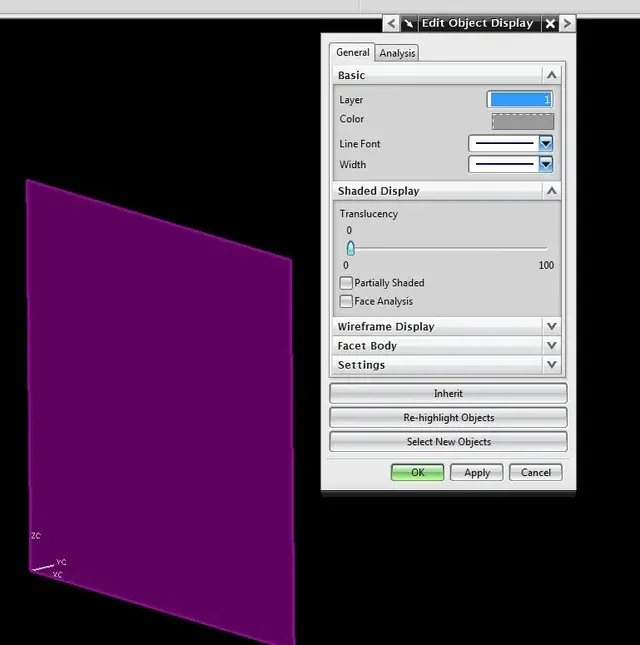
Did you check what you indicated beppino? try to force the color faces and that of the sheet on the same value, selecting "apply to all etc." in the "settings" mask of the "edit object display".
 
the problem is that in nx (and in nug before), there is a subtle difference between face and surface (a surface has two faces).
in image 2 see the surface of the image 1 selected and the color box is grey (empty to say that the color is not unique, in fact the face is orange while the surface is of another color that you do not see).
to select then you have to apply the filter twice and that is first by color and then set the face filter (images 3 and 4).
so it should work (at least I hope :biggrin:)
Hi.
 

Attachments

  • f1.webp
    f1.webp
    5.1 KB · Views: 7
  • f2.webp
    f2.webp
    21.6 KB · Views: 8
  • f3.webp
    f3.webp
    40.9 KB · Views: 10
  • f4.webp
    f4.webp
    30.4 KB · Views: 11
Hello, everyone. the problem is that different colors are just avideo. looking in the information I realize that remains the original color that I imported so do not hesitate to use the filter.thanks
 
Hello, everyone. the problem is that different colors are just avideo. looking in the information I realize that remains the original color that I imported so do not hesitate to use the filter.thanks
We crossed with the post. Look at your last one.

Hi.
 
the problem is that in nx (and in nug before), there is a subtle difference between face and surface (a surface has two faces).
in image 2 see the surface of the image 1 selected and the color box is grey (empty to say that the color is not unique, in fact the face is orange while the surface is of another color that you do not see).
to select then you have to apply the filter twice and that is first by color and then set the face filter (images 3 and 4).
so it should work (at least I hope :biggrin:)
Hi.
Maybe there are!!!! in my post a long time ago I proposed a procedure that unfortunately did not work.
the workaround that perhaps solves the problem is to use the command of synchronuos modeling 'group face'. In this way you 'tag' faces that nx sees as body sheet. Try and then tell me.
Hi.
 

Forum statistics

Threads
44,997
Messages
339,767
Members
4
Latest member
ibt

Members online

No members online now.
ciao
Back
Top