tartufon80
Guest
Good morning, everyone!
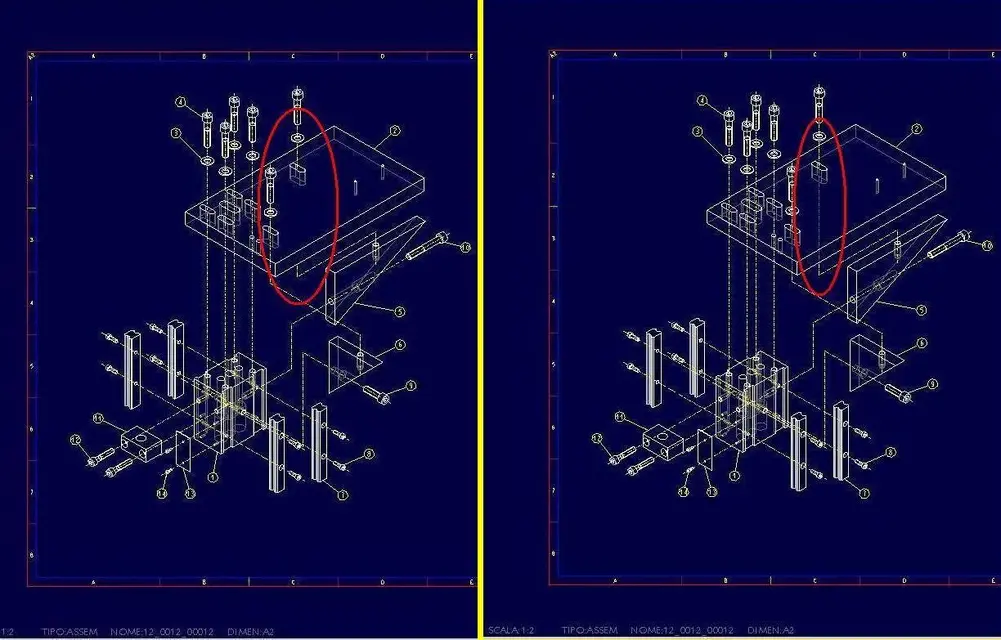
in the attached image is represented the explosion of a set.
in 3d I created the offset lines according to my needs.
I noticed that when a offset line is behind a component it is hidden, like another 3d entity.
However, following the menu displays -> drawing display -> component display, you cannot select it to put it in the status "hidden lines".
to solve the problem I proceeded in the opposite way: I brought all the view in "hidden" mode, and then I reported in "no hidden" mode all the components I didn't care about.
use wf3.
do you know if there is another way, more "immediate", to do what I have described, or is it the only possible solution?
I also tried to create a layer, managed by a rule, where all offset lines go to finish, but I still couldn't find a valid road.
Thank you!
in the attached image is represented the explosion of a set.
in 3d I created the offset lines according to my needs.
I noticed that when a offset line is behind a component it is hidden, like another 3d entity.
However, following the menu displays -> drawing display -> component display, you cannot select it to put it in the status "hidden lines".
to solve the problem I proceeded in the opposite way: I brought all the view in "hidden" mode, and then I reported in "no hidden" mode all the components I didn't care about.
use wf3.
do you know if there is another way, more "immediate", to do what I have described, or is it the only possible solution?
I also tried to create a layer, managed by a rule, where all offset lines go to finish, but I still couldn't find a valid road.
Thank you!