
• This forum is the machine-generated translation of www.cad3d.it/forum1 - the Italian design community. Several terms are not translated correctly.

moving project in new pc

  • Thread starter Thread starter brckhmptn
  • Start date Start date

brckhmptn

Guest
good evening, some time ago I moved a project that I had on the old pc (now malfunctioning, of which I subsequently released) on the new. being a rookie with design software in general since I've tried so far, I didn't remember that I would then have problems opening various .ipt files, .iam etc... in fact most files are not opened due to unresolved references. Are they in a position to solve the problem? I read about the pack and go function but I don't understand if it's exactly the one for my situation. Thank you for your patience.
 
Hi.
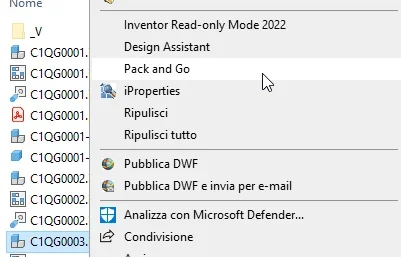
from explore win resources, select the .iam file (assieme) you want to copy.1675973489055.webpSelect pack and gowhere then decide the destination folder and other options.
at the bottom, you can search for files connected to 3d models (explosive example and 2d tables)1675973646507.webpThis creates a folder containing your project/assieme + all the linked files.
will also create the project file (.ipj) that "bind" everything. by double-clicking on the project file, it will start inventor by activating the project of the destination folder, and then you will have no problem reopening (in the new folder) the project to.
 

Forum statistics

Threads
44,997
Messages
339,767
Members
4
Latest member
ibt

Members online

No members online now.
ciao
Back
Top