• This forum is the machine-generated translation of www.cad3d.it/forum1 - the Italian design community. Several terms are not translated correctly.

multiline command - lines on multiple layers

  • Thread starter Thread starter dave87
  • Start date Start date

dave87

Guest
Hello, everyone.
I would like to create multi-line styles.

I would like to make the side/front views of steel beams. In particular, I need the hidden lines to vade in a certain layer, while those in sight in another.

is it possible, or can you specify only 1 type of layer common to all lines?

I was thinking that instead of specifying "from layer" I could specify "from block".
Is it possible?
 
apart from that front and side does not mean anything. for how I interpret the front and side view do not need hidden lines.
you don't understand your problem:
i need hidden lines to vade in a certain layer
Have you created the layer of hidden lines? If yes, just select it and then draw the multiline. If not you create the layer hidden lines.
and same for the other layer
is possible, or you can specify only 1 type of layer common to all lines
for each entity you can specify only one layer. multilinea is an entity so you can't split it into multiple layers.
I was thinking that instead of specifying "from layer" I could specify "from block".
Nothing changes. as specified by the name works with the blocks

Maybe it's better if you take a serious autocad course
 
for each entity you can specify only one layer. multilinea is an entity so you can't split it into multiple layers.
I correct myself, with styleml command, which I did not know, you can set a style that makes different lines of color and format lines. However, you cannot assign specific layers.

However I do not understand the usefulness of drawing in this way unless they are drawing beams all day, but also in that case there are better methods
 
Last edited:
apart from that front and side does not mean anything.
here is a front and side view of a typical double t beam:1.webp
I correct myself, with styleml command, which I did not know, you can set a style that makes different lines of color and format lines. you can not assign specific layers.
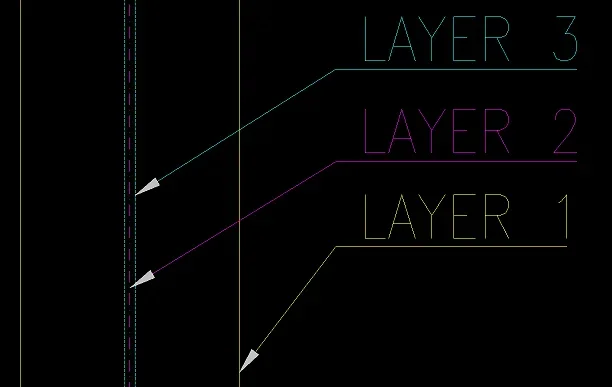
I thought it was so. I wanted to create a multiline style (which basically generates me a block) where the lines already went into the right layer, in this way.2.webpthe only thing I can do is, in the phase of definition of the multilinea style, give to the various lines already the color of the ctb and the right style (treated or continuous line or point-line).Am I right?
However I do not understand the usefulness of drawing in this way unless they are drawing beams all day, but also there are better methods
Like what?
 
In any case you will always have lines 5 odd lines and then the axis you have to draw it as normal line.
but really select multiline style, set the width of the multinea and track it is faster than making an axis and then offsets of this?
maybe you should create a dynamic block for side view and one for front view instead of doing all these multilinea steps
 
but really select multiline style, set the width of the multinea and track it is faster than making an axis and then offsets of this?
Well yes, it is faster like that.
or better, I created a multiline style database. just recall the name of the beam and he tracks me the relative profile.
maybe you should create a dynamic block for side view and one for front view instead of doing all these multilinea steps
You think? Can you tell me a guide to create dynamic blocks?
 

Forum statistics

Threads
44,997
Messages
339,767
Members
4
Latest member
ibt

Members online

No members online now.
Back
Top