
Vidal88
Guest
Hello.
I have a problem with autocad about moving and copying multiline texts: immediately after selecting the copy or move command, I click on the multiline text and while I am moving it to indicate the new location, the model space is confined in a rectangle on the top left and from that moment I can interact only in that tiny space and are therefore unable to continue working on the main space. accurate that I have the 2011 version but I also tried with older versions until 2008 but nothing happens the same thing, besides I tried the same file in another computer with the same version of autocad and the problem did not show up. I think at this point that the problem is on my computer but I just can't figure out what it might be. What do you think depends on?
p.s.: I attach an image where the problem is displayed. notice the confined model on the top left where you see the green solids of the drawing much smaller and the multiline text blocked during the move.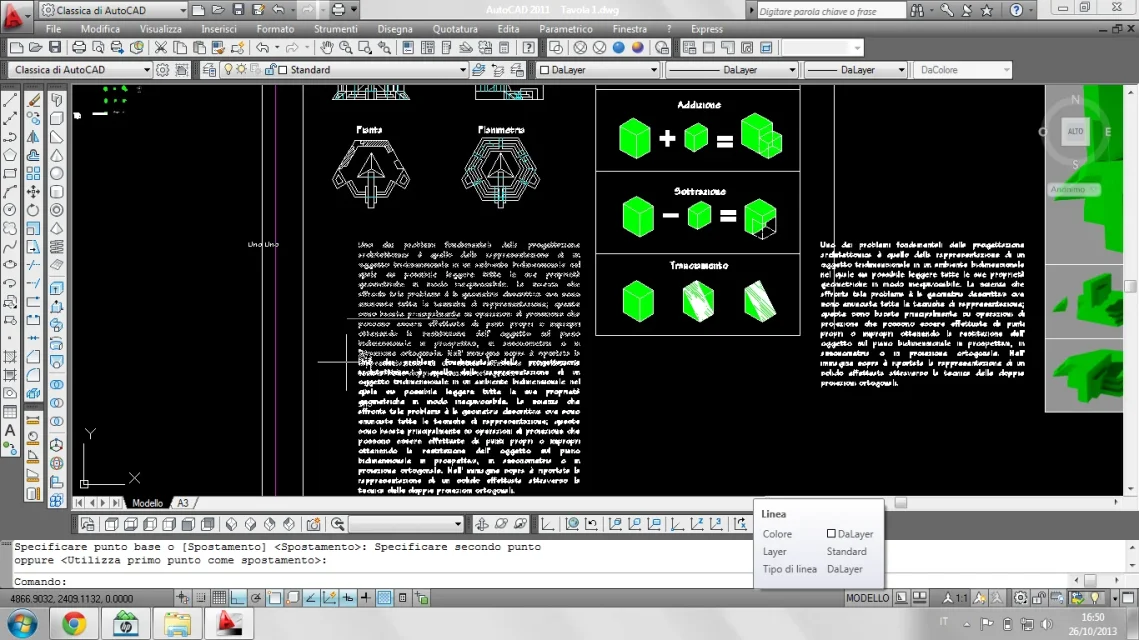 Thank you.
I have a problem with autocad about moving and copying multiline texts: immediately after selecting the copy or move command, I click on the multiline text and while I am moving it to indicate the new location, the model space is confined in a rectangle on the top left and from that moment I can interact only in that tiny space and are therefore unable to continue working on the main space. accurate that I have the 2011 version but I also tried with older versions until 2008 but nothing happens the same thing, besides I tried the same file in another computer with the same version of autocad and the problem did not show up. I think at this point that the problem is on my computer but I just can't figure out what it might be. What do you think depends on?
p.s.: I attach an image where the problem is displayed. notice the confined model on the top left where you see the green solids of the drawing much smaller and the multiline text blocked during the move.
Thank you.