
• This forum is the machine-generated translation of www.cad3d.it/forum1 - the Italian design community. Several terms are not translated correctly.

name distinct cut elements

  • Thread starter Thread starter tanticapelli
  • Start date Start date
I confirm what is suggested on the creation of multibody units, that is, that a body is exported per folder (on the export name I do not see solutions at the moment).
you have to pay attention to the flags (see image)
from the "saving" properties of the feature manager add a line that is called description but in the field then what do I write to us? because whatever I go to write I will find it identical in every line
but sorry, you enter a common value to all folders and then the progressive one by editing the folder? If so, you're wrong.
I thought you understood that the description should be compiled for each individual folder. ie I in welds insert the description item and the drawing value then go into the properties of the first folder of the cut distinction, I go into the property synthesis tab, place me on the description item and add the progressive on all folders (see picture)
 

Attachments

  • Cattura.webp
    Cattura.webp
    27.8 KB · Views: 6
  • Immagine.webp
    Immagine.webp
    35.3 KB · Views: 6
I confirm what is suggested on the creation of multibody units, that is, that a body is exported per folder (on the export name I do not see solutions at the moment).
you have to pay attention to the flags (see image)
ok I have tried to save the bodies together, I had already done it yesterday (putting the check from you indicated) but foolishly I did not realize that it would insert the same part several times already with the name that I want (if I give it to the body before saving the bodies), so then I can generate a distinct materials and easily export everything in step with the task planning. That's cool.
It is enough to hide or eliminate the climbers if I want to make a partial export maybe even excluding them from the cutting distinction so being reported from the property window I can easily fill the fields without confusing.
I thought you understood that the description should be compiled for each individual folder. ie I in welds insert the description item and the drawing value then go into the properties of the first folder of the cut distinction, I go into the property synthesis tab, place me on the description item and add the progressive on all folders (see picture)
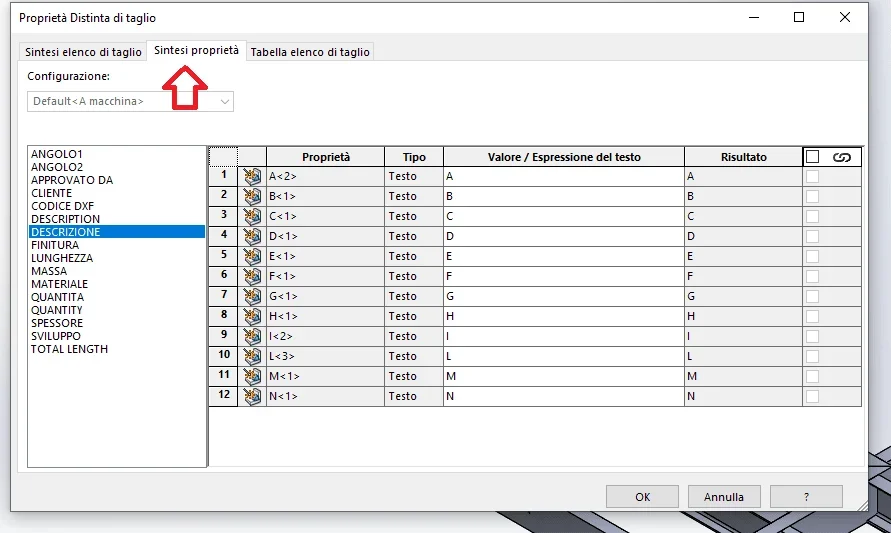
ok no, in fact I did not understand, at this point I will put by hand the names of the profiles, but it can be well, I gain time after in phase of rescue bodies.

Okay massive, I'd say we got to a great point! Thank you very much and good day!
 
Good morning.
I hope this is the right topic.

I would like to know if even to you with the option of rename the folders of the cut distinction automatically, in the part, adds the symbols <1>. then you see in column table name distinct cut element. I could delete them by renameing the column, but it wouldn't be automatic, but manual.

Does anyone know how to eliminate them please?

Thank you.
 

Forum statistics

Threads
44,997
Messages
339,767
Members
4
Latest member
ibt

Members online

No members online now.
Back
Top