• This forum is the machine-generated translation of www.cad3d.it/forum1 - the Italian design community. Several terms are not translated correctly.

new structural publication

  • Thread starter Thread starter Tarkus
  • Start date Start date

Tarkus

Guest
Hello everyone,:smile:
There's something I can't understand:
I posted a custom profile for fg; say a frame tube that I called "35x35x2"
in publishing it asked me the family name and I entered the name of the new family; we say "carbon steel square tubes"
It's okay.
now I want to publish another profile (e.g. 45x45x2) belonging to the same family.
I can't do that.
If I do the same publishing procedure, it tells me that the "family name is already in use" and it doesn't make me move on.
therefore there must be a different procedure to add a member to the same family,
What? :confused:
I couldn't find instructions on the guide....:frown:
 
maybe (and I say maybe, because I'm not experienced in this matter) the first time you have added structural part and made you create the family, for later publications you will have to do public part and choose the family created before.... I don't know however, maybe you have already tried
 
Yes, I have already tried, but the command tells you the same procedure as the initial publication, resulting in the same message : familiar already in use...
 
do not re-publish it, you should edit the family previously created and then add the new element 45x45x2
 
do not re-publish it, you should edit the family previously created and then add the new element 45x45x2
Uh, and how? :confused:
from the cc editor?
There is also there, under change, the public command, but it always makes me the same joke....
 
your tubular must set it with the "create structural form"
Immagine.webpso as to set the fields of choice of your shape as height, width, thickness and length. a flying set all you publish (1 time only). you edit the c.c., you look for the newly published part and you edit the family table by adding number x rows how many tubes you want to have (45x45x2, 35x35x2 etc..)
 
your tubular must set it with the "create structural form"

so as to set the fields of choice of your shape as height, width, thickness and length. a flying set all you publish (1 time only). you edit the c.c., you look for the newly published part and you edit the family table by adding number x rows how many tubes you want to have (45x45x2, 35x35x2 etc..)
ok, then add row/rows,publish each row with the values of the form I want to add.
so the fields of choice must necessarily reflect the parameters that serve to create the different forms of that family. . .
I try...
 
Okay, it works, in other words to add members to a family, you don't even need to make models, just add rows and change parameters.
thanks peppe.:finger:
 
In fact, made a couple of custom profiles that I needed to close an urgent job I stopped.
After a year and broken though, I'm back on the cc.
I've been trying in the crops this morning, but I can't make a component that has the characteristics of other structural profiles:frown:
or:
the profile inserted in the frame reports only the name of the fictitious standardization agency that I gave him during the publication and the progressive number that attracts him inventor, therefore type, size length etc.

even in iproperties-project, things are not in place:
In n° part I find nothing, while I should have to be in the inventor style, a line of text with:
-the reference standard (in this case a sn fit (without norms)+the profile size+the profile length.
I don't find anything in the warehouse number, as I should have the profile size again.
where should these data be inserted?
I apologize for the domandona:redface:, but I would like to understand a voltra for all.:smile:
 
opening the c.c. editor, editing your family can add/remove columns that can determine all these fields. number part, number warehouse etc... then create your column, then in "column expression" go to determine which numerical parameters to go to withdraw , while in "map on the property of inventor" go to decide on which property of inventor go to fill out the above value (eg number part, number warehouse, name displayed that is precisely the name that makes you see in the browser)
 
thanks peppe,:finger:,
As soon as I have some time I try, I'll ever break you again if I don't have something clear...:smile:
 
I join this discussion for a curiosity: I'm developing the standard parts libraries and I have a problem in mapping inventor properties:
while I added the specific column that automatically inserts the description of the Italian screw as "design.description", in custom properties I need to appear a text field related to the description in English.
However, the custom properties are not (of course!) available among the mapped options.

Do you know how to get out?
 
I join this discussion for a curiosity: I'm developing the standard parts libraries and I have a problem in mapping inventor properties:
while I added the specific column that automatically inserts the description of the Italian screw as "design.description", in custom properties I need to appear a text field related to the description in English.
However, the custom properties are not (of course!) available among the mapped options.

Do you know how to get out?
in the mapping property of inventor there should be "personalized" if the selection asks you the name of this property and enter it.
naturally adds this field to the custom properties of the part.
 
in the mapping property of inventor there should be "personalized" if the selection asks you the name of this property and enter it.
naturally adds this field to the custom properties of the part.
He should do this, but for some reason "unknown" doesn't. I'll explain.
each of our models contains in custom iproprieties the following text field: "description" or the description of the part in English.

while in the drawing parts (plants, trees or anything) each designer compiles by hand of the pre-existing fields (esite already the ip "description" and as text you put the word "plate, shaft....", of course being a custom field in the inventor libraries is not present and is not mapped.

therefore, at this point, while having put:
customized. description as column tag created in the editor, when placing the screw in the axieme and going into the ip, there is no field description in custom ip.
 
He should do this, but for some reason "unknown" doesn't. I'll explain.
each of our models contains in custom iproprieties the following text field: "description" or the description of the part in English.

while in the drawing parts (plants, trees or anything) each designer compiles by hand of the pre-existing fields (esite already the ip "description" and as text you put the word "plate, shaft....", of course being a custom field in the inventor libraries is not present and is not mapped.

therefore, at this point, while having put:
customized. description as column tag created in the editor, when placing the screw in the axieme and going into the ip, there is no field description in custom ip.
I just tried and it works for me. is it that you leave the blank column "description" in the c.c. without filling it? do you have inventor in English?
 
I just tried and it works for me. is it that you leave the blank column "description" in the c.c. without filling it? do you have inventor in English?
First of all, I thank you for your wonderful availability in helping me! I'm really grateful.

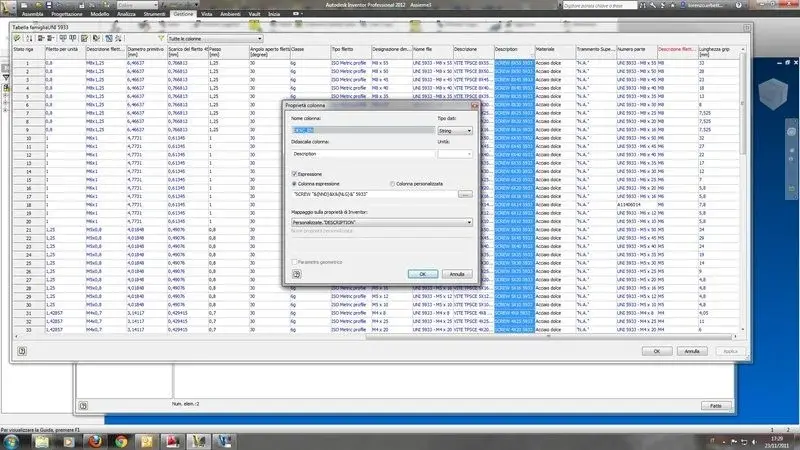
So, in the cc, or in the family table of the vine in question (5933), I created such a column:


or partly parametrized. but that " cursed" field description is not updated to me or once placed the screw in the axieme this does not contain any that in the fields of custom ip.
 

Attachments

  • tabellax.webp
    tabellax.webp
    64.1 KB · Views: 16
Last edited by a moderator:
update: in my copy of inventor 2010 at home I managed to the first hit without any problem. tomorrow morning I try to understand why it doesn't work so simply with licenses 2012 at work.
 
I have done other tests and according to me sometimes the field description can bother him, in fact I tried with another name of the property and it always works.
I don't know... .
 

Forum statistics

Threads
44,997
Messages
339,767
Members
4
Latest member
ibt

Members online

No members online now.
Back
Top