
• This forum is the machine-generated translation of www.cad3d.it/forum1 - the Italian design community. Several terms are not translated correctly.

note filettatura

  • Thread starter Thread starter TECNOMODEL
  • Start date Start date

TECNOMODEL

Guest
today inventor decided to make a magic.... .
all of a sudden the threads began to put them on the table soQuota filettatura.webpin the past I had set the style so that it inserted m. x step-class.
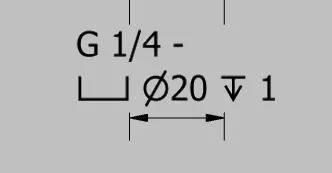
But I can't find where it is set, I have changed the known style and direction of the style of altitude but I don't get results.
suggestions?
 
logical, I care not to display the whole part after the designation of the thread and its class.
then delete symbol, ø and depth of the lamatura.

obviously in case of gas threads the quota will be g 1/8, g 1/4, g 1 etc, in case of metric threads will be m6x1-6h, m30x1.5-6h etc.
 
click with the button dx on the quota " edit note hole ".
in the window that opens, under "known format ", read the name of the type of quota that you want to treat ( hypotheses : passing lamatura - complete thread ), do cancel.

click with the button dx on the quota " change style quota ".
in the window that opens, under " (quota style) known format ", choose the type "passing lamatura - complete thread ", remove the check " uses default settings " and, in the window that at this point becomes edible, remove the indications that you do not want to make appear.
Save.
if it works as you want, click with the dx button on the quota " change style ", you positions on the style that appears on the blue background, dx key " saves in the library of styles "
 

Forum statistics

Threads
44,997
Messages
339,767
Members
4
Latest member
ibt

Members online

No members online now.
Back
Top