
Biggmetals
Guest
Good morning.
for work I am preparing technical drawings for a catalog developing.
because of the many changes in measures that every article can have, for each one I am preparing a table with generalized quotas (l,s,p,w,t etc.) that will refer to every entity to be measured that varies
es:
l = length
xs: 20
s: 25
m: 30
l: 35
xl: 50
to avoid putting when a quota repeats l1, l2, l3 in big characters I would like to put the number to pedice but I can not find the way.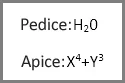 for now I have solved by creating a text note and resize it and then positioning it dragging it, but it does not make everything exactly uniform. without counting that in the note creation menu does not detect the company's custom font (while for odds yes)
I tried to look on the guide but I didn't find answer, can anyone help me?
for work I am preparing technical drawings for a catalog developing.
because of the many changes in measures that every article can have, for each one I am preparing a table with generalized quotas (l,s,p,w,t etc.) that will refer to every entity to be measured that varies
es:
l = length
xs: 20
s: 25
m: 30
l: 35
xl: 50
to avoid putting when a quota repeats l1, l2, l3 in big characters I would like to put the number to pedice but I can not find the way.
for now I have solved by creating a text note and resize it and then positioning it dragging it, but it does not make everything exactly uniform. without counting that in the note creation menu does not detect the company's custom font (while for odds yes)I tried to look on the guide but I didn't find answer, can anyone help me?