• This forum is the machine-generated translation of www.cad3d.it/forum1 - the Italian design community. Several terms are not translated correctly.

open .idw from together

  • Thread starter Thread starter Luca23
  • Start date Start date

Luca23

Guest
Good morning to all,

I'm familiar with inventor and I'm amazed that, from the tree of a set, you can't directly open the *.idw file of a particular in it. Is there no way to do that?

second point, having a particular open *.ipt, and having saved the table *.idw in a folder that is not that of the part, can not open that table directly?

I thank you in advance of the answer, I took a look in the forum and on the net but I did not find much
 
hi technomodel, I saw this.

My doubt is about the direct opening, from the axieme tree, of the table of a particular content in the axieme.

and as from the second point, in the opening of the table from the 3d of the detail when table and model are not located in the same folder.
 
I can't answer because I use the vault, so I have to go look for the tables inside it.
If I had your doubt, I would do a test set and experiment.
 
Good morning to all,

I'm familiar with inventor and I'm amazed that, from the tree of a set, you can't directly open the *.idw file of a particular in it. Is there no way to do that?

second point, having a particular open *.ipt, and having saved the table *.idw in a folder that is not that of the part, can not open that table directly?

I thank you in advance of the answer, I took a look in the forum and on the net but I did not find much
Hi.

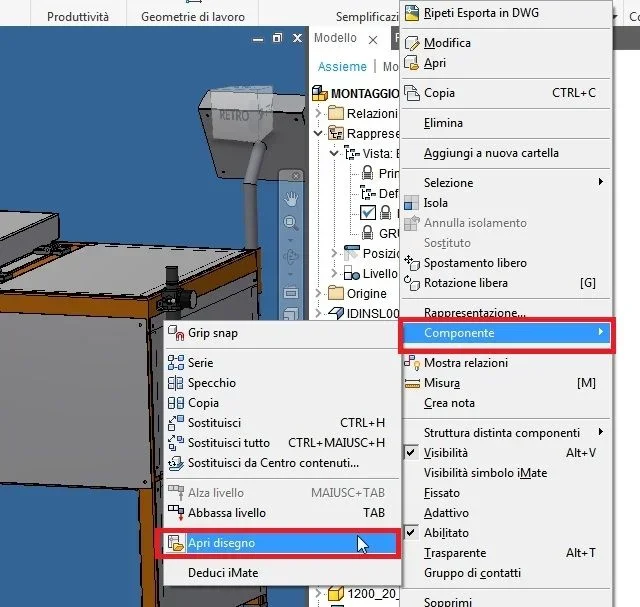
from the axieme you can open the table directly on the part whether you select it to video, whether you select it from the browser

1- select the part or the axieme, right button, (and in the last versions it was "hidden" in component, open drawing
_foto__171.webpif the .idw table is not in the folder of its 3d file, or in a search folder determined in the project file (menu start - projects), the file will not be found.
solution 1 , edit project file with search path
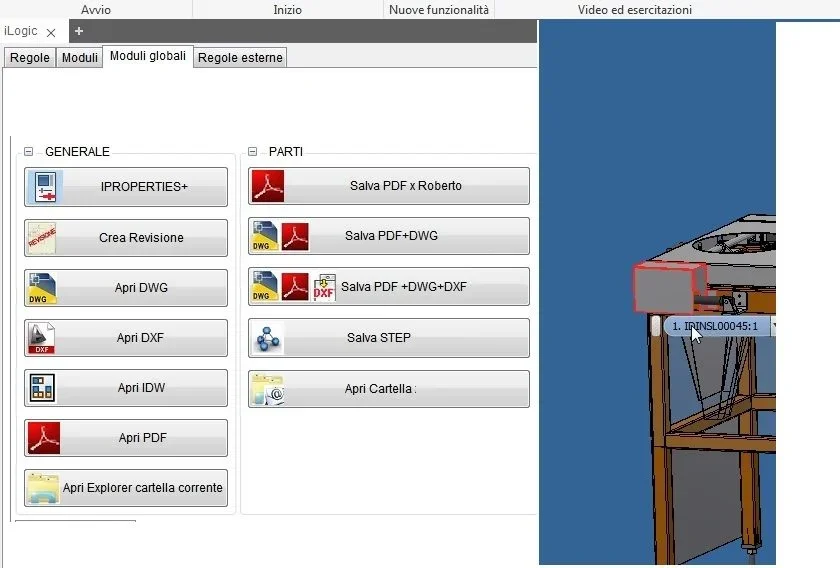
solution2 , realize ilogic files that allows you to select the 3d from the axieme and "retrieve" the idw file by performing the sum of strings between the path of the table2d (which must be fixed or traceable to always certain rules, and the file name 3d_foto__172.webp
 
Sorry I know it's not an answer but it hit me the card with the modules to export the files to dwg step and more and I would like to ask matteo some tips to write the code
thanks in advance
 
hi guys, for a few days I use the 2019 version of inventor and known that selecting from the tree of a set any component to which is associated a table and command open drawing, inventor always tries to open the table of the main axieme. until 2017 it did not happen in fact having configured a quick button, selecting my component opened the associated table.
you noticed too or wrong something.
thanks and good year to all
 
hi guys, for a few days I use the 2019 version of inventor and known that selecting from the tree of a set any component to which is associated a table and command open drawing, inventor always tries to open the table of the main axieme. until 2017 it did not happen in fact having configured a quick button, selecting my component opened the associated table.
you noticed too or wrong something.
thanks and good year to all
Hi.

Perhaps the previous post will answer?http://www.cad3d.it/forum1/threads/aprire-idw-da-assieme.52651/#post-412621
 

Forum statistics

Threads
44,997
Messages
339,767
Members
4
Latest member
ibt

Members online

No members online now.
Back
Top