• This forum is the machine-generated translation of www.cad3d.it/forum1 - the Italian design community. Several terms are not translated correctly.

open surface

  • Thread starter Thread starter mitz
  • Start date Start date

mitz

Guest
Hello everyone, I press that they are a neophyte of solidworks and 3d in general.
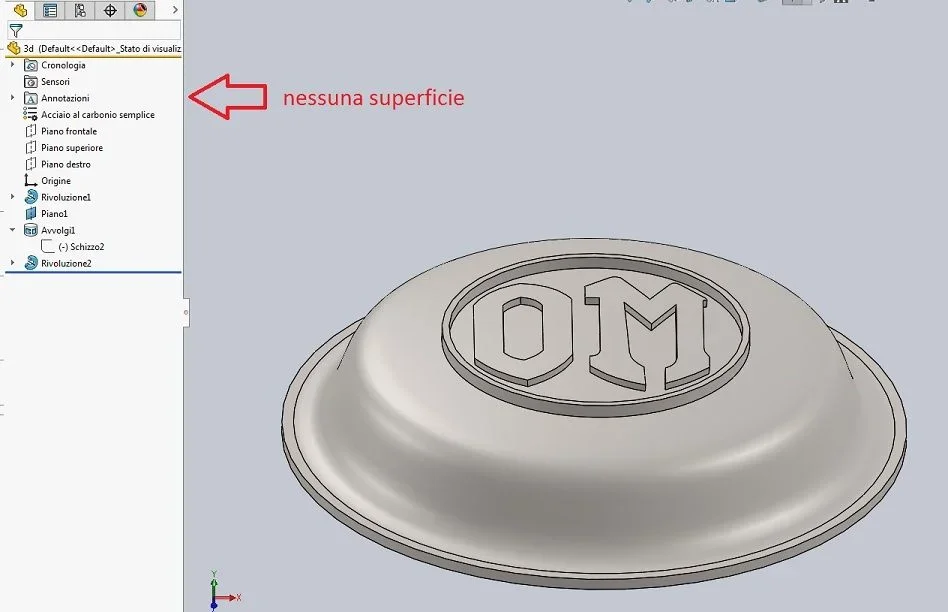
I tried to search the forum but I didn't find what I was looking for... I have long been trying to create a writing on a non-planar surface, that is, like a portion of sphere and I would like the extruded writing to have the same surface pattern.
the steps I have performed are as follows:
- half-section sketch with spline on front and revolution to create the "cupoletta"
- a new plane parallel to the upper floor detached of a 20mm
- 1mm cup offset surface above the dome itself
- then I used the function line of division with the sketch of the writing
- function deletes face and I have selected the faces of the dome excluding the writing
- then I used the thickening function for each letter
- eventually converting the initial sketch I reused the revolution function with the visa in the merge result box.

I found this method on the net... problem: when I gave the file to my friend for 3d printing told me that it was not possible to run it because there is a mistake. I performed the verification and in fact the function deletes face leaves me an open surface even if later the regenero. . .

Can you please advise me a different method to get the same result or suggest where I'm wrong? Thank you so much!3d.webp
 
Last edited:
what you have attached is not visible, a white dot appears in the middle of the screen.
- always check the attachments before posting them. and possibly attach the file with the problem so that you can analyze it and do some tests giving us immediately the possible correct solution without having to go to attempts imagining how the model is made and that options of the various features have been used.
- search the forum https://www.cad3d.it/forum1/threads/avvolgi-su-sfera-problem.51311/ orhttps://www.cad3d.it/forum1/threads/avvolgimento-di-uno-schizzo-su-una-superficie-sferica.31556/- if you are in the beginning to do first of all the internal tutorials to the program that are done well and give a good infarination and then rely on the tutorials of youtube and similar that, being neophytes, you do not have the critical ability to recognize those done well.
- insert the version into the profile so that whoever helps it by giving consistent information with the version used
 
thanks massivonweizen for the answer. I entered the version of solidworks in the profile -> 2016
I’m trying to change the previous post with the jpg file attached but from my pc you see while instead I can’t load it so as to make it visible to all of you. regarding the original file
3d.sldprt I have the following error:
the uploaded file does not have an allowed extension.
If I don't remember badly, I already tried the function you suggested (wrap on ball) but I think I had problems because my surface is not spherical. Maybe try again.
Thank you so much!
 
very quickly and without taking into account the measures, could you do so?
Of course you can do better... .
(I noticed that the site accepts .zip files and not .rar.)
 

Attachments

Last edited:
apart from using underdefinite sketches that are the basis for incomprehensible errors, you modeled at the Ispeiamochemelacavo.
doing the tutorials is indispensable.
to make that model do not need to do all that passage with surfaces, deletions and regeneration of the same.
That's enough.
- a revolution (well done and quoted)
- a tangent plan where you have to write
- a function of wrappings for writings
- a function of the writing containment circle

That's all you need.
then as you modeled you reading the feature manager (what you learn by doing the tutorials) you see up there are two surfaces and a solid body; You delete the surfaces and you'll be fine.
Immagine.webp
 
Last edited:
Massivonweizen excuse, what do you mean by "a function of the circle of containment of writings"?
I can't find references on the tutorials.
thanks again for patience
 
It is not the name of the function, but things need function.
If you make the envelope of the sketch 2 it gives you error because you have the two circles from 37 and 39; then you have to delete them and then do it again with what I called revolution2
 
Good morning, I'm trying and trying, but I can't figure out where I'm wrong. Why when I use the function wrap up the word "discrew"?
 

Attachments

could be a 2016 limit.
in 2017 in fact the function has additional options, which I did not remember being a function that I never needed to use.
I don't have 2016 so I don't have a way to do any tests, maybe someone else can look at the file if you place it.
otherwise return to the original model and delete those 2 surfaces too
 
at this point I also think it is a limit of the 2016 version improved in the next.. .
thanks for the precious advice!
 

Forum statistics

Threads
44,997
Messages
339,767
Members
4
Latest member
ibt

Members online

No members online now.
Back
Top