
• This forum is the machine-generated translation of www.cad3d.it/forum1 - the Italian design community. Several terms are not translated correctly.

ordered dimensions - special standard needs

LordKelvin

Guest
Good morning to all,

I am required to use exactly a particular quotation standard for the "ordinate dimensions" or in caia v5 cumulative dimensions. in practice it is to have lines of zero and lines with the other dimensions (starting from the zero) but perpendicularly to the size in question. I attach an exemplifying screenshots (sorry I had to a little improvise with paint here, but just to make the idea)quote.webpI've been trying for a week. .
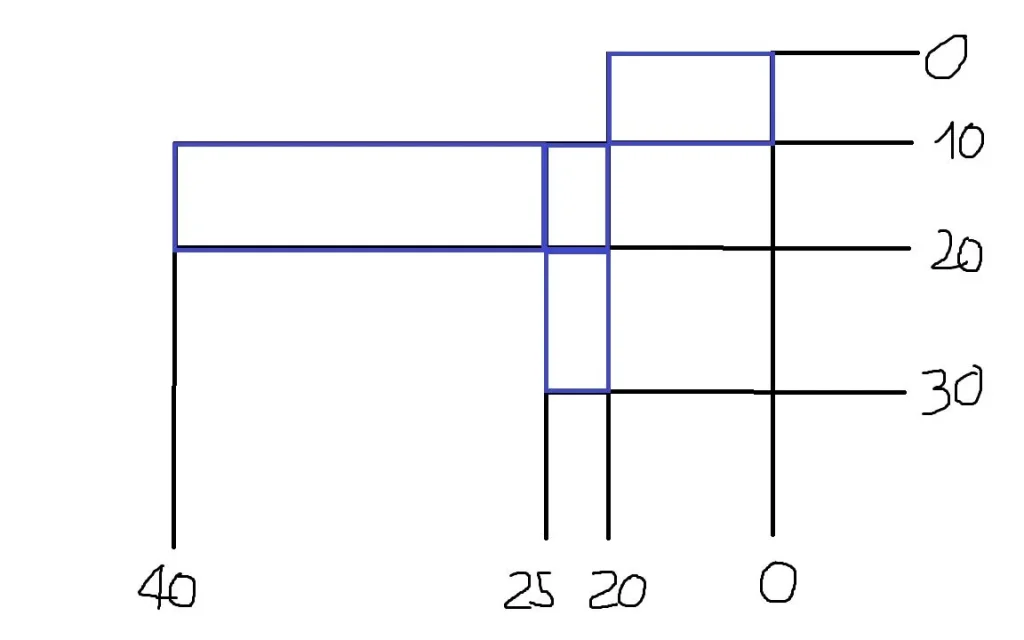
thanks to all for the help.

Mario
 
you in cv5 can create. c is the special function. search it near the odds buttons
Good morning, I hope you all had a good we.

thanks falonef for the answer.

I had guessed that it could be created because I saw some tables made with catia. the point and that I can do the "ordinate dimensions" but I can not find exactly that type of standard as from screenshot attached. I always find something different. they want exactly the same graphic dress as from screenshot.

Thank you very much
 
But the "multiple rates" do that..... I think, it's the function that made you falonef, or there's something in your sketch that I can't understand................ or the quota does that.
The only thing is the "0" that cats defaults a symbol , but I think in options or standards there is definitely the option to change .
 
quote2.webp
But the "multiple rates" do that..... I think, it's the function that made you falonef, or there's something in your sketch that I can't understand................ or the quota does that.
The only thing is the "0" that cats defaults a symbol , but I think in options or standards there is definitely the option to change .
I know that "in general" they do that but I would need that exact graphics, in my catia v5 r18 the cumulative odds have a different type graphics (allego screenshot)
 
View attachment 37506I do so............ but it is a question of configuration .
we are closer in fact... but without arrows and instead of "zero" (0) a big ball almost was a "or" capital. . .
and how do mcbramby change the configuration without messing up everything? What settings do you have, please?

Thank you.
 
Unfortunately I use cat v5 r20 ................ cmq you need to connect to catia as administrator (you find it explained on the forum) , then you have to create your own standard (change the existing) or overwrite the existing .
I suggest you create your own:)
you will see in the standard drafting that there are a lot of options , if you go to the quota you will see the cumulative quota , you can do them what you want by trying to change the standard until you like the quota , helped with the help of catia in this case is very useful , and then you will see that there are many other things you can fix and standardize x use catia as best you aggrada .
 
cmq is not as you go out to yourself, but x remove the arrows just do also button dx on the quota and then remove the odds.......... .
 
cmq is not as you go out to yourself, but x remove the arrows just do also button dx on the quota and then remove the odds.......... .
Yes, the fact and that it comes out different from you...

cmq I try to do by admin mode.. thank you very much!!

Mario
 

Forum statistics

Threads
44,997
Messages
339,767
Members
4
Latest member
ibt

Members online

No members online now.
Back
Top