• This forum is the machine-generated translation of www.cad3d.it/forum1 - the Italian design community. Several terms are not translated correctly.

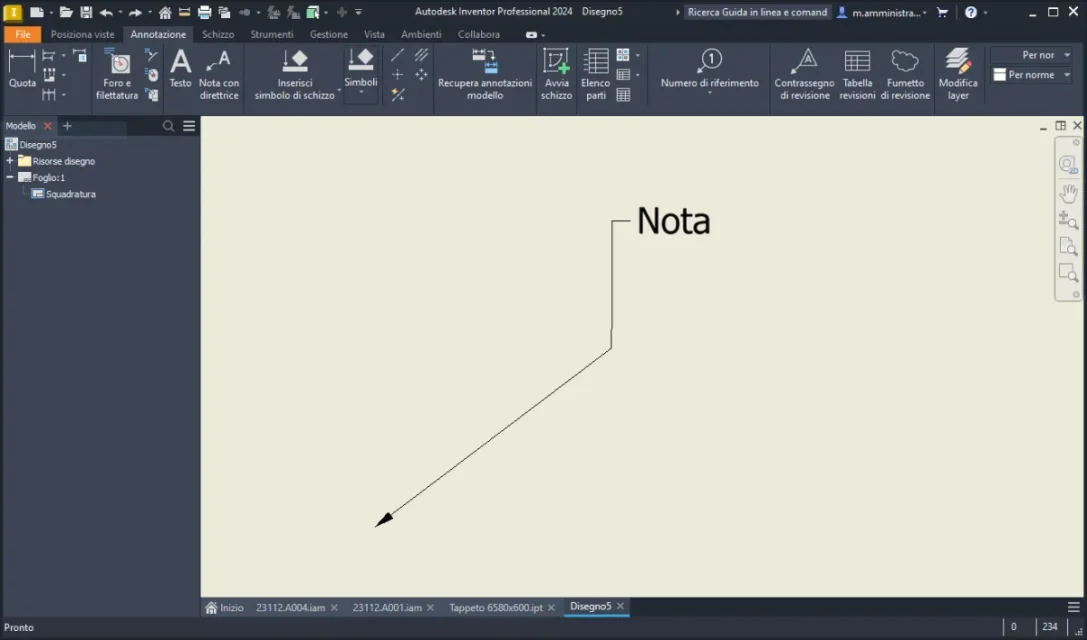
orientation noted with director

  • Thread starter Thread starter Mr. Hauza
  • Start date Start date
Cattura.webpYou mean that?
if yes, right click on the note and "add vertex/director" then move vertically.
or during the creation of the note itself click several times to create the director as you prefer.
 
View attachment 69529You mean that?
if yes, right click on the note and "add vertex/director" then move vertically.
or during the creation of the note itself click several times to create the director as you prefer.
Hello, thank you for the answer. Unfortunately as a solution is not equivalent because the text is always developed either on the left or on the right and is not at the center of the director. If you see my image uploaded before you will notice that with the old versions of inventor putting the director vertically, not only the text remained horizontal but developed at the center of the director and could be justified both at the center either right or left. very comfortable thing when the note was long and therefore articulated on several lines. If you try your solution but put a note of 3-4 lines you understand the problem. Unfortunately this was very convenient and I do not understand why it was changed. will remain a mystery forever.
 
If I don't remember badly, several years ago we had the same problem in the office where I worked and we were told by the autodesk assistance (and here I go to memory) that depended on the distance settings between the line of the leader and the text.

taken from the forum autodesk dimension text orientation
 
Hello, thank you for the answer. I read the question on the forum, but in that case it seems to me refers to when a quota is very small and cannot put it in line with the others and therefore creates a director to indicate that there is that number. In my case I refer to "note with director" then a text box with an arrow that if you want to orientate upwards the text is also aligned vertically upwards and you no longer have the possibility to keep it always readable horizontally. will remain a thing without sense or explanation. the other antipathic thing is that if I open an old table with the new inventor that previously created note can no longer manage it and put it upright. and when I don't have enough space to place it either on the right or on the left is really a break and I have to move all the views again to make room. What a big break. thanks anyway for your contribution.
 
if you share a file(empty) with only one director, you can do a further verification.... so you can check if the problem persists even on pc with a different configuration.
 
As soon as I have 1 minute I try. I don't know if it could be a particular configuration but never say......
 
Here is an empty .idw with only the director. I entered a random text just to prove how it works. with text of multiple lines the problem is more obvious. Let's see if we can, together, find a solution. Thank you all.
 

Attachments

someone asked for this "better" in 2013: was implemented by the 2016 version:there is another request to restore it:
 
At least it makes me feel less alone
a similar problem I experienced with the "between" function for extrusions and processing. I haven't used it for months anymore because it's no longer present... then I found it was hidden well, very well. cursed, the simplest, intuitive and functioning things change. there will be a group in hell only for them '
 
@ cast16 thanks for the post, solved the problem.

There is a way to circumvent the obstacle and make the horizontal text, it is not the same but I think it can go
View attachment 69540
You have to say that I like this solution, I didn't really think about using the other symbols. good also for the future and for other uses. Thank you very much
 
@ cast16 thanks for the post, solved the problem.

There is a way to circumvent the obstacle and make the horizontal text, it is not the same but I think it can go
View attachment 69540
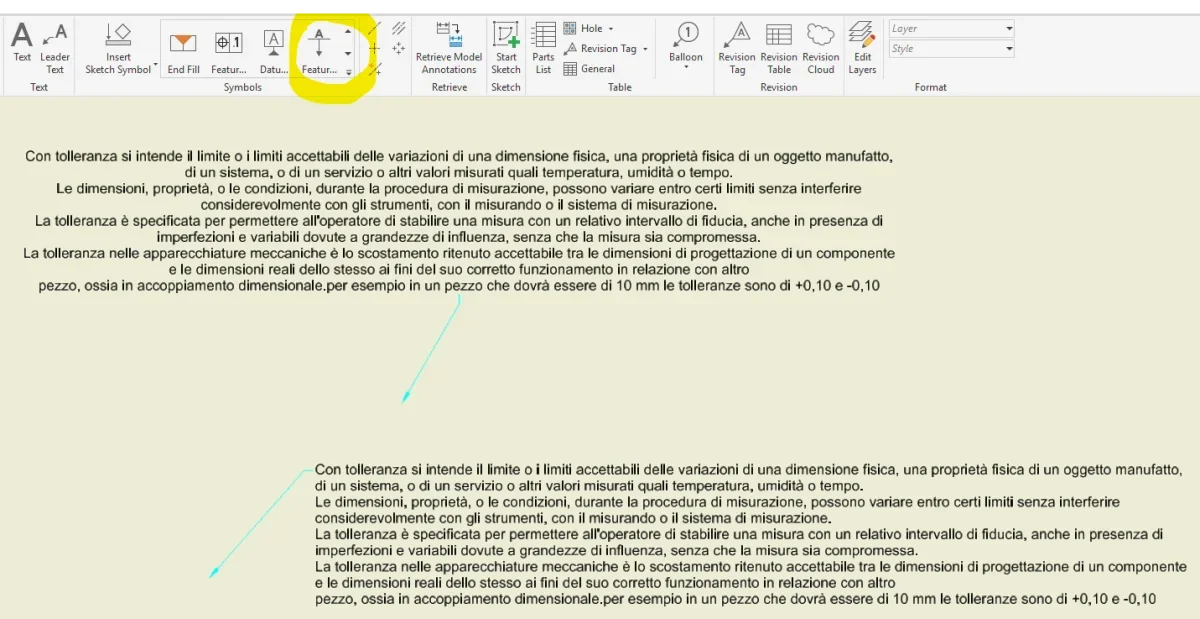
cmq for those interested in the solution of the problem, I tried to use this solution instead of the note with classical director. for now the problems encountered are two:
1. Impossible to add a second director
2. It is impossible to direct the arrow in the direction that they are not horizontal and vertical. when the director is still at a line the arrow goes in the direction always orthogonal to the surface (of course, being a note made to identify faces)

as a buffer solution is not bad, but of course it is not a note with classical director. cursed in autodesk. 😅😅😅
 

Forum statistics

Threads
44,997
Messages
339,767
Members
4
Latest member
ibt

Members online

No members online now.
ciao
Back
Top