• This forum is the machine-generated translation of www.cad3d.it/forum1 - the Italian design community. Several terms are not translated correctly.

origin sketch

  • Thread starter Thread starter supertramp
  • Start date Start date

supertramp

Guest
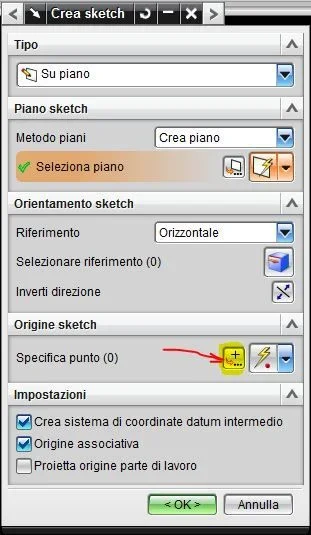
Is there a quick way to start sketching from the center of a flat face? I put an image to explain myself: every time I start a sketch and I put on a face I are proposed points where automatically I will find the axle of the sketch. I know I can move it later, but it would be very convenient to be able to decide from the center of the face in question. I know that by pressing the alt key the origin of the sketch will coincide with the axle of the model but I do not know if there is a shortcut to select directly the center of a face as origin of the sketch itself.
I hope to have been clear, thanks in advance for the collaboration :)centro sketch.webp
 
I know a way, but it's not like it's really fast.

1- parts with sketch command
2- Select the plan face
3-on sketch origin -> specific point click on the first left icon1a.webp4- Select dot on face from top menu1b.webp5- Select the face
6- Put parameters u v 0.5 coordinates on both1c.webp7-click ok click ok1e.webpat this point the sketch has the origin in the center of the face.

I hope I was useful.

Say hi.
 

Forum statistics

Threads
44,997
Messages
339,767
Members
4
Latest member
ibt

Members online

No members online now.
ciao
Back
Top