• This forum is the machine-generated translation of www.cad3d.it/forum1 - the Italian design community. Several terms are not translated correctly.

outlook settings in the view window

  • Thread starter Thread starter mastandrea
  • Start date Start date

mastandrea

Guest
Forgive my ignorance.. .
I work on modeling 17 but for a different time (exactly from when I passed from 16 to 17) I no longer know how to set the perspective in the view window.
while before it was enough a click with the dx, now also from the settings, I do not find the item where to set "p.to observe" "p.to escape" "distance" "visual field". . .

I already thank those who can help me in my gap.. .
soon
Andrea
 
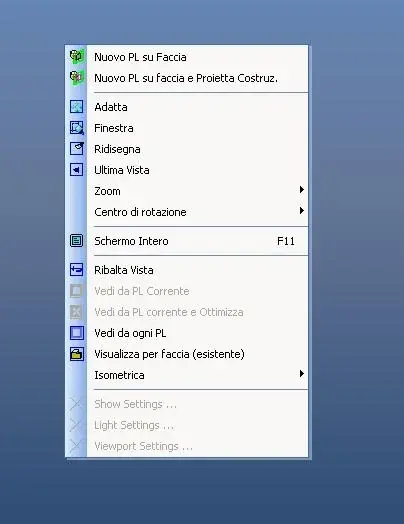
thank you for your answer, unfortunately the menu of my right button does not match your.... and not even version 16

Meanwhile, you helped me... :rolleyes: I know what my problem is. !
 

Attachments

  • Cattura-r1.webp
    Cattura-r1.webp
    15.3 KB · Views: 4
thank you for your answer, unfortunately the menu of my right button does not match your.... and not even version 16

Meanwhile, you helped me... :rolleyes: I know what my problem is. !
you have to select a face, however just add the comnado in the curtain
 
thank you for your answer, unfortunately the menu of my right button does not match your.... and not even version 16
just customize the right button menu:
- instruments
- customization
- right-click menu
- commands (all commands)
- and finally drag the "display properties" box inside the menu
 

Attachments

  • Menù tasto destro.webp
    Menù tasto destro.webp
    94.6 KB · Views: 7
:finger: problem solved!
I reset the menu of the button dx and now it is ok
Thank you very much for your tips! !
soon

for the mod: the discussion can be closed...:wink:
 

Forum statistics

Threads
44,997
Messages
339,767
Members
4
Latest member
ibt

Members online

No members online now.
Back
Top