• This forum is the machine-generated translation of www.cad3d.it/forum1 - the Italian design community. Several terms are not translated correctly.

panoramic personalized properties

  • Thread starter Thread starter tanticapelli
  • Start date Start date

tanticapelli

Guest
Hello, everyone.

are at the grip with a set full of configured parts and I have created a separate custom materials with multiple columns that refer to specific values of each part configuration used within the axieme.

As it is essential that the custom properties are correctly compiled in order not to mistake the data recalled within the table I ask this question:

how can I have an overview of the custom properties (without having to tick in that window where I have to click on the curtain to change configuration) of each part in order to be able to comfortably control the strings that remain correctly to the relative configurations? because I realized that some custom properties have the string @pincopallo related to the wrong configuration.

Thank you.

so many hairs

 
in practice would you just want to see all the properties of all the configurations of a part?
 
the thing that seems more complete, but perhaps not very practical, is to make a data table. He opened it in excel and verify its contents, change them if needed is when you return to money, update your values. I did a test with a simple part with wrong properties specially and check if it works
 
I'm trying to create a custom property compilation template.

However I cannot understand that syntax I have to use to connect a parameter to a generic configuration and a generic part so that there is no need to go to call it back from the blind manually every time.

to understand us better take a look at http://help.solidworks.com/2012/ita...rties.htm?id=825c9cfa15cd4f1990712554c365f636and there explains how to fill out a custom property when you know the name of the component and configuration.

but if I want to write a generic string to generate a template.prtprp how should I do it?

Thank you.

so many hairs
 
the data table can also be useful to update or control the properties in a moment by exploiting the potential of excel.
an example for control: you can insert in dedicated columns the values to control, as a list of designers, and then on another dedicated column read the value present in the column of the property of solidworks and compare it with that of the designers; if there is no correspondence is reported.
an example for the update: we can have the classic profile to l with the various processing that has a property with description and a property with length; for the simple reason to break the so-called commercial asks that in the description the length is added to facilitate the life to him and in the meantime annoy the designer (the classic two pigeons with a fava). if you do it as solid you have to manually change every property of each configuration with the biblical times that we know, with excel and with the concatena function instead you just change the first cell of the description column and then copy it in all the others to do the same job in a few seconds.

Obviously it is not said that this method is always valid and moreover, if I do not say drafts, weights the file. is not even utlie if the configurations are 2 or 3. but better to remember that there is also this
 
for example of a part of plate organized in several configurations I created two equations related to the basic quotations x height of the "contour case" which is located within the flat repetition.

I called the height equation "length sv" and the width "width sv".

all right here because I can easily recall them by acting on the curtain of the custom property of every single configuration.

But the thing is very uncomfortable if I have many parts and many configurations.

therefore through the property tab builder I am trying to create a list of pre-compiled properties with generic remains able to automatically absorb configuration name and name part:

I tried with
"width sv@$configuration@name_part"
and
"Lunghezza sv@$configuration@nome_parte"

but do not work!!!?!? ! ♪


so many hairs
 
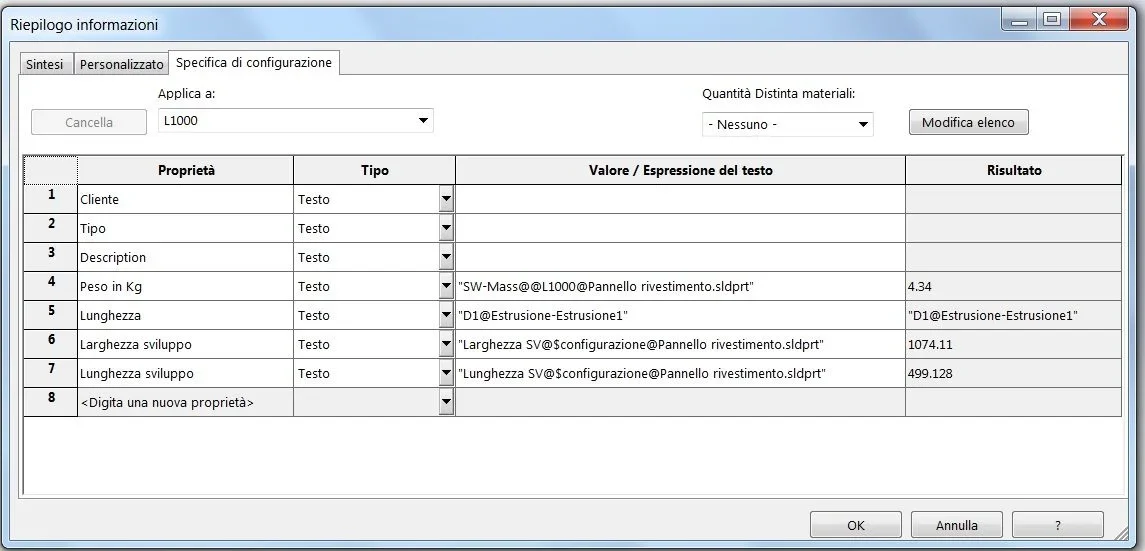
width development text "width sv@$configuration@$nome_parte.sldprt" 1074.11
length text development "length sv@$configuration@nome_parte.sldprt" 499.128

It works!!!! ! ! ! ! ! ! ! ! ! ! ! ! ! ! ! ! ! ! !
 
I'm trying to create a custom property compilation template.

However I cannot understand that syntax I have to use to connect a parameter to a generic configuration and a generic part so that there is no need to go to call it back from the blind manually every time.

to understand us better take a look at http://help.solidworks.com/2012/ita...rties.htm?id=825c9cfa15cd4f1990712554c365f636and there explains how to fill out a custom property when you know the name of the component and configuration.

but if I want to write a generic string to generate a template.prtprp how should I do it?

Thank you.

so many hairs
the properties insert them into the part model or together; mass, weight, and that present in the variable curtain you can set them previously and then save the template.
attention you have two property cards: the general one and the configurations.
if not present in the configurations it is worth the general property otherwise it is the property of the configuration.
in configurations you cannot create default properties because when you open the model there are no configurations.

in creating the data table you do nothing initially.
- create table with automatic creation
- solidworks collects all items that may be subject to change in configurations (quote, status functions, custom properties)
- opens the excel sheet already compiled with all the necessary headings and all the configurations present.
- if you want to change something you do it otherwise closes excel and you return to solidworks.
if you add a new property or function or quota to the reopening of the data table (better to open it mode in new window) in solid appears a window with new addable data, you select those that affect and confirm and in exceol you will find new columns
 
We don't mess up.
one thing is to check that the data entered is corrected and want to display them all at once, and this was your request for the first post and for me the most indicated solution, albeit efarraginosa, is what I described.
other thing is wanting to tick on the tab builder, which I doubt manage the properties of the configurations, but only those of the general card, to compile the properties.
 
the properties insert them into the part model or together; mass, weight, and that present in the variable curtain you can set them previously and then save the template.
attention you have two property cards: the general one and the configurations.
if not present in the configurations it is worth the general property otherwise it is the property of the configuration.
in configurations you cannot create default properties because when you open the model there are no configurations.

in creating the data table you do nothing initially.
- create table with automatic creation
- solidworks collects all items that may be subject to change in configurations (quote, status functions, custom properties)
- opens the excel sheet already compiled with all the necessary headings and all the configurations present.
- if you want to change something you do it otherwise closes excel and you return to solidworks.
if you add a new property or function or quota to the reopening of the data table (better to open it mode in new window) in solid appears a window with new addable data, you select those that affect and confirm and in exceol you will find new columns
Hello Masses!

It's true that material can't be updated... Yet the strings I entered in the part configuration properties window works but only if you first recalculate all. . .

but possible that it is necessary to lean on excel to make a decent template.prtprp?

so many hairs
 

Attachments

  • Distinta materiali1.webp
    Distinta materiali1.webp
    27 KB · Views: 34
  • Proprietà di configurazione.webp
    Proprietà di configurazione.webp
    40.4 KB · Views: 39
You're right, I wanted to condense everything in one post but there's a reason: as the string that recalls the value always contains the scope of the configuration (when there is not only the default one) I happened that for the rush to fill out I crossed values that belonged to different configurations risking to completely wrong the table.

Therefore from here comes the need to create a template that automatically reads the scope of the function, quota or other that I decide to be recalled.

In the above examples there is an example but I have difficulties in making them work within the distinct materials.

Otherwise if it worked with a simple template file I would have solved "all my problems" while also avoiding the risk of grossly wronging.

so many hairs
 
Maybe I understand what you mean.
do this test:
instead of writing global variables (I thought you meant this when you wrote equations) insert the annotation quotations on development (actually active development, launch the command quota without entering the sketch contour box, quoti the contour sketch) and in the custom properties instead of recalling the global variables enter the value/expression item and select the quotas inserted before.
make a configuration regenerate and the value should change
 
hello Masses at the end today I solved thanks to a guru of the assistance center.
in the end compared to my last interventions the error is syntax on the text of the custom property.
but the concept is correct. otherwise it would not be possible to manage a custom property template.
so doing everything remains correctly inserted inside the distinct materials without strange disambiguations.
I don't have the right string but it's very simple, generic, and it can be used for any parameter you want to recall.

Good job, as soon as I'm in for you.

Thank you.

so many hairs
 
Hello everyone

for example in the case of the "mass" the correct syntax (headed on 2017 sp5) is:

"sw-mass@nome_configuration@nome_parte.sldprt" quotes included
in the "configuration specific" section

or

"sw-mass@nome_parte.sldprt" quotes
in the section "personalized"

clearly as I said the utility is in creating a template by means of poperty tab builder, otherwise if you have to insert everything by hand goodnight to the bucket.

so many hairs
 

Forum statistics

Threads
44,997
Messages
339,767
Members
4
Latest member
ibt

Members online

No members online now.
Back
Top